Author: Chastity White Rose

  • Chapter 10: Software Licenses

    This blog has turned into most of my rants about computer programming recently, but I still play and teach Chess in case you are interested. But tonight, I spent some time writing another chapter of my programming book, Chastity’s Code Cookbook.

    Chapter 10: Software Licenses

    Perhaps it could be said that once you have written a program, what you do with it is even more important. For most of my life, I never considered the concept of copyright or ownership of the toy programs I wrote. I figured that unless I made a great game or operating system that I would not need to consider writing the terms and conditions about what people can or should do with my work.

    And even now, I don’t think my programs have enough of an impact for anyone to care about software licenses. However, I have found some software licenses that are compatible with my personal philosophy for how software should be shared and distributed.

    Generally, I only recommend software that is considered “Free Software” by the definitions of the Free Software Foundation.

    I have been an advocate of Free Software as it is directly tied to Freedom of speech. I am well aware that Software Freedom and Open source are usually, but not always, the same thing. This page by the FSF on the GNU project links to licenses where you can read the full text. However, I will also provide my summaries based on my understanding.

    https://www.gnu.org/licenses/license-list.html

    GNU GENERAL PUBLIC LICENSE Version 3

    https://www.gnu.org/licenses/gpl-3.0.html

    This section is the abridged and simplified version by Chastity White Rose. In case of confusion, see the original text.

    The General Public License guarantees your Freedom to change a program licensed under it and to share it with others. However, when you share it with others, they must have the same Freedom you do. Therefore, you must give others access to your source code if you choose to distribute your own modified version.

    Part of this Freedom is to include the source code when you distribute it. Source code is the preferred form of the program that makes it possible and/or easy to modify, provided you know the programming language being used. Examples include source files for languages such as C, C++, Assembly, Pascal, or Java. Also included in this definition are build scripts written in Bash, Windows Batch, GNU Make, or any similar system.

    In my opinion, the benefit of the GPL3, as well as past and future versions of it, is that it declares the author does not intend it to be used in proprietary programs. As a programmer and author, I would not want a big tech company to come along and use my code for evil purposes or to restrict others from accessing what I intended to be free.

    At the time of this writing, I don’t think anything I have written is in danger of being misused. Still, I hope that people use my programs if they find them useful, modify them to make them more useful to their purposes, and share their work with others who go on to do the same.

    The reason for restricting proprietary use is so that another person or company can’t take my code, claim to be the original owner, and turn it into something opposed to what I intended. More importantly, I never want someone to charge money for my software. Specifically in the case of software written by me, Chastity White Rose, Free Software is free as in Free Speech and Free Price.

    Considering all this, I place all my code in this book under the GPL3 license so that the Free Software Foundation and entire world of Open Source and Free Software nerds can take action on my behalf if someone ever tries to restrict my work after my death. These words are my statement that you can’t steal what was made to be free.

    GNU Lesser General Public License Version 3

    https://www.gnu.org/licenses/lgpl-3.0.html

    The Lesser GPL is very much like the regular GPL with an important exception. It is to allow proprietary programs to use a library. At first, I didn’t see the point of this; however, when I read the following article, I came to understand better.

    https://www.gnu.org/licenses/why-not-lgpl.html

    The reason it was to the advantage of the Free Software community to allow the GNU C library to be linked by proprietary programs is that it prevents the need for those developers to rely on other proprietary software.

    When I think about it, would I really want someone to have to rely on a C compiler or library made by Microsoft or Apple because they couldn’t use GNU Libc for the proprietary game they made? No, I wouldn’t want that. I will explain my reasons for this.

    Basically, complying with the normal GPL3 prevents someone from profiting from their work. If you are required to provide the source code, then anyone smart enough to compile it on their system can copy and modify your game infinitely without paying you.

    The Lesser GPL3 allows someone, for example, to use a free library to implement the graphics, sound, etc., for their game or utility program without providing the source code to their own program, which uses these libraries, but does not copy code from it.

    In short, if you want to make money, you probably want the Lesser GPL, but if you just want to be a nice person and make your code free for the education and entertainment of all people without promise of reward, the normal GPL serves the purpose best in my opinion.

    There are hundreds of other software licenses to be considered if you have written a program and want to decide which terms to release it under. You can, of course, create your own from scratch, but it might be worth reading about those that already exist to see if they match your ideals.

    Free vs. Proprietary

    I am not against proprietary programs when they are video games for entertainment only. I also believe the programmers should be paid for their work, like any other job, to help them survive.

    But my personal ideals are different from those of most programmers. My goal is to write books to share my code and to teach people how to do things, but I don’t plan to profit off the code because I value individual Freedom more than I do money. I hope that even after my death, others will still learn the joy of computer programming and use it to make great things.

    Writing computer software isn’t just a hobby or a business; it is a ministry. Think about all the software that has been written to create the internet and allow people to write books and share them with the world. Think about the programmers who made video and audio recording, encoding, and formatting possible.

    This book is about computer programming, not religion, but I must say, if you had a message that would save the lives or the souls of others, would you really want to be restricted in what manner you use to share that information? Therefore, I propose that Free Software is a necessity in light of Digital Rights Management and companies like Amazon removing ebooks from people’s devices that they have already paid for.

    Traditional books are dying, and bookstores are closing. If we don’t work together to stop digital book burning, then we lose the final method of sharing words of eternal value.
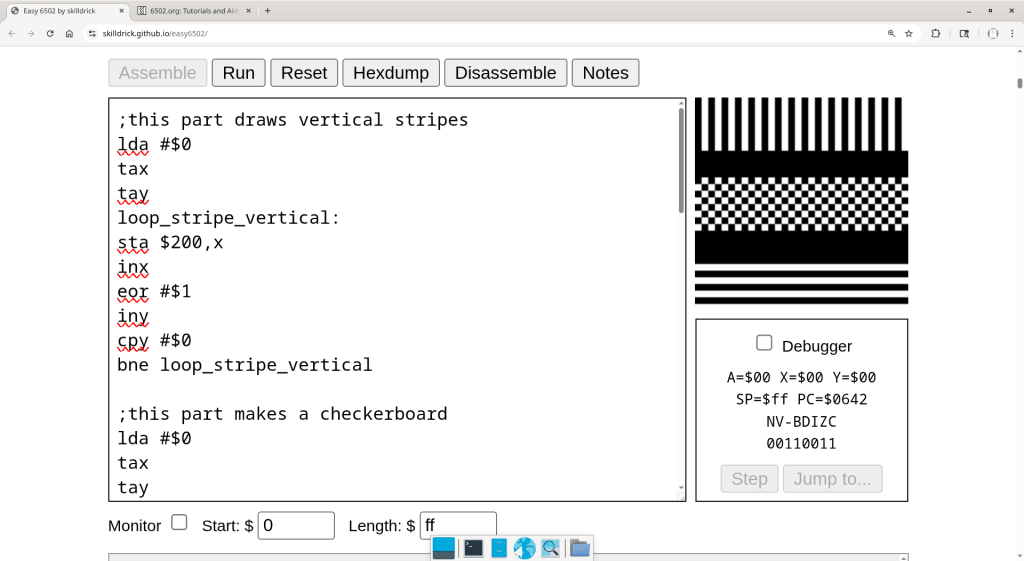
  • 6502 Assembly monochrome demo

    As if learning Intel x86 Assembly wasn’t weird enough, I have decided to learn some basic 6502 Assembly. This CPU was used in the NES and the Apple 2 computers. I found an Easy 6502 emulator that runs entirely within a web page. The only form of output is the pixels in a window that represent memory addresses on a fictional computer. I made a very cool demo. Below is my source code.

    ;this part draws vertical stripes
    lda #$0
    tax
    tay
    loop_stripe_vertical:
    sta $200,x
    inx
    eor #$1
    iny
    cpy #$0
    bne loop_stripe_vertical
    
    ;this part makes a checkerboard
    lda #$0
    tax
    tay
    loop_checkerboard:
    sta $380,x
    inx
    eor #$1
    
    iny
    cpy #$20
    bne color_keep_checker
    
    pha ;push A to the stack
    lda #$0 ;load A with zero
    tay ;transfer A to Y
    pla ;pull original A back from stack
    eor #$1
    
    color_keep_checker:
    cpx #$0
    bne loop_checkerboard
    
    ;this part draws horizontal stripes
    lda #$0
    tax
    tay
    loop_stripe_horizontal:
    sta $500,x
    inx
    ;eor #$1
    
    iny
    cpy #$20
    bne color_keep
    
    pha ;push A to the stack
    lda #$0 ;load A with zero
    tay ;transfer A to Y
    pla ;pull original A back from stack
    eor #$1
    
    color_keep:
    cpx #$0
    bne loop_stripe_horizontal
    

    When assembled and run, the result looks like this. Small routines that draw stripes and a checkerboard based on the way this specific emulator works.

    This example, while extremely cool, is limited in its usefulness compared to a program that runs on a PC with a way of outputting text to a terminal. If I find the right kind of emulator, I would like to figure out how to rewrite some of my Intel Assembly programs into 6502 Assembly. Honestly, the languages are different but the math is still the same once I find the correct name of the instruction to do what I want. I am following this reference.

    http://www.6502.org/tutorials/6502opcodes.html

  • Chastity Windows Reverse Engineering Notes

    The Windows version of FASM includes header files for the Windows API. It also includes some examples, but not a single one of them were a simple “Hello World” console program.

    Fortunately, I was able to find one that actually assembled and ran on the FASM forum. Below is the source code.

    format PE console
    include 'win32ax.inc'
    .code
    start:
    invoke  WriteConsole, <invoke GetStdHandle,STD_OUTPUT_HANDLE>,"Hello World!",12,0
    invoke  ExitProcess,0
    .end start
    

    To get it working required me to keep the include files in a location I remembered and set the include environment variable. I found this out from the FASM Windows documentation.

    set include=C:\fasm\INCLUDE

    However, there was another problem. The example that I found online and got working uses macros, most specifically, one called “invoke”. While this works if you include the headers, it hides the details of what is actually happening. Therefore, I decided to reverse engineer the process by using NOP instructions to sandwich the bytes of machine code.

    90 hex is the byte for NOP (No OPeration). So to extract the macro call that exits the program, I use this.

    db 10h dup 90h
    invoke  ExitProcess,0
    db 10h dup 90h
    

    Then I disassemble the executable and find the actual instructions given.

    ndisasm main.exe -b 32 > disasm.txt

    As simple as this method is, it actually works. For example, this output is given as part of the output.

    0000022D  90                nop
    0000022E  90                nop
    0000022F  90                nop
    00000230  90                nop
    00000231  90                nop
    00000232  90                nop
    00000233  90                nop
    00000234  90                nop
    00000235  90                nop
    00000236  90                nop
    00000237  90                nop
    00000238  90                nop
    00000239  90                nop
    0000023A  90                nop
    0000023B  90                nop
    0000023C  90                nop
    0000023D  6A00              push dword 0x0
    0000023F  FF1548204000      call dword near [0x402048]
    00000245  90                nop
    00000246  90                nop
    00000247  90                nop
    00000248  90                nop
    00000249  90                nop
    0000024A  90                nop
    0000024B  90                nop
    0000024C  90                nop
    0000024D  90                nop
    0000024E  90                nop
    0000024F  90                nop
    00000250  90                nop
    00000251  90                nop
    00000252  90                nop
    00000253  90                nop
    00000254  90                nop
    

    There can be no mistake that it is that location between the NOPs where the relevant code is. Therefore, I replaced the macro that exits the program with this.

    ;Exit the process with code 0
     push 0
     call [ExitProcess]
    

    What I learned

    As I repeated the same process for the other macros, I found that the way system calls in Windows work is that the numbers are pushed onto the stack in the reverse order they are needed. I was able to decode the macros and get a working program without the use of “invoke”. Here is the full source!

    format PE console
    include 'win32ax.inc'
    
    main:
    
    ;Write 13 bytes from a string to standard output
    push 0              ;this must be zero. I have no idea why!  
    push 13             ;number of bytes to write
    push main_string    ;address of string to print
    push -11            ;STD_OUTPUT_HANDLE = Negative Eleven
    call [GetStdHandle] ;use the above handle
    push eax            ;eax is return value of previous function
    call [WriteConsole] ;all the data is in place, do the write thing!
    
    ;Exit the process with code 0
    push 0
    call [ExitProcess]
    
    .end main
    
    main_string db 'Hello World!',0Ah
    

    I don’t know much about the Windows API, but I did discover some helpful information when I searched the names of these functions that were part of the original macros.

    https://learn.microsoft.com/en-us/windows/console/getstdhandle
    https://learn.microsoft.com/en-us/windows/console/writeconsole

    Why I did this

    You might wonder why I even bothered to get a working Windows API program in Assembly Language. After all, I am a Linux user to the extreme. However, since Windows is the most used operating system for the average person, I figured that if I write any useful programs in Assembly for 32-bit Linux, I can probably port them over to Windows by changing just a few things.

    Since my toy programs are designed to write text to the console anyway and I don’t do GUI stuff unless I am programming a game in C with SDL, I now have enough information from this small Hello World example to theoretically write anything to the console that I might want to in an official Windows executable.

    Obviously I need to learn a lot more for bigger programs but this is the first Assembly program I have ever gotten working for Windows, despite my great success with DOS and Linux, which are easier because they are better documented and ARE TAUGHT BETTER by others. People programming Assembly in Windows have been ruined by macros which hide the actual instructions being used. As I learn how these things work, I will be sure to pass on the information to others!

  • chastehex-DOS-32-bit

    This is a video showing some very long source code of a DOS program I wrote using Assembly Language.

    This program is technically a 16 bit DOS .com program and yet it can access 32 bit addresses of the file it operates on because the LSEEK DOS call uses CX:DX as a 32 bit address by using two 16 bit registers. By modifying several parts of the program, I improved upon it greatly. It should theoretically be able to operate on any file less than 2 gigabytes even though the program itself never accesses more than 16 bytes at one time.

    I may have just invented the world’s smallest and fastest DOS hex dumper and editor. The official gitlab repository has the source code seen in this video as well as the Linux 32 bit Assembly and the original C version I wrote first when I invented this program.

    https://gitlab.com/chastitywhiterose/chastehex.git

    I will have to make more videos showing examples of how it can be used, but I have a readme file in the repository that explains what it does and why I made it.

    ——–D-2142——————————-
    INT 21 – DOS 2+ – “LSEEK” – SET CURRENT FILE POSITION
    AH = 42h
    AL = origin of move
    00h start of file
    01h current file position
    02h end of file
    BX = file handle
    CX:DX = (signed) offset from origin of new file position
    Return: CF clear if successful
    DX:AX = new file position in bytes from start of file
    CF set on error
    AX = error code (01h,06h) (see #01680 at AH=59h/BX=0000h)
    Notes: for origins 01h and 02h, the pointer may be positioned before the
    start of the file; no error is returned in that case (except under
    Windows NT), but subsequent attempts at I/O will produce errors
    if the new position is beyond the current end of file, the file will
    be extended by the next write (see AH=40h); for FAT32 drives, the
    file must have been opened with AX=6C00h with the “extended size”
    flag in order to expand the file beyond 2GB
    BUG: using this method to grow a file from zero bytes to a very large size
    can corrupt the FAT in some versions of DOS; the file should first
    be grown from zero to one byte and then to the desired large size
    SeeAlso: AH=24h,INT 2F/AX=1228h

  • DOS Assembly putstring function

    This is a small program which uses the putstring function I wrote. This function is one of 4 ultimate functions I have created which make up “chastelib”. DOS programming is simpler than Windows and is not that different from Linux in that system calls are done with an interrupt.

    org 100h
    
    main:
    
    mov ax,text
    call putstring
    
    mov ax,4C00h
    int 21h
    
    text db 'Hello World!',0Dh,0Ah,0
    
    ;This section is for the putstring function I wrote.
    ;It will print any zero terminated string that register ax points to
    
    stdout dw 1 ; variable for standard output so that it can theoretically be redirected
    
    putstring:
    
    push ax
    push bx
    push cx
    push dx
    
    mov bx,ax                  ;copy ax to bx for use as index register
    
    putstring_strlen_start:    ;this loop finds the length of the string as part of the putstring function
    
    cmp [bx], byte 0           ;compare this byte with 0
    jz putstring_strlen_end    ;if comparison was zero, jump to loop end because we have found the length
    inc bx                     ;increment bx (add 1)
    jmp putstring_strlen_start ;jump to the start of the loop and keep trying until we find a zero
    
    putstring_strlen_end:
    
    sub bx,ax                  ; sub ax from bx to get the difference for number of bytes
    mov cx,bx                  ; mov bx to cx
    mov dx,ax                  ; dx will have address of string to write
    
    mov ah,40h                 ; select DOS function 40h write 
    mov bx,[stdout]            ; file handle 1=stdout
    int 21h                    ; call the DOS kernel
    
    pop dx
    pop cx
    pop bx
    pop ax
    
    ret
    

    Anyone can assemble and run this source code, but you will need a DOS emulator like DOSBox in order for it to work. In fact, I have a video showing me assembling and running it inside of DOSBox.

    Lately I have been having a programming phase and am working on a book about programming in DOS. There is no money involved in this because nobody except nerds like me care about DOS. Speaking of nerds, if you follow my blog, don’t forget that this site was set up for teaching Chess. Leave me a comment if you play Chess online or live in Lee’s Summit. I am still playing Chess every day although some of my time has been taken up with programming in Assembly language because it is so much fun.

    If you like this post, you may be interested in my much longer post/book that is all about Assembly programming in DOS.

  • Chastity’s Hex Compare Tool

    Welcome to Chastity’s Hex Compare program also known as “chastecmp”. Enter two filenames as command line arguments such as:

    ./chastecmp file1.txt file2.txt

    It works for any binary files too, not just text. In fact for text comparison you want entirely different tools. This tool can be used to find the tiny differences between files in hexadecimal. It shows only those bytes which are different. I wrote it as a solution to a reddit user who asked how to compare two files in hexadecimal.

    It is an improvement over the Linux “cmp” tool which displays the offsets in decimal and the bytes in octal. Aside from using two different bases in the data, it falls short of usefulness because there are more hex editors than octal editors.

    Here are also some graphical tools I can recommend if you are looking for a GUI instead of my command line program.

    vbindiff
    wxHexeditor

    Below is the full source code:

    #include <stdio.h>
    #include <stdlib.h>
     
    int main(int argc, char *argv[])
    {
     int argx,x;
     FILE* fp[3]; /*file pointers*/
     int c1,c2;
     long flength[3]; /*length of the file opened*/
       
     /*printf("argc=%i\n",argc);*/
    
     if(argc<3)
     {
      printf("Welcome to Chastity's Hex Compare program also known as \"chastecmp\".\n\n");
      printf("Enter two filenames as command line arguments such as:\n");
      printf("%s file1.txt file2.txt\n",argv[0]);
      return 0;
     }
    
     argx=1;
     while(argx<3)
     {
       fp[argx] = fopen(argv[argx], "rb"); /*Try to open the file.*/
       if(!fp[argx]) /*If the pointer is NULL then this becomes true and the file open has failed!*/
       {
        printf("Error: Cannot open file \"%s\": ",argv[argx]);
        printf("No such file or directory\n");
        return 1;
       }
      /*printf("File \"%s\": opened.\n",argv[argx]);*/
    
      printf("fp[%X] = fopen(%s, \"rb\");\n",argx,argv[argx]);
      argx++;
     }
    
     printf("Comparing files %s and %s\n",argv[1],argv[2]);
    
     argx=1;
     while(argx<3)
     {
      fseek(fp[argx],0,SEEK_END); /*go to end of file*/
      flength[argx]=ftell(fp[argx]); /*get position of the file*/
      printf("length of file fp[%X]=%lX\n",argx,flength[argx]);
      fseek(fp[argx],0,SEEK_SET); /*go back to the beginning*/
      argx++;
     }
    
     x=0;
     while(x<flength[1])
     {
      c1 = fgetc(fp[1]);
      c2 = fgetc(fp[2]);
      if(c1!=c2)
      {
       printf("%08X: %02X %02X\n",x,c1,c2);
      }
      x++;  
     }
    
     argx=1;
     while(argx<3)
     {
      fclose(fp[argx]);
      printf("fclose(fp[%X]);\n",argx);
      argx++;
     }
    
     return 0;
    }
    
  • Assembly Chaste Lib

    I have created two functions in x86 Assembly Language that allow me to output any zero terminated string or output any integer in any base from 2 to 36. I will show the full source so people can play with it. This uses system calls on Linux so it won’t work on Windows.

    first, the header file “chaste-lib.asm”

    ; This file is where I keep my function definitions.
    ; These are usually my string and integer output routines.
    
    putstring: ; function to print zero terminated string pointed to by register eax
    
    mov edx,eax ; copy eax to edx as well. Now both registers have the address of the main_string
    
    strlen_start: ; this loop finds the lenge of the string as part of the putstring function
    
    cmp [edx],byte 0 ; compare byte at address edx with 0
    jz strlen_end ; if comparison was zero, jump to loop end because we have found the length
    inc edx
    jmp strlen_start
    
    strlen_end:
    sub edx,eax ; edx will now have correct number of bytes when we use it for the system write call
    
    mov ecx,eax ; copy eax to ecx which must contain address of string to write
    mov eax, 4  ; invoke SYS_WRITE (kernel opcode 4)
    ;mov ebx, 1  ; ebx=1 means write to the STDOUT file
    int 80h     ; system call to write the message
    
    ret ; this is the end of the putstring function return to calling location


    radix dd 16 ;radix or base for integer output. 2=binary, 16=hexadecimal, 10=decimal
    
    putint: ; function to output decimal form of whatever integer is in eax
    
    push eax ;save eax on the stack to restore later
    
    mov ebp,int_string+31 ;address of start digits
    
    digits_start:
    
    mov edx,0;
    mov esi,[radix] ;radix is from memory location just before this function
    div esi
    cmp edx,10
    jb decimal_digit
    jge hexadecimal_digit
    
    decimal_digit: ;we go here if it is only a digit 0 to 9
    add edx,'0'
    jmp save_digit
    
    hexadecimal_digit:
    sub edx,10
    add edx,'A'
    
    
    save_digit:
    
    mov [ebp],dl
    cmp eax,0
    jz digits_end
    dec ebp
    jmp digits_start
    
    digits_end:
    
    mov eax,ebp ; now that the digits have been written to the string, display it!
    call putstring
    
    pop eax  ;load eax from the stack so it will be as it was before this function was called
    ret
    

    next, the main source that includes the header: “main.asm”

    format ELF executable
    entry main
    
    include 'chaste-lib.asm'
    
    main: ; the main function of our assembly function, just as if I were writing C.
    
    ; I can load any string address into eax and print it!
    
    mov ebx, 1 ;ebx must be 1 to write to standard output
    
    mov eax,msg
    call putstring
    mov eax,main_string ; move the address of main_string into eax register
    call putstring
    
    mov [radix],2 ; can choose radix for integer output!
    
    mov eax,0
    loop1:
    call putint
    inc eax
    cmp eax,100h;
    jnz loop1
    
    mov eax, 1  ; invoke SYS_EXIT (kernel opcode 1)
    mov ebx, 0  ; return 0 status on exit - 'No Errors'
    int 80h
    
    ; this is where I keep my string variables
    
    msg db 'Hello World!', 0Ah,0     ; assign msg variable with your message string
    main_string db "This is Chastity's Assembly Language counting program!",0Ah,0
    int_string db 32 dup '?',0Ah,0


    ; This Assembly source file has been formatted for the FASM assembler.
    ; The following 3 commands assemble, give executable permissions, and run the program
    ;
    ;	fasm main.asm
    ;	chmod +x main
    ;	./main


    If you have the fasm compiler, you can assemble this source on any Linux distribution running on an intel CPU. Assembly is platform specific but it runs really fast and the process of programming with it is enjoyable for me.

  • Assembly Language Counting Program

    I have been learning x86 assembly language. I know a little bit from years ago but now it is coming back to me. I formerly did 16 bit DOS hobby programs. This is 32 bit Linux programming in assembly using FASM as my assembler.

    format ELF executable
    entry main
    
    main: ; the main function of our assembly function, just as if I were writing C.
    
    ; I can load any string address into eax and print it!
    
    mov eax,msg
    call putstring
    mov eax,main_string ; move the address of main_string into eax register
    call putstring
    
    
    mov eax,0
    loop1:
    call putint
    inc eax
    cmp eax,16;
    jnz loop1
    
    mov eax, 1  ; invoke SYS_EXIT (kernel opcode 1)
    mov ebx, 0  ; return 0 status on exit - 'No Errors'
    int 80h
    
    ; this is where I keep my string variables
    
    msg: db 'Hello World!', 0Ah,0     ; assign msg variable with your message string
    main_string db 'This is the assembly counting program!',0Ah,0
    int_string db 32 dup '?',0Ah,0
    
    ; this is where I keep my function definitions
    
    putstring: ; function to print zero terminated string pointed to by register eax
    
    mov edx,eax ; copy eax to edx as well. Now both registers have the address of the main_string
    
    strlen_start: ; this loop finds the lenge of the string as part of the putstring function
    
    cmp [edx],byte 0 ; compare byte at address edx with 0
    jz strlen_end ; if comparison was zero, jump to loop end because we have found the length
    inc edx
    jmp strlen_start
    
    strlen_end:
    sub edx,eax ; edx will now have correct number of bytes when we use it for the system write call
    
    mov ecx,eax ; copy eax to ecx which must contain address of string to write
    mov eax, 4  ; invoke SYS_WRITE (kernel opcode 4)
    mov ebx, 1  ; write to the STDOUT file
    int 80h     ; system call to write the message
    
    ret ; this is the end of the putstring function return to calling location
    
    putint: ; function to output decimal form of whatever integer is in eax
    
    push eax ;save eax on the stack to restore later
    
    mov ebx,int_string+31 ;address of start digits
    
    digits_start:
    
    mov edx,0;
    mov esi,10
    div esi
    add edx,'0'
    mov [ebx],dl
    cmp eax,0
    jz digits_end
    dec ebx
    jmp digits_start
    
    digits_end:
    
    mov eax,ebx ; now that the digits have been written to the string, display it!
    call putstring
    
    pop eax  ;load eax from the stack so it will be as it was before this function was called
    ret
    
    ; This Assembly source file has been formatted for the FASM assembler.
    ; The following 3 commands assemble, give executable permissions, and run the program
    ;
    ;	fasm main.asm
    ;	chmod +x main
    ;	./main
    

    This program only works on computers with Intel x86 CPUs and running a Linux distribution. the “int 80h” instructions mean interrupt 128. For some reason, this calls the Linux kernel. I don’t know why it works this way but I do know enough assembly to write my own string and integer routines to replace printf since it is not available in pure assembly like I could in the C programming language.

  • The Negative Powers of Two

    The negative powers of two are what happens when you start at 1 and keep dividing by 2. Although normally fractional numbers of this sort can’t exist for the integer type, I can simulate it using an array of decimal digits and my pattern recognition to write the small program below which gives the correct digits.

    /*negative powers of two*/
    #include <stdio.h>
    #include <stdlib.h>
    int main()
    {
     /*most important variable: number of digits*/
     int length=64;
    
     char *a;
     int alength=2,x,y,temp;
    
     a=(char*)malloc(length*sizeof(*a));if(a==NULL){printf("Failed to create array a\n");return(1);}
    
     x=0;
     while(x<length)
     {
      a[x]=0;
      x++;
     }
     a[0]=1;
    
     while(alength<length)
     {
      printf("%i.",a[0]);
    
      x=1;
      while(x<alength)
      {
       printf("%d",a[x]);
       x++;
      }
      printf("\n");
    
      y=0;
      x=0;
      while(x<length)
      {
       if( (a[x]&1)==1 ){temp=5;}else{temp=0;} 
       a[x]>>=1;
       a[x]+=y;
       y=temp;
       x++;
      }
      if(a[alength]>0){alength++;}
    
     }
    
     if(a!=NULL){free(a); a=NULL;}
    
     return 0;
    }
    

    The output of the above program is:

    1.0
    0.5
    0.25
    0.125
    0.0625
    0.03125
    0.015625
    0.0078125
    0.00390625
    0.001953125
    0.0009765625
    0.00048828125
    0.000244140625
    0.0001220703125
    0.00006103515625
    0.000030517578125
    0.0000152587890625
    0.00000762939453125
    0.000003814697265625
    0.0000019073486328125
    0.00000095367431640625
    0.000000476837158203125
    0.0000002384185791015625
    0.00000011920928955078125
    0.000000059604644775390625
    0.0000000298023223876953125
    0.00000001490116119384765625
    0.000000007450580596923828125
    0.0000000037252902984619140625
    0.00000000186264514923095703125
    0.000000000931322574615478515625
    0.0000000004656612873077392578125
    0.00000000023283064365386962890625
    0.000000000116415321826934814453125
    0.0000000000582076609134674072265625
    0.00000000002910383045673370361328125
    0.000000000014551915228366851806640625
    0.0000000000072759576141834259033203125
    0.00000000000363797880709171295166015625
    0.000000000001818989403545856475830078125
    0.0000000000009094947017729282379150390625
    0.00000000000045474735088646411895751953125
    0.000000000000227373675443232059478759765625
    0.0000000000001136868377216160297393798828125
    0.00000000000005684341886080801486968994140625
    0.000000000000028421709430404007434844970703125
    0.0000000000000142108547152020037174224853515625
    0.00000000000000710542735760100185871124267578125
    0.000000000000003552713678800500929355621337890625
    0.0000000000000017763568394002504646778106689453125
    0.00000000000000088817841970012523233890533447265625
    0.000000000000000444089209850062616169452667236328125
    0.0000000000000002220446049250313080847263336181640625
    0.00000000000000011102230246251565404236316680908203125
    0.000000000000000055511151231257827021181583404541015625
    0.0000000000000000277555756156289135105907917022705078125
    0.00000000000000001387778780781445675529539585113525390625
    0.000000000000000006938893903907228377647697925567626953125
    0.0000000000000000034694469519536141888238489627838134765625
    0.00000000000000000173472347597680709441192448139190673828125
    0.000000000000000000867361737988403547205962240695953369140625
    0.0000000000000000004336808689942017736029811203479766845703125
    0.00000000000000000021684043449710088680149056017398834228515625

    I know this post is not exactly Chess related but I am thinking of using this site to double as a way to share some of my computer programming code too. I also may be able to create mathematical data structures to represent the game of Chess in some way.

    I am writing a book about Chess and so I may sometimes share cool programs like this that are heavily math related. My obsession with numbers is how I got my start in programming originally.

  • Installing SDL2 on Debian Linux

    The commands I used to install SDL version 2.32.8 from the source archive on my Debian Linux system.

    ./configure –prefix=/usr make sudo make install


    Sources I read

    Linux and other UNIX systems: * Run ‘./configure; make; make install’

    https://wiki.libsdl.org/SDL2/Installation


    At first I forgot to specify the /usr prefix. I messed up my system and nothing was compiling because the default /usr/local was where the new install was whereas all the other libraries were installed in subdirectories of /usr.

    Therefore I had to repead the command and then remove the sdl2-config file from the /usr/local/bin directory.

    Then everything compiled as before, even my Tetris game and my new LGBT font library.

    Technically I did not need the latest SDL2 version available but I wanted to learn how to install updates from source rather than only relying on the Debian repositories.

    This is because I am considering making my own Linux distribution.