Category: chess

  • Learning Pascal for fun

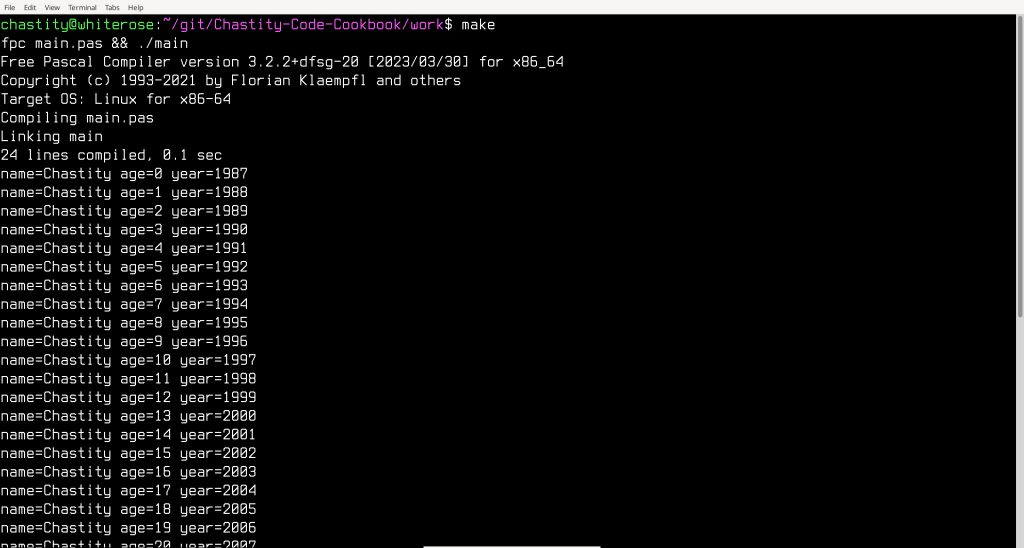
    I am experimenting with old programming languages from the 20th century. My main focus is on teaching beginners to program with languages easier than Assembly. BASIC and Pascal are both older than C and so it is my duty to learn about them so I can make recommendations.

    The following program is something I wrote as a basic outline of how variables in Pascal are defined and how a loop can be used. As I learn more I intend to translate some of my C programs into Pascal so I can share with others who appreciate this old language that is good but not as well known as most others.

    program life;
    
    var
     name:string;
     year:integer;
     age:integer;
    
    begin
     name:='Chastity';
     year:=1987;
     age:=0;
    
     while year<=2026 do
     begin
      WriteLn('name=',name,' age=',age,' year=',year);
      year:=year+1;
      age:=age+1;
     end;
    
    end.
    
    (*
     fpc main.pas && ./main
    *)
    
  • AAA Linux Chapter 18

    Chapter 18: Bitwise Operations for Advanced Nerds

    This chapter contains information which will assist you in understanding more about how computers work, but that in general is not required for MOST programming unless you are trying to operate on individual bits.

    To start out, I will describe 5 essential bitwise operations independently of any specific programming language. This is because these operations exist in every programming language I know of, including Assembly and C.

    After I have explained what the bitwise operations do, I will give examples of how this can be used in Assembly language to substitute for addition and subtraction! You might wonder why you would do this. The fact is that you don’t need to but it is a fun trick that only advanced nerds like me do for a special challenge.

    The Bitwise Operations

    This chapter explains 5 bitwise operations which operate on the bits of data in a computer. For the purpose of demonstration, it doesn’t matter which number the bits represent at the moment. This is because the bits don’t have to represent numbers at all but can represent anything described in two states. Bits are commonly used to represent statements that are true or false. For the purposes of this section, the words AND, OR, XOR are in capital letters because their meaning is only loosely related to the English words they get their name from.

    Bitwise AND Operation

    0 AND 0 == 0
    0 AND 1 == 0	
    1 AND 0 == 0
    1 AND 1 == 1
    

    Think of the bitwise AND operation as multiplication of single bits. 1 times 1 is always 1 but 0 times anything is always 0. That’s how I personally think of it. I guess you could say that something is true only if two conditions are true. For example, if I go to Walmart AND do my job then it is true that I get paid.

    I like to think of the AND operation as the “prefer 0” operation. It will always choose a 0 if either of the two bits is a 0, otherwise, if no 0 is available, it will choose 1.

    Bitwise OR Operation

    0 OR 0 == 0
    0 OR 1 == 1	
    1 OR 0 == 1
    1 OR 1 == 1
    

    The bitwise OR operation can be thought of as something that is true if one or two conditions are true. For example, it is true that playing in the street will result in you dying because you got run over by a car. It is also true that if you live long enough, something else will kill you. Therefore, the bit of your impending death is always 1.

    I like to think of the OR operation as the “prefer 1” operation. It will always choose a 1 if one of the two bits is a 1, otherwise, if no 1 is available, it will choose 0.

    Bitwise XOR Operation

    0 XOR 0 == 0
    0 XOR 1 == 1	
    1 XOR 0 == 1
    1 XOR 1 == 0
    

    The bitwise XOR operation is different because it isn’t really used much for evaluating true or false. Instead, this operation returns 1 if the bits compared are different or 0 if they are the same. This means that any bit, or group of bits, XORed with itself, will always result in 0.

    If you look at my XOR chart above, you will see that using XOR of any bit with a 1 causes the result to be the opposite of the original bit.

    The XOR operation is the quickest way to achieve this bit inversion. If you have a setting that you want to switch on or off, you can toggle it by XORing that bit with 1.

    While the AND, OR, XOR operations can work in the context of individual bits, or groups of them, the next operations, the bit shifts, only make sense in the context of a group of bits. At minimum, you will be operating on 8 bits at a time because a byte is the lowest addressable size of memory.

    Bitwise Left and Right Shift Operations

    Consider the case of the following 8 bit binary value:

    00001000

    This would of course represent the number 8 because a 1 is in the 8’s place value. We can left shift or right shift.

    00001000 ==  8 : is the original byte
    
    00010000 == 16 : original left shift 1
    00000100 ==  4 : original right shift 1
    

    That is really all there is to shifts. They can be used to multiply or divide by a power of two. In some cases, this can be faster than using the mul and div instructions described in chapter 6.

    Example 00: Fake Add

    The following example shows how it is possible to write an addition routine using a combination of the AND,XOR,SHL operations. In this case, the numbers are shown in decimal to be easier for most people to see that the addition is correct.

    format ELF executable
    
    main:
    
    mov dword [radix],10
    mov dword [int_width],1
    
    mov edi,1987
    mov esi,39
    
    mov eax,edi
    call putint
    call putline
    mov eax,esi
    call putint
    call putline
    
    fake_add:
    mov eax,edi
    xor edi,esi
    and esi,eax
    shl esi,1
    jnz fake_add
    
    mov eax,edi
    call putint
    call putline
    mov eax,esi
    call putint
    call putline
    
    mov eax,1
    mov ebx,0
    int 0x80
    
    include 'chastelib32.asm'
    

    If you run it, you will see that the correct result of 2026 which is 1987+39. These are the values we set the edi and esi registers to before simulating addition with these fancy bitwise operations that make even seasoned programmers run scared.

    But how does this monstrosity of a program work? You see the AND operation keeps track of whether both bits in each place value are 1 or not. If they both are, this means that we have to “carry” those bits as we would do in an ordinary binary addition. We store the carry in the esi register and then left shift it once each time in the loop. The loop continues until esi equals zero and there are no more bits to invert with XOR.

    The fact that it works is easy to work out in my head but I don’t blame you if you can’t visualize it. However, this shows the power of what bit operations can do, even though you will probably never need to do this.

    Example 01: Fake Sub

    In case the fake addition example above wasn’t enough for you, here is a slightly modified example that does a fake subtraction operation using the same operations. Try it out and you will see that it subtracts 38 from 2025 and gets the original 1987.

    format ELF executable
    
    main:
    
    mov dword [radix],10
    mov dword [int_width],1
    
    mov edi,2026
    mov esi,39
    
    mov eax,edi
    call putint
    call putline
    mov eax,esi
    call putint
    call putline
    
    fake_sub:
    xor edi,esi
    and esi,edi
    shl esi,1
    jnz fake_sub
    
    mov eax,edi
    call putint
    call putline
    mov eax,esi
    call putint
    call putline
    
    mov eax,1
    mov ebx,0
    int 0x80
    
    include 'chastelib32.asm'
    

    I will try to explain how this works. You see, we first XOR the edi register with the esi register. Then, we AND esi with the new value of edi. This means that the bits in the current place value will only both be 1 if those bits were 0 in edi and then were inverted to 1 by the XOR with esi. This means that at the start of the loop, destination bit=0 and source bit=1. 0 minus 1 means that we need to “borrow” (I hate that term because it is really stealing because we never give it back). We left shift esi as usual and then we keep XORing the new borrow in esi until it is zero.

    Also, you may have noticed that I never used the “cmp” instruction to compare si with zero in this examples. This is because the zero flag is automatically updated with most operations. In fact there are places in my standard library of functions (chastelib) where it wasn’t strictly required to compare with “cmp” but I added it for clarity so I could read my code and more easily remember what I was doing.

    But let’s face it, the examples in this chapter are purely for showing off how advanced my knowledge of the binary numeral system and manipulating bits in ways no reasonable person should ever attempt. I must admit, it would be great for an obfuscated code contest to make a program with code that is unreadable to most humans.

    And while I am on the subject of making unreadable code, why stop at simulating addition and subtraction? I can do multiplication and division too!

    Example 10 Fake Mul

    format ELF executable
    
    main:
    
    mov dword [radix],10
    mov dword [int_width],1
    
    mov edi,6
    mov esi,7
    
    mov eax,edi
    call putint
    call putline
    mov eax,esi
    call putint
    call putline
    
    fake_mul:
    mov eax,0
    fake_mul_add_loop:
    cmp esi,0
    jz fake_mul_add_loop_end
    test esi,1
    jz skip_add
    add eax,edi
    skip_add:
    shl edi,1
    shr esi,1
    jmp fake_mul_add_loop
    fake_mul_add_loop_end:
    mov edi,eax
    
    mov eax,edi
    call putint
    call putline
    
    mov eax,1
    mov ebx,0
    int 0x80
    
    include 'chastelib32.asm'
    

    This fake multiplication uses eax as a temporary variable to store the sum of repeated addition. Each time through the loop, we test the low bit of esi (source register) and add edi (destination register). Each time we double edi by left shifting it once while right shifting esi once.

    To test the low bit of esi, this example uses an instruction that has not been presented in this book. However, this is one of those times when it should be used because it is the easiest way to test for a bit.

    test esi,1
    

    This tests the lowest bit of the esi register. If the low bit (ones place) is 0, then the jump if zero command will skip past the part where we add edi to eax.

    The purpose of the bit shifts is to reduce the number of times we have to add edi to eax. Because 6 and 7 are the values we use, the loop will execute and exactly these results will happen.

    eax starts as 0 but at the end of each cycle, eax, edi, and esi will be these values.

    cycle eax edi esi
    0 6 6 7
    1 18 12 3
    2 42 24 1

    In short, because esi was 7 and was represented as 111 in binary, because it is the sum of 4+2+1, then the result of 42 is the sum of:

    (4*6)+(2*6)+(1*6)

    Because of this optimized algorithm, it took only 3 loop cycles instead of the usual 7 cycles if we had just added 6 to eax 7 times. The speed won’t be much for such a small number as 42 but for larger numbers, this is the kind of optimization I would want.

    Example 11 Fake Div

    For the final example, I have prepared the long division algorithm. I always wondered why they called it long division, but now that I wrote this 70 line long program just to divide 256 by 10, I finally understand.

    Despite its complexity, it follows the same method that humans use for doing long division. We extract the bits from high to low positions from the dividend (edi) and shift them into the low bits of a temporary number (ebx). If this number is large enough (not below divisor) then we subtract the divisor. Each time, we save the resulting bit in the quotient (eax). 0 means the number was too small to subtract the divisor and 1 means it was big enough to subtract the divisor.

    Because this is a 32 bit system, the “fake_div_sub_loop” needs to execute exactly 32 times. For this purpose, ecx was chosen as a counter. By initializing it to 1 and left shifting it each time, it will loop 32 times until ecx will be 0 when an overflow happens and the bit is lost.

    The eax,ebx,and ecx registers are pushed and popped in this example, despite not being part of a function call. This is to signal that their purpose was temporary and because of the complexity, I thought it would be a good convention to follow for clarity that they are not the final return values.

    format ELF executable
    
    main:
    
    mov dword [radix],10
    mov dword [int_width],1
    
    mov edi,256
    mov esi,10
    
    mov eax,edi
    call putint
    call putline
    mov eax,esi
    call putint
    call putline
    
    fake_div:
    ;save registers used in the long division algorithm
    push eax
    push ebx
    push ecx
    mov eax,0
    mov ebx,0
    mov ecx,1
    cmp esi,0
    jz fake_div_sub_loop_end ;div by 0 invalid
    fake_div_sub_loop:
    cmp ecx,0
    jz fake_div_sub_loop_end
    shl eax,1
    shl ebx,1
    test edi,edi ;test edi with itself to check sign bit
    jns skip_or  ;skip copy of sign bit if it was 0
    or ebx,1     ;store a 1 in low bit of ebx based on sign
    skip_or:
    shl edi,1
    
    ;skip subtraction if ebx is below esi
    cmp ebx,esi
    jb skip_sub 
    sub ebx,esi
    or eax,1
    skip_sub:
    
    shl ecx,1
    jmp fake_div_sub_loop
    fake_div_sub_loop_end:
    
    ;send results to correct registers and clean up
    mov edi,eax ;copy quotient to edi
    mov esi,ebx ;copy remainder to esi
    ;restore registers to their original values
    pop ecx
    pop ebx
    pop eax
    
    mov eax,edi
    call putint
    call putline
    
    mov eax,esi
    call putint
    call putline
    
    mov eax,1
    mov ebx,0
    int 0x80
    
    include 'chastelib32.asm'
    

    The results of the fake division program are here:

    256
    10
    25
    6
    

    The program correctly divides 256 by 10 which is 25 but with a remainder of 6. Although this program is probably the most difficult to understand, it gives the correct results.

    Which can only mean that the long division algorithm I have in my autistic head works because I used to perform these operations on paper a lot and I know the process so well that I created this example.

    Will I need to know these Algorithms?

    Believe it or not, there may be times when you will need to use these algorithms. There are some older processors which don’t have multiplication and division instructions. For Intel processors, you can already use the real mul and div instructions.

    But I have a feeling that somewhere in the hardware of those instructions on the Intel CPUs, they probably work a lot like the algorithms I wrote for this chapter.

    When I promised you Assembly Arithmetic Algorithms, I was not joking. I have spent 26 years learning computer programming and I always liked to learn everything whether other people considered it practical or profitable.

  • AAA Linux News: Chapter 17 added

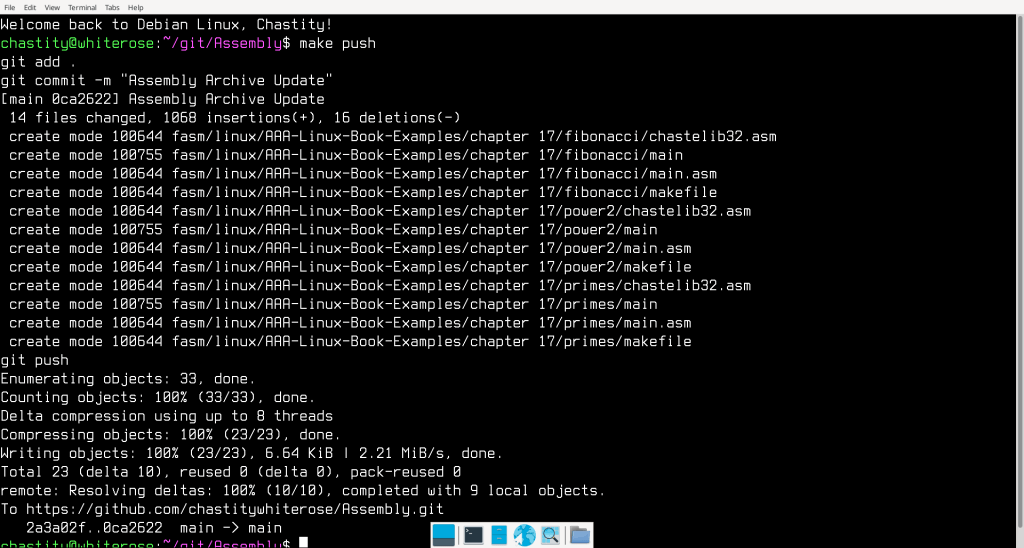
    The 3 integer sequence programs from the DOS Assembly Arithmetic Algorithms have now been added to the Linux version. What was Chapter 5 for the DOS book is now Chapter 17 for the Linux book.

    I am not sure whether readers prefer this content sooner or later in the book but I felt that I had a lot more ground to cover in the Linux book and so I spent 16 chapters explaining the system calls and why they were used in the programs I included. The Linux book has chastack,chastext,chastecmp, and chastehex.

    These programs use all of them most important system calls and therefore, since I have succeeded in writing these, there is no terminal program for Linux that is out of reach. Those who read this book will probably learn to do everything I can in Assembly for Linux and probably more if they have true courage!

    https://leanpub.com/assemblyarithmeticalgorithms-Linux

  • chastext 64-bit

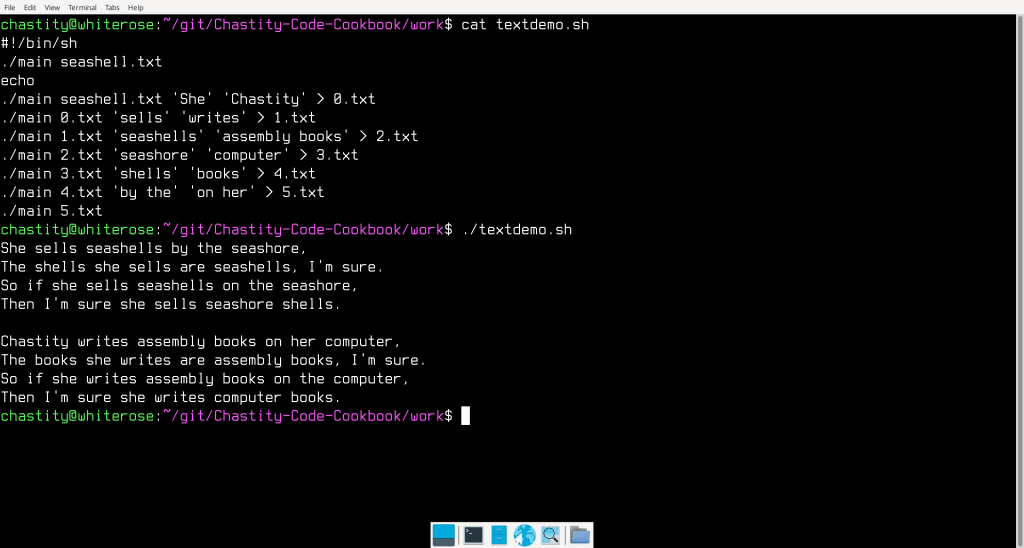
    I have converted my chastext program to 64 bit Assembly for Linux. Next to chastehex, this is the program I am most proud of because it can find and replace exact strings of text. It isn’t quite the same as the Linux “sed” tool, but it is faster, smaller, and I wrote it myself and can do whatever I want with it.

    So of course what I did was write shell script to show what it is capable of!

    main.asm

    ;Linux 64-bit Assembly Source for chastext
    ;a basic text search and replace program
    format ELF64 executable
    entry main
    
    include 'chastelib64.asm'
    
    main:
    
    pop rax
    mov [argc],rax ;save the argument count for later
    
    cmp qword [argc],1
    ja help_skip ;if more than 1 argument is given, skip the help message and process the other arguments
    
    help:
    mov rax,help_message
    call putstring
    jmp main_end
    help_skip:
    
    pop rax ;pop the next arg which is the name of the program we are running
    
    get_filename:
    pop rax ;pop the next arg which is the name of the file we will open
    
    mov [filename],rax ; save the name of the file we will open to read
    
    arg_open_file:
    
    ;Linux system call to open a file
    
    mov rsi,0   ;open file in read only mode
    mov rdi,rax ;filename should be in rax before this function was called
    mov rax,2   ;invoke SYS_OPEN (kernel opcode 2 on 64 bit systems)
    syscall     ;call the kernel
    
    cmp rax,0
    jns file_open_no_errors ;if rax is not negative/signed there was no error
    
    ;Otherwise, if it was signed, then this code will display an error message.
    
    mov rax,open_error_message
    call putstr_and_line
    
    jmp main_end ;end the program because we failed at opening the file
    
    file_open_no_errors:
    
    mov [filedesc],rax ; save the file descriptor number for later use
    
    ;before we just textdump or "cat" the file, we need to check for the existence of more arguments which will modify the output
    
    cmp qword[argc],3
    jb search_skip
    
    pop rax ;pop the next arg which is the string we are searching for
    mov [string_search],rax
    
    search_skip:
    
    cmp qword[argc],4
    jb replace_skip
    
    pop rax ;pop the next arg which is the string we are searching for
    mov [string_replace],rax
    
    replace_skip:
    
    ;now we begin displaying the file but also searching for the search string if it exists. We will check for these based on the number of arguments like we did earlier
    
    textdump:
    
    ;if only there are only 2 arguments (name of program plus input file)
    ;then we do a loop that ignores searching and replacing
    ;this loop will read one character from the file and then send it to stdout
    ;until there are no more bytes to display
    ;but if there are above 2 arguments, we skip this loop and go to search mode
    
    cmp qword[argc],2 ;test arguments 2=only filename given
    ja search_mode    ;but if above 2, then go to search mode because a search string was given
    
    ;This loop is the same as the Linux 'cat' command
    ;or the DOS 'type' command for a single file
    ;it will read one byte and echo it to standard output until EOF
    
    cat:
    
    mov rdx,1            ;number of bytes to read
    mov rsi,byte_array   ;address to store the bytes
    mov rdi,[filedesc]   ;move the opened file descriptor into rdi
    mov rax,0            ;invoke SYS_READ (kernel opcode 0 on 64 bit Intel)
    syscall              ;call the kernel
    
    mov [bytes_read],rax
    
    cmp rax,0
    jnz file_success ;if more than zero bytes read, proceed to display
    
    jmp main_end ;otherwise, end the program
    
    ; this point is reached if file was read from successfully
    
    file_success:
    
    ;print the last read character to stdout by switching to write call
    mov rdi,1            ;write to the STDOUT file
    mov rax,1          ;invoke SYS_WRITE (kernel opcode 1 on 64 bit systems)
    syscall            ;system call to write the message
    
    jmp cat
    
    search_mode:
    
    ;this is the beginning of search mode
    ;it handles the file by seeking and reading to search every position for the search string
    
    ;first, seek to the file_address we initialized to zero
    ;this variable will be added to depending on actions taken
    
    mov rdx,0              ;whence argument (SEEK_SET)
    mov rsi,[file_address] ;move the file cursor to this address
    mov rdi,[filedesc]     ;move the opened file descriptor into rbx
    mov rax,8              ;invoke SYS_LSEEK (kernel opcode 8 on 64 bit Intel)
    syscall                ;call the kernel
    
    ;obtain the length of the search string using my strlen function
    mov rax,[string_search]
    call strlen ;get the length of the search string
    
    ;use the length of the string we are searching for as the number of bytes to read at this location
    
    mov rdx,rax            ;number of bytes to read
    mov rsi,byte_array     ;address to store the bytes
    mov rdi,[filedesc]     ;move the opened file descriptor into rbx
    mov rax,0              ;invoke SYS_READ (kernel opcode 0 on 64 bit Intel)
    syscall                ;call the kernel
    
    mov [bytes_read],rax   ;store how many bytes were read with that last read operation
    
    mov rbx,byte_array     ;move the address of bytes read into rbx
    add rbx,rax            ;add number of bytes read (return value of read function in rax)
    mov byte[rbx],0        ;terminate the string with zero
    
    cmp rax,rdx ;if the number of bytes is not what we expected to read, end this loop
    jnz textdump_end
    
    ;move our two strings into the rsi and rdi registers for comparison
    ;with my custom written strcmp function
    
    mov rsi,[string_search]
    mov rdi,byte_array
    call strcmp ;compare these two strings
    
    cmp rax,0 ;test if they are the same (if rax returned zero)
    jnz not_match ;if they are not a match go to that section for printing a character
    
    ;but if they are a match, then we either quote them
    ;or replace them if a replacement string is available
    
    ;but regardless of which action we do, since a match was found, let us add this count to the file address
    ;so that we read from beyond this point next time the textdump loop starts
    mov rax,[bytes_read]
    add [file_address],rax
    
    cmp qword[argc],4 ;if less than 4 args, no replacement exist, so we quote the strings
    jb print_quotes
    
    ;otherwise, we will print the replacement string instead of the original!
    
    mov rax,[string_replace]
    call putstring ;print the string
    
    jmp textdump ;restart the main loop
    
    print_quotes:
    ;print quotes around matched string
    mov al,'"'
    call putchar
    
    mov rax,byte_array
    call putstring ;print the string
    
    mov al,'"'
    call putchar
    
    jmp textdump ;restart the main loop
    
    not_match: 
    
    ;Instead of calling the putchar function in the case of no match,
    ;I do a system call to print 1 byte to standard output
    ;This is simple and also compatible with binary files we want to replace text in.
    ;But it only works if the search and replace strings are of the same length
    
    mov rdx,1            ;number of bytes to write == 1
    mov rsi,byte_array   ;pointer/address of string to write
    mov rdi,1            ;write to the STDOUT file
    mov rax,1            ;invoke SYS_WRITE (kernel opcode 1 on 64 bit systems)
    syscall              ;system call to write the message
    
    add [file_address],1 ;add 1 to the file address so we don't read this same position again
    
    jmp textdump
    
    textdump_end:
    
    ;print the remaining bytes, if any, left after the main loop ended
    ;mov rax,byte_array
    ;call putstring
    
    mov rdx,[bytes_read] ;number of bytes to write == last read call result
    mov rsi,byte_array   ;pointer/address of string to write
    mov rdi,1            ;write to the STDOUT file
    mov rax,1            ;invoke SYS_WRITE (kernel opcode 1 on 64 bit systems)
    syscall              ;system call to write the message
    
    main_end:
    
    ;this is the end of the program
    ;we close the open file and then use the exit call
    
    ;Linux system call to close a file
    
    mov rdi,[filedesc] ;file number to close
    mov rax,3          ;invoke SYS_CLOSE (kernel opcode 3 for 64 bit Intel)
    syscall            ;call the kernel
    
    mov rax, 0x3C ; invoke SYS_EXIT (kernel opcode 0x3C (60 decimal) on 64 bit systems)
    mov rdi,0   ; return 0 status on exit - 'No Errors'
    syscall
    
    ;the strlen and strcmp are named after the equivalent C functions
    ;but are written from scratch by me based on their expected behavior
    
    ;The strlen function gets the length of string in rax and returns it in rax
    ;This is the same algorithm used in my putstring function
    
    strlen:
    
    push rbx
    mov rbx,rax ; copy rax to rbx. rbx will be used as index to the string
    
    strlen_start: ; this loop finds the length of the string
    
    cmp [rbx],byte 0 ; compare byte at address rbx with 0
    jz strlen_end ; if comparison was zero, jump to loop end
    inc rbx
    jmp strlen_start
    
    strlen_end:
    sub rbx,rax ;subtract start pointer from current pointer to get length of string
    mov rax,rbx ;copy the string length back to rax
    pop rbx
    
    ret
    
    ;strcmp compares the string at rsi to the one at rdi
    ;rax returns 0 if the strings are the same and 1 if different
    ;the algorithm is simple but I will explain it for those who are confused
    
    ;rax is initialized to zero
    ;a byte from each string is loaded into the al and bl registers
    ;the bytes are compared. if they are different, then we jump to the end
    ;However, if they are the same, then we check if one of them is zero
    ;for this purpose it doesn't matter whether we compare al or bl with zero
    ;because it is known that they are the same if the jnz did not take place
    ;if it is zero, this also jumps to the end of the function
    ;If neither jump took place, then we jump to the start of the loop
    ;but when the function finally ends bl will be subtracted from al
    ;this ensures that the function returns zero if the final characters are the same
    ;rbx,rsi,and rdi are preserved but rax is the return value
    ;also, the sub instruction at the end of the function also updates the flags
    ;so you can "jz" or "jnz" to a label after calling this function based on results
    
    strcmp:
    
    push rbx
    push rsi
    push rdi
    
    mov rax,0
    
    strcmp_start:
    
    ;read a byte from each string
    mov al,[rdi]
    mov bl,[rsi]
    cmp al,bl
    jnz strcmp_end
    
    cmp al,0
    jz strcmp_end
    
    inc rdi
    inc rsi
    
    jmp strcmp_start
    
    strcmp_end:
    sub al,bl
    
    pop rdi
    pop rsi
    pop rbx
    
    ret
    
    help_message db 'chastext by Chastity White Rose',0Ah,0Ah
    db '"cat" a file:',0Ah,0Ah,9,'chastext file',0Ah,0Ah
    db 'search for a string:',0Ah,0Ah,9,'chastext file search',0Ah,0Ah
    db 'replace string:',0Ah,0Ah,9,'chastext file search replace',0Ah,0Ah
    db 'Find or replace any string!',0Ah,0
    
    open_error_message db 'error while opening file',0
    
    file_address dq 0 ;file address defaults to zero AKA beginning of file
    
    ;variables for managing arguments and files
    argc rq 1
    filename rq 1 ; name of the file to be opened
    filedesc rq 1 ; file descriptor
    bytes_read rq 1
    
    string_search rq 1 ; place to hold the search string pointer
    string_replace rq 1 ; place to hold the replacement string pointer
    
    ;where we will store data from the file
    byte_array db 0xA4 dup 0
    

    chastelib64.asm

    ; chastelib assembly header file for 64 bit Linux
    ; This file is where I keep the source of my most important Assembly functions
    ; These are my string and integer output and conversion routines.
    
    ; To simplify documentation. The Accumulator/Arithmetic register
    ; (ax,eax,rax) depending on bit size shall be referred to as register A
    ; for the description of these core functions because the A register
    ; is treated special both by the Intel company and my code;
    
    ; putstring; Prints a zero terminated string from the address pointer to by A register.
    ; intstr;    Converts the number in A into a zero terminated string and points A to that address
    ; putint;    Prints the integer in A by calling intstr and then putstring.
    ; strint;    Converts the zero terminated string into an integer and sets A to that value
       
    ; Now, the source of the functions begins, with comments included for parts that I felt needed explanation.
    
    putstring:
    
    push rax
    push rbx
    push rcx
    push rdx
    
    mov rbx,rax ;copy eax to ebx to be used as index to the string
    
    putstring_strlen_start: ; this loop finds the length of the string as part of the putstring function
    
    cmp [rbx],byte 0 ; compare byte at address rbx with 0
    jz putstring_strlen_end ; if comparison was zero, jump to loop end because we have found the length
    inc rbx
    jmp putstring_strlen_start
    
    putstring_strlen_end:
    sub rbx,rax ;subtract start pointer from current pointer to get length of string
    
    ;Write string using Linux Write system call.
    ;Reference for 64 bit x86 syscalls is below.
    ;https://www.chromium.org/chromium-os/developer-library/reference/linux-constants/syscalls/#x86_64-64-bit
    
    mov rdx,rbx      ;number of bytes to write
    mov rsi,rax      ;pointer/address of string to write
    mov rdi,1        ;write to the STDOUT file
    mov rax,1        ;write (kernel opcode 1 on 64 bit systems)
    syscall          ;system call for 64-bit Linux kernel
    
    pop rdx
    pop rcx
    pop rbx
    pop rax
    
    ret ; this is the end of the putstring function return to calling location
    
    ; This is the location in memory where digits are written to by the intstr function
    ; The string of bytes and settings such as the radix and width are global variables defined below.
    
    int_string db 64 dup '?' ;reserve bytes for characters string for 64-bit binary integer
    
    int_string_end db 0 ;zero byte terminator for the integer string
    
    radix dq 2 ;radix or base for integer output. 2=binary, 8=octal, 10=decimal, 16=hexadecimal
    int_width dq 8 ;default width of integers. Extra zeros prefixed if more than 1
    
    ;this function creates a string of the integer in rax
    ;it uses the above radix variable to determine base from 2 to 36
    ;it then loads rax with the address of the string
    ;this means that it can be used with the putstring function
    
    intstr:
    
    mov rbx,int_string_end-1 ;find address of lowest digit(just before the newline 0Ah)
    mov rcx,1
    
    digits_start:
    
    mov rdx,0;
    div qword [radix]
    cmp rdx,10
    jb decimal_digit
    jnb hexadecimal_digit
    
    decimal_digit: ;we go here if it is only a digit 0 to 9
    add rdx,'0'
    jmp save_digit
    
    hexadecimal_digit:
    sub rdx,10
    add rdx,'A'
    
    save_digit:
    
    mov [rbx],dl
    cmp rax,0
    jz intstr_end
    dec rbx
    inc rcx
    jmp digits_start
    
    intstr_end:
    
    prefix_zeros:
    cmp rcx,[int_width]
    jnb end_zeros
    dec rbx
    mov [rbx],byte '0'
    inc rcx
    jmp prefix_zeros
    end_zeros:
    
    mov rax,rbx ;point eax register to this string for putstring
    
    ret
    
    ; function to print string form of whatever integer is in rax
    ; The radix determines which number base the string form takes.
    ; Anything from 2 to 36 is a valid radix
    ; in practice though, only bases 2,8,10,and 16 will make sense to other programmers
    ; this function does not process anything by itself but calls the combination of my other
    ; functions in the order I intended them to be used.
    
    putint: 
    
    push rax
    push rbx
    push rcx
    push rdx
    
    call intstr
    
    call putstring
    
    pop rdx
    pop rcx
    pop rbx
    pop rax
    
    ret
    
    ;this function converts a string pointed to by rax into an integer returned in rax instead
    ;it is a little complicated because it has to account for whether the character in
    ;a string is a decimal digit 0 to 9, or an alphabet character for bases higher than ten
    ;it also checks for both uppercase and lowercase letters for bases 11 to 36
    ;finally, it checks if that letter makes sense for the base.
    ;For example, G to Z cannot be used in hexadecimal, only A to F can
    ;The purpose of writing this function was to be able to accept user input as integers
    ;This function is improved with error checking and uses the new strint_error variable
    ;The program can check this value after the call and see how many errors happened.
    
    strint_error db 0 ;declare a byte variable that keeps track of errors
    
    strint:
    
    mov rbx,rax ;copy string address from rax to rbx because rax will be replaced soon!
    mov rax,0
    mov [strint_error],0 ;set errors to 0 at the start of this function
    
    read_strint:
    mov rcx,0 ; zero rcx so only lower 8 bits are used
    mov cl,[rbx]
    inc rbx
    cmp cl,0 ; compare byte at address rdx with 0
    jz strint_end ; if comparison was zero, this is the end of string
    
    ;if char is below '0' or above '9', it is outside the range of these and is not a digit
    cmp cl,'0'
    jb not_digit
    cmp cl,'9'
    ja not_digit
    
    ;but if it is a digit, then correct and process the character
    is_digit:
    sub cl,'0'
    jmp process_char
    
    not_digit:
    ;it isn't a digit, but it could an alphabet character which is a digit in a higher base
    
    ;if char is below 'A' or above 'Z', it is outside the range of these and is not capital letter
    cmp cl,'A'
    jb not_upper
    cmp cl,'Z'
    ja not_upper
    
    is_upper:
    sub cl,'A'
    add cl,10
    jmp process_char
    
    not_upper:
    
    ;if char is below 'a' or above 'z', it is outside the range of these and is not lowercase letter
    cmp cl,'a'
    jb not_lower
    cmp cl,'z'
    ja not_lower
    
    is_lower:
    sub cl,'a'
    add cl,10
    jmp process_char
    
    not_lower:
    
    ;if we have reached this point, result invalid and end function with error
    jmp strint_end_error
    
    process_char:
    
    cmp rcx,[radix] ;compare char with radix
    jnb strint_end_error ;if this value is above or equal to radix, it is too high despite being a valid digit/alpha
    
    mov rdx,0 ;zero rdx because it is used in mul sometimes
    mul qword [radix] ;mul rax with radix
    add rax,rcx
    
    jmp read_strint ;jump back and continue the loop if nothing has exited it
    
    strint_end_error: ;we jump here if there was an error with one of the chars
    inc [strint_error] ;increment error counter because char invalid
    
    strint_end: ;we jump here when no errors happened
    
    ret
    
    ;The utility functions below simply print a space or a newline.
    ;these help me save code when printing lots of strings and integers.
    
    space db ' ',0 ;a string containing only a space
    
    putspace:
    push rax
    mov rax,space
    call putstring
    pop rax
    ret
    
    line db 0Ah,0 ;a string containing only a newline
    
    ;the next function which pushes rax to the stack
    ;moves the address of the line string and prints it with putstring
    ;then it pops the original value of rax back from the stack before the function returns
    ;this allows me to print a newline anywhere in the code without a single register changing
    
    putline:
    push rax
    mov rax,line
    call putstring
    pop rax
    ret
    
    ;a function for printing a single character that is the value of al
    
    char: db 0,0
    
    putchar:
    push rax
    mov [char],al
    mov rax,char
    call putstring
    pop rax
    ret
    
    ;a small function just for the common operation
    ;printing an integer followed by a space
    ;this saves a few bytes in the assembled code
    ;by reducing the number of function calls in the main program
    
    putint_and_space:
    call putint
    call putspace
    ret
    
    ;a small function just for the common operation
    ;printing an integer followed by a line feed
    ;this saves a few bytes in the assembled code
    ;by reducing the number of function calls in the main program
    
    putint_and_line:
    call putint
    call putline
    ret
    
    ;a small function just for the common operation
    ;printing a string followed by a line feed
    ;this saves a few bytes in the assembled code
    ;by reducing the number of function calls in the main program
    ;it also means we don't need to include a newline in every string!
    
    putstr_and_line:
    call putstring
    call putline
    ret
    

  • Assembly Magic

    A programmer is not a magician
    They just know how to use addition
    Those with skill and high ambition
    Don’t hesitate to break tradition

    Reverse addition is subtraction
    There is no need for fancy abstraction
    Do not fall for hype and distraction
    Don’t hesitate to learn, take action

    Repeated addition is called multiplication
    Despite its badly taught reputation
    Teaching math is my obligation
    With my books I will teach the nation

    Subtraction loops can form division
    Conditional jumps make each decision
    Divide by the radix for integer vision
    But a zero divisor can cause a collision

    Programming languages are all the same
    When arithmetic is your favorite game
    It is fun to choose each variable name
    But when my code fails, I take the blame

    But of every language I have used
    I love writing Assembly the most
    And I wrote the chastehex program
    Of which I sometimes like to boast

    I like Assembly language because
    It gives me the complete control
    And brings back the satisfaction
    That the evil tech companies stole

    Anyone can learn to write code
    That is what some people say
    And I agree with this statement
    When they learn in the right way

    People hear that something is hard
    And so they never even try to start
    But if they did they would soon see
    That building software is an art

    I wrote a book to teach my favorite
    Assembly Arithmetic Algorithms
    I am a bit too obsessed with math
    And others suffer from my autism

    I write my books and comment my functions
    So that other people have a chance to read
    And learn what makes computers work
    And do all the tasks that humans need

    And to those who don’t yet understand
    They think my math is some kind of magic
    I rarely meet those who take the time to learn
    And my lonely pursuit is kind of tragic

    But the special way I write my programs
    Is yet another form of Creative Writing
    And because of evil tech companies
    People like me cannot stop fighting

    They fire people and replace them with AI
    But that will only work for a short while
    Because the code is of no use at all
    Unless it can make a human soul smile

  • chastext for Linux

    This is the source of my chastext program in Linux Intel Assembly language. It is actually very impressive that I managed to fix the many bugs it had. It is a simple find a replace program that I may use in future development of small assembly programs. Each run of the program can only change one kind of string to another, but since the commands can be chained together, transformations are possible beyond what I can explain right now. I would have to write a script just to show what it can do.

    main.asm

    ;Linux 32-bit Assembly Source for chastext ;a basic text search and replace program format ELF executable entry main

    ;a reduced form of chastelib without functions this program doesn’t use include ‘chastext-chastelib32.asm’

    main:

    pop eax mov [argc],eax ;save the argument count for later

    cmp dword [argc],1 ja help_skip ;if more than 1 argument is given, skip the help message and process the other arguments

    help: mov eax,help_message call putstring jmp main_end help_skip:

    pop eax ;pop the next arg which is the name of the program we are running

    get_filename: pop eax ;pop the next arg which is the name of the file we will open

    mov [filename],eax ; save the name of the file we will open to read

    arg_open_file:

    ;Linux system call to open a file

    mov ecx,0 ;open file in read only mode mov ebx,eax ;filename should be in eax before this function was called mov eax,5 ;invoke SYS_OPEN (kernel opcode 5) int 80h ;call the kernel

    cmp eax,0 jns file_open_no_errors ;if eax is not negative/signed there was no error

    ;Otherwise, if it was signed, then this code will display an error message.

    mov eax,open_error_message call putstr_and_line

    jmp main_end ;end the program because we failed at opening the file

    file_open_no_errors:

    mov [filedesc],eax ; save the file descriptor number for later use

    ;before we just textdump or “cat” the file, we need to check for the existence of more arguments which will modify the output

    cmp dword[argc],3 jb search_skip

    pop eax ;pop the next arg which is the string we are searching for mov [string_search],eax

    search_skip:

    cmp dword[argc],4 jb replace_skip

    pop eax ;pop the next arg which is the string we are searching for mov [string_replace],eax

    replace_skip:

    ;now we begin displaying the file but also searching for the search string if it exists. We will check for these based on the number of arguments like we did earlier

    textdump:

    ;if only there are only 2 arguments (name of program plus input file) ;then we do a loop that ignores searching and replacing ;this loop will read one character from the file and then send it to stdout ;until there are no more bytes to display

    cmp dword[argc],2 jnz putchar_skip

    mov edx,1 ;number of bytes to read mov ecx,byte_array ;address to store the bytes mov ebx,[filedesc] ;move the opened file descriptor into EBX mov eax,3 ;invoke SYS_READ (kernel opcode 3) int 80h ;call the kernel

    mov [bytes_read],eax

    cmp eax,0 jnz file_success ;if more than zero bytes read, proceed to display

    jmp main_end ;otherwise, end the program

    ; this point is reached if file was read from successfully

    file_success:

    ;normally, we will print the last read character mov al,[byte_array] call putchar

    putchar_skip:

    cmp dword[argc],3 ;if not enough arguments, skip the search string section jb textdump

    ;this is the beginning of search mode ;it handles the file by seeking and reading to search every position for the search string

    ;first, seek to the file_address we initialized to zero ;this variable will be added to depending on actions taken

    mov edx,0 ;whence argument (SEEK_SET) mov ecx,[file_address] ;move the file cursor to this address mov ebx,[filedesc] ;move the opened file descriptor into EBX mov eax,19 ;invoke SYS_LSEEK (kernel opcode 19) int 80h ;call the kernel

    ;obtain the length of the search string using my strlen function mov eax,[string_search] call strlen ;get the length of the search string

    ;use the length of the string we are searching for as the number of bytes to read at this location

    mov edx,eax ;number of bytes to read mov ecx,byte_array ;address to store the bytes mov ebx,[filedesc] ;move the opened file descriptor into EBX mov eax,3 ;invoke SYS_READ (kernel opcode 3) int 80h ;call the kernel

    mov ebx,byte_array ;move the address of bytes read into ebx add ebx,eax ;add number of bytes read (return value of read function in eax) mov byte[ebx],0 ;terminate the string with zero

    mov [bytes_read],eax ;store how many bytes were read with that last read operation

    cmp eax,edx ;if the number of bytes is not what we expected to read, end this loop jnz textdump_end

    ;move our two strings into the esi and edi registers for comparison ;with my custom written strcmp function

    mov esi,[string_search] mov edi,byte_array call strcmp ;compare these two strings

    cmp eax,0 ;test if they are the same (if eax returned zero) jnz not_match ;if they are not a match go to that section for printing a character

    ;but if they are a match, then we either quote them ;or replace them if a replacement string is available

    ;but regardless of which action we do, since a match was found, let us add this count to the file address ;so that we read from beyond this point next time the textdump loop starts mov eax,[bytes_read] add [file_address],eax

    cmp dword[argc],4 ;if less than 4 args, no replacement exist, so we quote the strings jb print_quotes

    ;otherwise, we will print the replacement string instead of the original!

    mov eax,[string_replace] call putstring ;print the string

    jmp textdump ;restart the main loop

    print_quotes: ;print quotes around matched string mov al,‘"’ call putchar

    mov eax,byte_array call putstring ;print the string

    mov al,‘"’ call putchar

    jmp textdump ;restart the main loop

    not_match:

    mov al,[byte_array] call putchar add [file_address],1 ;add 1 to the file address so we don’t read this same position again

    jmp textdump

    textdump_end:

    ;print the remaining bytes, if any, left after the main loop ended mov eax,byte_array call putstring

    main_end:

    ;this is the end of the program ;we close the open file and then use the exit call

    ;Linux system call to close a file

    mov ebx,[filedesc] ;file number to close mov eax,6 ;invoke SYS_CLOSE (kernel opcode 6) int 80h ;call the kernel

    mov eax, 1 ; invoke SYS_EXIT (kernel opcode 1) mov ebx, 0 ; return 0 status on exit – ‘No Errors’ int 80h

    ;the strlen and strcmp are named after the equivalent C functions ;but are written from scratch by me based on their expected behavior

    ;a function to get the length of string in eax and return the integer in eax

    strlen:

    mov ebx,eax ; copy eax to ebx. ebx will be used as index to the string

    strlen_start: ; this loop finds the length of the string as part of the putstring function

    cmp [ebx],byte 0 ; compare byte at address ebx with 0 jz strlen_end ; if comparison was zero, jump to loop end because we have found the length inc ebx jmp strlen_start

    strlen_end: sub ebx,eax ;subtract start pointer from current pointer to get length of string

    mov eax,ebx ;copy the string length back to eax

    ret

    ;compare the string at esi to the one at edi

    strcmp:

    mov eax,0 ;this will be stay zero unless the strings are different

    strcmp_start: mov bl,[edi] cmp bl,0 jz strcmp_end mov bh,[esi] cmp bh,0 jz strcmp_end

    inc edi inc esi

    cmp bl,bh jz strcmp_start ;if they are the same, continue to next character

    inc eax ;if they were different, eax will be incremented and the function ends

    strcmp_end: ret

    help_message db ‘chastext by Chastity White Rose’,0Ah,0Ah db ‘“cat” a file:’,0Ah,0Ah,9,‘chastext file’,0Ah,0Ah db ‘search for a string:’,0Ah,0Ah,9,‘chastext file search’,0Ah,0Ah db ‘replace string:’,0Ah,0Ah,9,‘chastext file search replace’,0Ah,0Ah db ‘Find or replace any string!’,0Ah,0

    open_error_message db ‘error while opening file’,0

    file_address dd 0 ;file address defaults to zero AKA beginning of file

    ;variables for managing arguments and files argc rd 1 filename rd 1 ; name of the file to be opened filedesc rd 1 ; file descriptor bytes_read rd 1

    string_search rd 1 ; place to hold the search string pointer string_replace rd 1 ; place to hold the replacement string pointer

    ;where we will store data from the file byte_array db 0xBD dup 0

  • chastext for DOS

    I wrote a DOS version of the chastext program for simple search and replace. It does have some limitations because command line arguments are handled very different in DOS than they are in Linux. I can’t simple put quotes around two words to have them count as one argument like I can in Linux.

    Aside from that, it seems to work. I can replace individual words in a text file with a different word. I will have a demo video up soon but see the post about the Linux version in the Linux forum to get the basic idea of what it should do.

    I am not trying to recreate sed or awk but a simple find/replace is a worthwhile project for learning something new after I have mastered my chastehex and chastecmp programs. I can manipulate binary files flawlessly because they are predictable so now I am testing my limits on text based processing.

    main.asm

    org 100h     ;DOS programs start at this address
    
    mov word [radix],16 ; can choose radix for integer output!
    
    mov ch,0     ;zero ch (upper half of cx)
    mov cl,[80h] ;load length in bytes of the command string
    cmp cx,0
    jnz args_exist
    
    mov ax,help    ;if no arguments were given, show a help message
    call putstring
    jmp ending     ;and end the program because there is nothing to do
    
    args_exist:
    
    ;Point bx to the beginning of arg string
    ;however, this always contains a space
    mov bx,81h
    
    skip_start_spaces:
    cmp byte [bx],' ' ;is this byte a space?
    jnz skip_start_spaces_end ;if not, we are done skipping spaces
    inc bx ;otherwise, go to next char
    dec cx ;but subtract 1 from character count
    jmp skip_start_spaces
    skip_start_spaces_end:
    
    mov [arg_string_index],bx ; save the location of the first non space in the arg string
    
    ;find the end of the string based on length
    mov ax,bx
    add ax,cx
    mov [arg_string_end],ax ;now we know where the string ends.
    
    ;now bx points to the first non space character in the arguments passed to the DOS program
    ;and we know that [arg_string_end] is where it ends
    
    ;the next step is to filter the arguments into separate zero terminated strings
    ;each space will be changed to a zero (normally)
    ;but we also need to account for spaces inside quotes that are considered part of the string
    ;Linux handles this normally but DOS needs me to write the code to mimic this behavior
    ;because the program needs to function identically for DOS or Linux
    
    mov cl,' ' ;set the default filter character (argument terminator) to a space
    mov ch,0   ;are we currently checking spaces 0 or quote characters 1 as terminators?
    
    ;this loop is the new and improved argument filter
    ;it keeps track of whether we are inside or outside a quote
    ;and also which type of quote started the quote
    ;the actual quote marks are not part of the string unless they
    ;are the opposite quote type than what started the string
    ;The important thing is that spaces can exist inside of quoted strings
    ;as one argument rather than each new word being a new argument
    ;could be important for filenames containing spaces, etc.
    
    argument_filter:
    
    cmp bx,[arg_string_end] ;are we at the end of the arg string?
    jz argument_filter_end       ;if yes, stop the filter and terminate with zero
    
    cmp ch,1       ;are we inside a quoted string?
    jz quote_check ;if yes, don't do anything to the spaces
    
    cmp byte[bx],cl ;compare the byte at address bx to the string terminator
    jnz ignore_char ;if it is not the same, we ignore it
    mov byte[bx],0  ;but if it matches, change it to a zero
    ignore_char:
    
    cmp byte [bx],0x22 ;is this a double quote -> "
    jz start_quote
    cmp byte [bx],0x27 ;is this a single quote -> '
    jz start_quote
    jmp quote_no ;it was not a quote
    
    start_quote:
    
    mov ch,1    ;set ch to 1 to set that we are inside a quote now
    mov cl,[bx] ;save this quote type as the new terminator
    mov byte[bx],0 ;but delete the first quote with zero
    
    ;check for single or double quotes
    quote_check:
    
    cmp [bx],cl ;is this character the same type of quote that started this sub string?
    jnz quote_no ;if it is not, then skip to quote_no section
    
    ;but if it was matching, change this byte to zero
    ;and change cl back to a space
    mov cl,' ' ;cl is now a space
    mov ch,0   ;ch is 0 because now we have ended the quoted string
    mov byte[bx],0 ;delete the end quote with zero
    
    quote_no:
    
    inc bx ;go to the next character
    jmp argument_filter   ;jump back to the beginning of argument filter
    
    argument_filter_end:
    mov byte [bx],0 ;terminate the ending with a zero for safety
    
    ;special case!!!
    ;If the first argument passed began with a quoted string
    ;it would have been changed to a 0 instead. This requires us to add one to the
    ;starting argument string index
    mov bx,[arg_string_index]
    cmp byte[bx],0
    jnz first_argument_was_not_quote
    inc word[arg_string_index] ;add 1 so it points to the next byte before we process arguments
    first_argument_was_not_quote:


    ;now that the argument string is prepared, we will try to use the first argument as a filename to open
    
    mov ah,3Dh                ;call number for DOS open existing file
    mov al,0                  ;file access: 0=read,1=write,2=read+write
    mov dx,[arg_string_index] ;string address to interpret as filename
    int 21h                   ;DOS call to finalize open function
    
    mov [file_handle],ax ;save the file handle
    
    jc file_error ;if carry flag is set, we have an error, otherwise, file is open
    
    file_opened:
    
    mov ax,dx
    ;call putstring
    ;call putline
    jmp use_file ;skip past error message and start using the file
    
    ;this section prints error message and then ends the program if file error found
    
    file_error: ;prints error code2=file not found
    mov ax,dx
    call putstr_and_line
    mov ax,file_error_message
    call putstring
    mov ax,[file_handle]
    call putint
    jmp ending
    
    ;how we use the file depends on the number of arguments given
    ;if no arguments other than the filename exist, we do a regular hex dump
    ;otherwise we look for two more arguments: the search and replace strings
    
    use_file:
    
    call get_next_arg ;get address of next arg and return into ax register
    cmp ax,[arg_string_end] ;this time, if ax equals end of string, we hex dump and then end the program later
    jz textdump ;jump to hexdump section
    
    ;otherwise, we save the address at ax to our search string
    mov [string_search],ax
    ;call putstr_and_line
    
    
    call get_next_arg ;get address of next arg and return into ax register
    cmp ax,[arg_string_end] ;this time, if ax equals end of string, we hex dump and then end the program later
    jz textdump ;jump to hexdump section
    
    ;otherwise, we save the address at ax to our replacement string
    mov [string_replace],ax
    ;call putstr_and_line
    
    ;all other arguments that may exist after this are irrelevant
    
    textdump:
    
    ;we start the loop with a call to read exactly 1 byte
    
    mov ah,3Fh           ;call number for read function
    mov bx,[file_handle] ;store file handle to read from in bx
    mov cx,1             ;we are reading one byte
    mov dx,byte_array    ;store the bytes here
    int 21h
    
    ;call putint ;check the number of bytes read
    
    cmp ax,1        ;check to see if exactly 1 byte was read
    jz file_success ;if true, proceed to display
    ;mov ax,end_of_file
    ;call putstring
    jmp file_close ;otherwise close the file and end program after failure
    
    ; this point is reached if 1 byte was read from the file successfully
    file_success:
    
    ;first, check to see if there is a search string
    ;if there is a search string, skip the normal putchar
    cmp word[string_search],0 
    jnz putchar_skip
    
    ;but if there is not a search string
    ;we will print the last read character
    ;and then jump to the beginning of the textdump loop to print them until EOF
    mov al,[byte_array]
    call putchar
    jmp textdump
    
    putchar_skip:
    
    ;if search string doesn't exist, just jump and repeat the loop
    ;otherwise we continue into the section that compares the input with the search string
    
    mov bx,[string_search]
    
    mov al,[bx]
    mov ah,[byte_array]
    cmp al,ah ;compare the first character of search string with the byte read already
    jz search_start ; if they are equal, skip putchar and begin searching for the string
    
    ;otherwise, if they are not equal, just putchar the last byte read and repeat the loop
    mov al,[byte_array]
    call putchar
    jmp textdump
    
    search_start:
    mov ax,[string_search]
    call strlen ;get the length of the search string
    ;call putint_and_line ; print length of search string only for debugging
    
    ;attempt to read the length-1 bytes because the first one is already read into the byte array
    
    dec ax               ;subtract 1 from ax which holds our length of string
    
    mov dx,byte_array+1  ;store the bytes here
    mov cx,ax            ;we are reading this many bytes to have a string to compare
    mov bx,[file_handle] ;store file handle to read from in bx
    mov ah,3Fh           ;call number for read function
    int 21h
    
    ;do some math to calculate where the string should end
    
    mov bx,dx ;mov into bx the address of second byte in the string
    add bx,ax ;add ax (the return value of the number of characters read)
    mov byte [bx],0 ;terminate the string with zero
    
    mov si,[string_search]
    mov di,byte_array
    
    call strcmp ;compare these two strings
    
    cmp ax,0 ;test if they are the same (if ax returned zero)
    jnz normal_print ;if they are not a match print them unmodified and unquoted
    
    ;but if they are a match, then we either quote them
    ;or replace them if a replacement string is available
    
    cmp word[string_replace],0 ;check to see if a replacement string is available
    jz print_quotes ;if not, skip to the part where we just quote the strings that match
    
    ;otherwise, we will print the replacement string instead of the original!
    
    mov ax,[string_replace]
    call putstring ;print the string
    
    jmp normal_print_skip
    
    print_quotes:
    ;print quotes around matched string
    mov al,'"'
    call putchar
    
    mov ax,byte_array
    call putstring ;print the string
    
    mov al,'"'
    call putchar
    
    jmp normal_print_skip
    
    normal_print: ;print normal / unquoted because it doesn't match
    
    mov ax,byte_array
    call putstring ;print the string
    
    normal_print_skip:
    
    jmp textdump
    
    file_close:
    ;close the file if it is open
    mov ah,3Eh
    mov bx,[file_handle]
    int 21h
    
    ;debugging section I use just to test values
    ;call putline
    ;mov ax,[string_search]
    ;call putstr_and_line
    ;mov ax,[string_replace]
    ;call putstr_and_line
    
    
    ending:
    mov ax,4C00h ; Exit program
    int 21h
    
    ;the strlen and strcmp are named after the equivalent C functions
    ;but are written from scratch by me based on their expected behavior
    
    ;a function to get the length of string in ax and return the integer in ax
    
    strlen:
    
    mov bx,ax ; copy ax to bx. bx will be used as index to the string
    
    strlen_start: ; this loop finds the length of the string as part of the putstring function
    
    cmp [bx],byte 0 ; compare byte at address bx with 0
    jz strlen_end ; if comparison was zero, jump to loop end because we have found the length
    inc bx
    jmp strlen_start
    
    strlen_end:
    sub bx,ax ;subtract start pointer from current pointer to get length of string
    
    mov ax,bx ;copy the string length back to eax
    
    ret
    
    ;compare the string at si to the one at di
    
    strcmp:
    
    mov ax,0 ;this will be stay zero unless the strings are different
    
    strcmp_start:
    mov bl,[di]
    cmp bl,0
    jz strcmp_end
    mov bh,[si]
    cmp bh,0
    jz strcmp_end
    
    inc di
    inc si
    
    cmp bl,bh
    jz strcmp_start ;if they are the same, continue to next character
    
    inc ax ;if they were different, eax will be incremented and the function ends
    
    strcmp_end:
    ret
    
    ;function to move ahead to the next argument
    ;only works after the filter has been applied to turn all spaces into zeroes
    
    get_next_arg:
    mov bx,[arg_string_index] ;get address of current arg
    find_zero:
    cmp byte [bx],0
    jz found_zero
    inc bx
    jmp find_zero ; this char is not zero, go to the next char
    found_zero:
    
    ;once we have found a zero, check to make sure we are not at the end
    
    find_non_zero:
    cmp bx,[arg_string_end]
    jz arg_finish ;if bx is already at end, nothing left to find
    cmp byte [bx],0
    jnz arg_finish ;if this char is not zero we have found the next string!
    inc bx
    jmp find_non_zero ;otherwise, keep looking
    
    arg_finish:
    mov [arg_string_index],bx ; save this index to the variable
    mov ax,bx ;but also save it to ax register for use in printing or something else
    ret
    
    help db 'chastext by Chastity White Rose',0Dh,0Ah
    db '"cat" or "type" a file without changing it:',0Dh,0Ah,9,'chastext file',0Dh,0Ah
    db 'search for a string and quote it:',0Dh,0Ah,9,'chastext file search',0Dh,0Ah
    db 'replace string:',0Dh,0Ah,9,'chastext file search replace',0Dh,0Ah
    db 'Find or replace any string!',0Dh,0Ah,0
    
    ; About the chastelib variant
    
    ;instead of including chastelib16.asm as a header file
    ;I copy pasted it except that I excluded functions that were not used.
    ;Notably, the strint function is excluded because strint_32 is used instead
    
    ;start of chastelib
    
    ; This file is where I keep my function definitions.
    ; These are usually my string and integer output routines.
    
    ;this is my best putstring function for DOS because it uses call 40h of interrupt 21h
    ;this means that it works in a similar way to my Linux Assembly code
    ;the plan is to make both my DOS and Linux functions identical except for the size of registers involved
    
    putstring:
    
    push ax
    push bx
    push cx
    push dx
    
    mov bx,ax                  ;copy ax to bx for use as index register
    
    putstring_strlen_start:    ;this loop finds the length of the string as part of the putstring function
    
    cmp [bx], byte 0           ;compare this byte with 0
    jz putstring_strlen_end    ;if comparison was zero, jump to loop end because we have found the length
    inc bx                     ;increment bx (add 1)
    jmp putstring_strlen_start ;jump to the start of the loop and keep trying until we find a zero
    
    putstring_strlen_end:
    
    sub bx,ax                  ; sub ax from bx to get the difference for number of bytes
    mov cx,bx                  ; mov bx to cx
    mov dx,ax                  ; dx will have address of string to write
    
    mov ah,40h                 ; select DOS function 40h write 
    mov bx,1                   ; file handle 1=stdout
    int 21h                    ; call the DOS kernel
    
    pop dx
    pop cx
    pop bx
    pop ax
    
    ret
    
    ;this is the location in memory where digits are written to by the intstr function
    int_string db 16 dup '?' ;enough bytes to hold maximum size 16-bit binary integer
    int_string_end db 0 ;zero byte terminator for the integer string
    
    radix dw 2 ;radix or base for integer output. 2=binary, 8=octal, 10=decimal, 16=hexadecimal
    int_width dw 8
    
    intstr:
    
    mov bx,int_string_end-1 ;find address of lowest digit(just before the newline 0Ah)
    mov cx,1
    
    digits_start:
    
    mov dx,0;
    div word [radix]
    cmp dx,10
    jb decimal_digit
    jge hexadecimal_digit
    
    decimal_digit: ;we go here if it is only a digit 0 to 9
    add dx,'0'
    jmp save_digit
    
    hexadecimal_digit:
    sub dx,10
    add dx,'A'
    
    save_digit:
    
    mov [bx],dl
    cmp ax,0
    jz intstr_end
    dec bx
    inc cx
    jmp digits_start
    
    intstr_end:
    
    prefix_zeros:
    cmp cx,[int_width]
    jnb end_zeros
    dec bx
    mov [bx],byte '0'
    inc cx
    jmp prefix_zeros
    end_zeros:
    
    mov ax,bx ; store string in ax for display later
    
    ret
    
    ;function to print string form of whatever integer is in ax
    ;The radix determines which number base the string form takes.
    ;Anything from 2 to 36 is a valid radix
    ;in practice though, only bases 2,8,10,and 16 will make sense to other programmers
    ;this function does not process anything by itself but calls the combination of my other
    ;functions in the order I intended them to be used.
    
    putint: 
    
    push ax
    push bx
    push cx
    push dx
    
    call intstr
    call putstring
    
    pop dx
    pop cx
    pop bx
    pop ax
    
    ret
    
    ;the next utility functions simply print a space or a newline
    ;these help me save code when printing lots of things for debugging
    
    space db ' ',0
    line db 0Dh,0Ah,0
    
    putspace:
    push ax
    mov ax,space
    call putstring
    pop ax
    ret
    
    putline:
    push ax
    mov ax,line
    call putstring
    pop ax
    ret
    
    ;a function for printing a single character that is the value of al
    
    char: db 0,0
    
    putchar:
    push ax
    mov [char],al
    mov ax,char
    call putstring
    pop ax
    ret
    
    ;a small function just for the common operation
    ;printing an integer followed by a space
    ;this saves a few bytes in the assembled code
    
    putint_and_space:
    call putint
    call putspace
    ret
    
    ;a small function just for the common operation
    ;printing an integer followed by a space
    ;this saves a few bytes in the assembled code
    
    putint_and_line:
    call putint
    call putline
    ret
    
    
    ;a small function just for the common operation
    ;printing an integer followed by a space
    ;this saves a few bytes in the assembled code
    
    putstr_and_space:
    call putstring
    call putspace
    ret
    
    ;a small function just for the common operation
    ;printing an integer followed by a space
    ;this saves a few bytes in the assembled code
    
    putstr_and_line:
    call putstring
    call putline
    ret
    
    ;end of chastelib
    
    arg_string_index dw 0
    arg_string_end dw 0
    
    file_error_message db 'Could not open the file! Error number: ',0
    file_handle dw 0
    end_of_file db 'EOF',0
    
    ;where we will store data from the file
    bytes_read dw 0
    
    string_search dw 0 ; place to hold the search string pointer
    string_replace dw 0 ; place to hold the replacement string pointer
    
    byte_array db 0x80 dup 0
    
  • chastehex for Windows update

    I made an update to the chastehex program for Windows. I made it consistent with the behavior of the Linux assembly and C version of the same program. Now it will print the name of the file being opened, display text according to the current mode you are using, and then display EOF to indicate that the end of the file was reached.

    chastehex is a rather complex program because of the fact that it can read or write bytes at specific addresses if you give it the right arguments. If you give it only a filename as an argument, it will hex dump the entire file.

    This update doesn’t change the size of the Windows executable despite the fact that I removed a lot of code from the source than was no longer used. It still pads it to the nearest multiple of 512 bytes. The total size of the executable is 2560 bytes or 2 and a half kilobytes. Although it is bigger than the Linux version, it is still smaller than the compiled C version that behaves the same.

    Although I have said it before, I will mention that this program did not need to be written because the C version is the same. However, writing assembly code and optimizing it is very fun. I don’t usually write things for Windows but because Windows is the most popular desktop operating system and it always runs on an Intel CPU, this program will always work for the majority of computers in the world.

    I was able to translate my Linux version updates into the Windows version of the program because my chastelib library provides a layer that works the same on any OS. It does exactly what I wrote it to do. The programs chastehex and chastecmp are the first two tools and I am still planning what the next tool will be. I hope to make something else that assists me in the act of programming directly rather than just modifying and comparing the binary code I generate.

    main.asm

    format PE console
    include 'win32ax.inc'
    include 'chastelibw32.asm'
    
    main:
    
    mov [radix],16 ; Choose radix for integer output.
    mov [int_width],1
    
    ;get command line argument string
    call [GetCommandLineA]
    
    mov [arg_start],eax ;store start of arg string
    
    ;short routine to find the length of the string
    ;and whether arguments are present
    mov ebx,eax
    find_arg_length:
    cmp [ebx], byte 0
    jz found_arg_length
    inc ebx
    jmp find_arg_length
    found_arg_length:
    ;at this point, ebx has the address of last byte in string which contains a zero
    ;we will subtract to get and store the length of the string
    mov [arg_end],ebx
    sub ebx,eax
    mov eax,ebx
    mov [arg_length],eax
    
    ;this loop will filter the string, replacing all spaces with zero
    mov ebx,[arg_start]
    arg_filter:
    cmp byte [ebx],' '
    ja notspace ; if char is above space, leave it alone
    mov byte [ebx],0 ;otherwise it counts as a space, change it to a zero
    notspace:
    inc ebx
    cmp ebx,[arg_end]
    jnz arg_filter
    
    arg_filter_end:
    
    ;optionally print first arg (name of program)
    ;mov eax,[arg_start]
    ;call putstr_and_line
    
    ;get next arg (first one after name of program)
    call get_next_arg
    cmp eax,[arg_end]
    jz help
    
    mov [file_name],eax
    call putstr_and_line
    
    jmp open_sesame
    
    help:
    
    mov eax,help_message
    call putstring
    
    jmp main_end
    
    open_sesame:
    
    ;open a file with the CreateFileA function
    ;https://learn.microsoft.com/en-us/windows/win32/api/fileapi/nf-fileapi-createfilea
    
    push 0           ;NULL: We are not using a template file
    push 0x80        ;FILE_ATTRIBUTE_NORMAL
    push 3           ;OPEN_EXISTING
    push 0           ;NULL: No security attributes
    push 0           ;NULL: Share mode irrelevant. Only this program reads the file.
    push 0x10000000  ;GENERIC_ALL access mode (Read+Write)
    push [file_name] ;
    call [CreateFileA]
    
    ;check eax for file handle or error code
    ;call putint
    cmp eax,-1
    jnz file_ok
    
    mov eax,file_error_message
    call putstring
    call [GetLastError]
    call putint
    jmp main_end ;end program if the file was not opened
    
    ;this label is jumped to when the file is opened correctly
    file_ok:
    
    mov [file_handle],eax
    
    ;before we proceed, we also check for more arguments.
    
    ;get next arg (first one after name of program)
    call get_next_arg
    cmp eax,[arg_end]
    jz hexdump ;proceed to normal hex dump if no more args
    
    ;otherwise interpret the arg as a hex address to seek to
    
    call strint
    mov [file_offset],eax
    
    ;seek to address of file with SetFilePointer function
    ;https://learn.microsoft.com/en-us/windows/win32/api/fileapi/nf-fileapi-setfilepointer
    push 0             ;seek from beginning of file (SEEK_SET)
    push 0             ;NULL: We are not using a 64 bit address
    push [file_offset] ;where we are seeking to
    push [file_handle] ;seek within this file
    call [SetFilePointer]
    
    ;check for more args
    call get_next_arg
    cmp eax,[arg_end]
    jz read_one_byte ;proceed to read one byte mode
    
    ;otherwise, write the rest of the arguments as bytes to the file!
    write_bytes:
    call strint
    mov [byte_array],al
    
    ;write only 1 byte using Win32 WriteFile system call.
    push 0              ;Optional Overlapped Structure 
    push 0              ;Optionally Store Number of Bytes Written
    push 1              ;Number of bytes to write
    push byte_array     ;address to store bytes
    push [file_handle]  ;handle of the open file
    call [WriteFile]
    
    mov eax,[file_offset]
    inc [file_offset]
    mov [int_width],8
    call putint_and_space
    
    mov eax,0
    mov al,[byte_array]
    mov [int_width],2
    call putint_and_line
    
    ;check for more args
    call get_next_arg
    cmp eax,[arg_end]
    jnz write_bytes
    ;continue write if the args still exist
    ;otherwise end program
    jmp main_end
    
    read_one_byte:
    
    ;read only 1 byte using Win32 ReadFile system call.
    push 0              ;Optional Overlapped Structure 
    push bytes_read     ;Store Number of Bytes Read from this call
    push 1              ;Number of bytes to read
    push byte_array     ;address to store bytes
    push [file_handle]  ;handle of the open file
    call [ReadFile]
    
    cmp [bytes_read],1 
    jz print_byte ;if less than one bytes read, there is an error
    
    mov eax,[file_offset]
    mov [int_width],8
    call putint_and_space
    mov eax,end_of_file
    call putstr_and_line
    
    jmp main_end
    
    print_byte:
    mov eax,[file_offset]
    mov [int_width],8
    call putint_and_space
    
    mov eax,0
    mov al,[byte_array]
    mov [int_width],2
    call putint_and_line
    
    jmp main_end
    
    hexdump:
    
    ;read bytes using Win32 ReadFile system call.
    push 0              ;Optional Overlapped Structure 
    push bytes_read     ;Store Number of Bytes Read from this call
    push 16             ;Number of bytes to read
    push byte_array     ;address to store bytes
    push [file_handle]  ;handle of the open file
    call [ReadFile]     ;all the data is in place, do the write thing!
    
    mov eax,[bytes_read]
    ;call putint
    ;mov eax,byte_array
    ;call putstring
    
    cmp eax,0
    jnz read_ok ;if more than zero bytes read, proceed to display
    
    jmp eof_end
    
    read_ok:
    call print_bytes_row
    
    jmp hexdump
    
    print_EOF:
    
    mov eax,[file_offset]
    mov [int_width],8
    call putint_and_space
    
    mov eax,end_of_file
    call putstr_and_line
    
    jmp main_end
    
    
    eof_end:
    ;before we end the program, let the user know End Of File was reached
    mov eax,end_of_file
    call putstr_and_line
    
    main_end:
    
    ;close the file
    push [file_handle]
    call [CloseHandle]
    
    ;Exit the process with code 0
    push 0
    call [ExitProcess]
    
    .end main


    ;variables for displaying messages
    file_error_message db 'error: ',0
    end_of_file db 'EOF',0
    read_error_message db 'Failure during reading of file. Error number: ',0
    
    help_message db 'chastehex by Chastity White Rose',0Ah,0Ah
    db 'hexdump a file:',0Ah,0Ah,9,'chastehex file',0Ah,0Ah
    db 'read a byte:',0Ah,0Ah,9,'chastehex file address',0Ah,0Ah
    db 'write a byte:',0Ah,0Ah,9,'chastehex file address value',0Ah,0Ah
    db 'The file must exist',0Ah,0
    
    ;function to move ahead to the next art
    ;only works after the filter has been applied to turn all spaces into zeroes
    get_next_arg:
    mov ebx,[arg_start]
    find_zero:
    cmp byte [ebx],0
    jz found_zero
    inc ebx
    jmp find_zero ; this char is not zero, go to the next char
    found_zero:
    
    find_non_zero:
    cmp ebx,[arg_end]
    jz arg_finish ;if ebx is already at end, nothing left to find
    cmp byte [ebx],0
    jnz arg_finish ;if this char is not zero we have found the next string!
    inc ebx
    jmp find_non_zero ;otherwise, keep looking
    
    arg_finish:
    mov [arg_start],ebx ; save this index to variable
    mov eax,ebx ;but also save it to ax register for use
    ret
    ;we can know that there are no more arguments when
    ;the either [arg_start] or eax are equal to [arg_end]


    ;this function prints a row of hex bytes
    ;each row is 16 bytes
    print_bytes_row:
    mov eax,[file_offset]
    mov [int_width],8
    call putint_and_space
    
    mov ebx,byte_array
    mov ecx,[bytes_read]
    add [file_offset],ecx
    next_byte:
    mov eax,0
    mov al,[ebx]
    mov [int_width],2
    call putint_and_space
    
    inc ebx
    dec ecx
    cmp ecx,0
    jnz next_byte
    
    mov ecx,[bytes_read]
    pad_spaces:
    cmp ecx,0x10
    jz pad_spaces_end
    mov eax,space_three
    call putstring
    inc ecx
    jmp pad_spaces
    pad_spaces_end:
    
    ;optionally, print chars after hex bytes
    call print_bytes_row_text
    call putline
    
    ret
    
    space_three db '   ',0
    
    print_bytes_row_text:
    mov ebx,byte_array
    mov ecx,[bytes_read]
    next_char:
    mov eax,0
    mov al,[ebx]
    
    ;if char is below '0' or above '9', it is outside the range of these and is not a digit
    cmp al,0x20
    jb not_printable
    cmp al,0x7E
    ja not_printable
    
    printable:
    ;if char is in printable range,copy as is and proceed to next index
    jmp next_index
    
    not_printable:
    mov al,'.' ;otherwise replace with placeholder value
    
    next_index:
    mov [ebx],al
    inc ebx
    dec ecx
    cmp ecx,0
    jnz next_char
    mov [ebx],byte 0 ;make sure string is zero terminated
    
    mov eax,byte_array
    call putstring
    
    ret


    ;variables for managing arguments
    arg_start  dd ? ;start of arg string
    arg_end    dd ? ;address of the end of the arg string
    arg_length dd ? ;length of arg string
    arg_spaces dd ? ;how many spaces exist in the arg command line
    
    ;variables for managing file IO.
    file_name dd ?
    bytes_read dd ? ;how many bytes are read with ReadFile operation
    byte_array db 16 dup ?,0
    file_handle dd ?
    file_offset dd ?
    

    chastelibw32.asm

    ; This file is where I keep my function definitions.
    ; These are usually my string and integer output routines.
    
    ; function to print zero terminated string pointed to by register eax
    
    putstring:
    
    push eax
    push ebx
    push ecx
    push edx
    
    mov ebx,eax ; copy eax to ebx as well. Now both registers have the address of the main_string
    
    putstring_strlen_start: ; this loop finds the lenge of the string as part of the putstring function
    
    cmp [ebx],byte 0 ; compare byte at address ebx with 0
    jz putstring_strlen_end ; if comparison was zero, jump to loop end because we have found the length
    inc ebx
    jmp putstring_strlen_start
    
    putstring_strlen_end:
    sub ebx,eax ;ebx will now have correct number of bytes
    
    ;Write String using Win32 WriteFile system call.
    push 0              ;Optional Overlapped Structure 
    push 0              ;Optionally Store Number of Bytes Written
    push ebx            ;Number of bytes to write
    push eax            ;address of string to print
    push -11            ;STD_OUTPUT_HANDLE = Negative Eleven
    call [GetStdHandle] ;use the above handle
    push eax            ;eax is return value of previous function
    call [WriteFile]    ;all the data is in place, do the write thing!
    
    pop edx
    pop ecx
    pop ebx
    pop eax
    
    ret ; this is the end of the putstring function return to calling location
    
    ; This is the location in memory where digits are written to by the intstr function
    ; The string of bytes and settings such as the radix and width are global variables defined below.
    
    int_string db 32 dup '?' ;enough bytes to hold maximum size 32-bit binary integer
    
    int_string_end db 0 ;zero byte terminator for the integer string
    
    radix dd 2 ;radix or base for integer output. 2=binary, 8=octal, 10=decimal, 16=hexadecimal
    int_width dd 8
    
    ;this function creates a string of the integer in eax
    ;it uses the above radix variable to determine base from 2 to 36
    ;it then loads eax with the address of the string
    ;this means that it can be used with the putstring function
    
    intstr:
    
    mov ebx,int_string_end-1 ;find address of lowest digit
    mov ecx,1
    
    digits_start:
    
    mov edx,0;
    div dword [radix]
    cmp edx,10
    jb decimal_digit
    jge hexadecimal_digit
    
    decimal_digit: ;we go here if it is only a digit 0 to 9
    add edx,'0'
    jmp save_digit
    
    hexadecimal_digit:
    sub edx,10
    add edx,'A'
    
    save_digit:
    
    mov [ebx],dl
    cmp eax,0
    jz intstr_end
    dec ebx
    inc ecx
    jmp digits_start
    
    intstr_end:
    
    prefix_zeros:
    cmp ecx,[int_width]
    jnb end_zeros
    dec ebx
    mov [ebx],byte '0'
    inc ecx
    jmp prefix_zeros
    end_zeros:
    
    mov eax,ebx ; now that the digits have been written to the string, display it!
    
    ret
    
    
    ; function to print string form of whatever integer is in eax
    ; The radix determines which number base the string form takes.
    ; Anything from 2 to 36 is a valid radix
    ; in practice though, only bases 2,8,10,and 16 will make sense to other programmers
    ; this function does not process anything by itself but calls the combination of my other
    ; functions in the order I intended them to be used.
    
    putint: 
    
    push eax
    push ebx
    push ecx
    push edx
    
    call intstr
    
    call putstring
    
    pop edx
    pop ecx
    pop ebx
    pop eax
    
    ret
    
    ;this function converts a string pointed to by eax into an integer returned in eax instead
    ;it is a little complicated because it has to account for whether the character in
    ;a string is a decimal digit 0 to 9, or an alphabet character for bases higher than ten
    ;it also checks for both uppercase and lowercase letters for bases 11 to 36
    ;finally, it checks if that letter makes sense for the base.
    ;For example, G to Z cannot be used in hexadecimal, only A to F can
    ;The purpose of writing this function was to be able to accept user input as integers
    
    strint:
    
    mov ebx,eax ;copy string address from eax to ebx because eax will be replaced soon!
    mov eax,0
    
    read_strint:
    mov ecx,0 ; zero ecx so only lower 8 bits are used
    mov cl,[ebx]
    inc ebx
    cmp cl,0 ; compare byte at address edx with 0
    jz strint_end ; if comparison was zero, this is the end of string
    
    ;if char is below '0' or above '9', it is outside the range of these and is not a digit
    cmp cl,'0'
    jb not_digit
    cmp cl,'9'
    ja not_digit
    
    ;but if it is a digit, then correct and process the character
    is_digit:
    sub cl,'0'
    jmp process_char
    
    not_digit:
    ;it isn't a digit, but it could be perhaps and alphabet character
    ;which is a digit in a higher base
    
    ;if char is below 'A' or above 'Z', it is outside the range of these and is not capital letter
    cmp cl,'A'
    jb not_upper
    cmp cl,'Z'
    ja not_upper
    
    is_upper:
    sub cl,'A'
    add cl,10
    jmp process_char
    
    not_upper:
    
    ;if char is below 'a' or above 'z', it is outside the range of these and is not lowercase letter
    cmp cl,'a'
    jb not_lower
    cmp cl,'z'
    ja not_lower
    
    is_lower:
    sub cl,'a'
    add cl,10
    jmp process_char
    
    not_lower:
    
    ;if we have reached this point, result invalid and end function
    jmp strint_end
    
    process_char:
    
    cmp ecx,[radix] ;compare char with radix
    jae strint_end ;if this value is above or equal to radix, it is too high despite being a valid digit/alpha
    
    mov edx,0 ;zero edx because it is used in mul sometimes
    mul [radix]    ;mul eax with radix
    add eax,ecx
    
    jmp read_strint ;jump back and continue the loop if nothing has exited it
    
    strint_end:
    
    ret


    ;the next utility functions simply print a space or a newline
    ;these help me save code when printing lots of things for debugging
    
    space db ' ',0
    line db 0Dh,0Ah,0
    
    putspace:
    push eax
    mov eax,space
    call putstring
    pop eax
    ret
    
    putline:
    push eax
    mov eax,line
    call putstring
    pop eax
    ret
    
    ;a function for printing a single character that is the value of al
    
    char: db 0,0
    
    putchar:
    push eax
    mov [char],al
    mov eax,char
    call putstring
    pop eax
    ret
    
    ;a small function just for the common operation
    ;printing an integer followed by a space
    ;this saves a few bytes in the assembled code
    ;by reducing the number of function calls in the main program
    
    putint_and_space:
    call putint
    call putspace
    ret
    
    ;a small function just for the common operation
    ;printing an integer followed by a line feed
    ;this saves a few bytes in the assembled code
    ;by reducing the number of function calls in the main program
    
    putint_and_line:
    call putint
    call putline
    ret
    
    ;a small function just for the common operation
    ;printing a string followed by a line feed
    ;this saves a few bytes in the assembled code
    ;by reducing the number of function calls in the main program
    ;it also means we don't need to include a newline in every string!
    
    putstr_and_line:
    call putstring
    call putline
    ret
    
    
  • chastelib SDL2 extension

    I wrote an extension to chastelib which is really an entire font library on its own. The idea is to emulate a Linux terminal and write text to it except that everything is really done using SDL. The characters printed are from the custom font I used in Chaste Tris. This font is perfect because it is pixelated and predictable.

    Besides the fact that this library allows me to use my favorite bitmap font, it also allows complete control over input. Normally I would have to use ncurses to control a terminal in the same way, but since this is not a real terminal, I can do anything I want.

    Now imagine a game that was based entirely on typing text but was done in SDL. This would allow a cross platform nerd environment for people who like DOS and Linux terminals but would be completely cross platform. It wouldn’t matter if you are on Windows, Mac, or Linux because it would operate the same. I don’t know the details of what this game would have but it might be fun if I ever figure it out.

    full source code of this program

    main.c

    /*
     main.c source file for an SDL2 project by Chastity White Rose
    */
    #include <stdio.h>
    #include <stdlib.h>
    #include <SDL.h>
    #include "chastelib.h"
    
    int width=1280,height=720;
    int loop=1;
    SDL_Window *window;
    SDL_Surface *surface;
    SDL_Event e;
    
    /*
    This header file must be included after the above global variables
    because it depends on them.
    */
    #include "chastelib_font_sdl.h"
    #include "chastelib_demo_sdl.h"
    
    int main(int argc, char **argv)
    {
     int x; /*variable to use for whatever I feel like*/
    
     if(SDL_Init(SDL_INIT_VIDEO))
     {
      printf( "SDL could not initialize! SDL_Error: %s\n",SDL_GetError());return -1;
     }
     window=SDL_CreateWindow("SDL2 Program",SDL_WINDOWPOS_CENTERED,SDL_WINDOWPOS_CENTERED,width,height,SDL_WINDOW_SHOWN );
     if(window==NULL){printf( "Window could not be created! SDL_Error: %s\n", SDL_GetError() );return -1;}
     surface = SDL_GetWindowSurface( window ); /*get surface for this window*/
     SDL_FillRect(surface,NULL,0xFF00FF);
     SDL_UpdateWindowSurface(window);
     printf("SDL Program Compiled Correctly\n");
     
     /*load the font from a file*/
     main_font=chaste_font_load("./font/FreeBASIC Font 8.bmp");
     
     /*change the scale of each character*/
     main_font.char_scale=4; 
     
     /*change the putstr function to the SDL version*/
     putstr=sdl_putstring;
     
     /*or use the version that automatically wraps words of text*/
     putstr=sdl_putstring_wrapped;
    
     /*
     below is an eight line test program to check if everything is correct!
     */
    
     if(0)
     {
      sdl_clear();  /*clear the screen before we begin writing*/
      x=putstr("Hello World\n"); /*draw a string of text to the surface*/
      putstr("string length = ");
      radix=10;
      putint(x);
      putstr("\nPress Esc to continue.\n");
      SDL_UpdateWindowSurface(window); /*update window to show the results*/
      sdl_wait_escape(); /*wait till escape key pressed*/
     }
    
     /*now call a demo function I wrote*/
     sdl_chastelib_test_suite();
    
     if(0)
     {
      sdl_clear();  /*clear the screen before we begin writing*/
      putstr("This program has ended\nPress Esc to close this window.\n");
      SDL_UpdateWindowSurface(window); /*update window to show the results*/
      sdl_wait_escape(); /*wait till escape key pressed*/
     }
     
     SDL_DestroyWindow(window);
     SDL_Quit();
     return 0;
    }
    
    /*
     This source file is an example to be included in the Chastity's Code Cookbook repository.
     This example follows the SDL version 2 which works differently than
     the most up to date version (version 3 at this time).
    
    main-sdl2:
    	gcc -Wall -ansi -pedantic main.c -o main `sdl2-config --cflags --libs` -lm && ./main
    
    */
    

    chastelib_font_sdl.h

    /*
    chastity font SDL2 surface version
    
    SDL surfaces are easy to work with and this was the original way I implemented my own text writing library.
    There is an incomplete version that uses an SDL renderer but offers no advantages over this one.
    */
    
    
    /*
    chastelib font structure
    
    In is version of my SDL2 font extension, a surface is used as an image which contains the printable characters.
    The data in it will be loaded by another function from an image file.
    */
    struct chaste_font
    {
     int char_width; /*width of a character*/
     int char_height; /*height of a character*/
     int char_scale; /*multiplier of original character size used in relevant functions*/
     SDL_Surface *surface; /*the surface of the image of loaded font*/
    };
    
    /*global font that will be reused many times*/
    struct chaste_font main_font;
    
    /*function to load a font and return a structure with the needed data to draw later*/
    struct chaste_font chaste_font_load(char *s)
    {
     struct chaste_font new_font;
     SDL_Surface *temp_surface;
     printf("Loading font: %s\n",s);
    
     /*load bitmap to temporary surface*/
     temp_surface=SDL_LoadBMP(s);
    
     /*convert to same surface as screen for faster blitting*/
     new_font.surface=SDL_ConvertSurface(temp_surface, surface->format, 0);
     
     /*free the temp surface*/
     SDL_FreeSurface(temp_surface); 
    
     if(new_font.surface==NULL){printf( "SDL could not load image! SDL_Error: %s\n",SDL_GetError());return new_font;}
    
     /*
      by default,font height is detected by original image height
      but the font width is the width of the image divided by 95
      because there are exactly 95 characters in the font format that I created.
     */
     new_font.char_width=new_font.surface->w/95; /*there are 95 characters in my font files*/
     new_font.char_height=new_font.surface->h;
    
     if(new_font.char_height==0)
     {
      printf("Something went horribly wrong loading the font from file:\n%s\n",s);
     }
     else
     {
      /*printf("Font loaded correctly\n");*/
      printf("Size of each character in loaded font is %d,%d\n",new_font.char_width,new_font.char_height);
      new_font.char_scale=1;
      printf("Character scale initialized to %d\n\n",new_font.char_scale);
     }
    
     return new_font;
    }
    
    /*global variables to control the cursor in the putchar function*/
    int cursor_x=0,cursor_y=0;
    int line_spacing_pixels=1; /*optionally space lines of text by this many pixels*/
    
    /*
    This function is designed to print a single character to the current surface of the main window
    This means that it can be called repeatedly to write entire strings of text
    */
    
    int sdl_putchar(char c)
    {
     int x,y; /*used as coordinates for source image to blit from*/
     int error=0; /*used only for error checking*/
     SDL_Rect rect_source,rect_dest;
    
      /*
      in the special case of a newline, the cursor is updated to the next line
      but no character is printed.
      */
      if(c=='\n')
      {
       cursor_x=0;
       cursor_y+=main_font.char_height*main_font.char_scale;
       cursor_y+=line_spacing_pixels; /*add space between lines for readability*/
      }
      else
      {
       x=(c-' ')*main_font.char_width; /*the x position of where this char is stored in the font source bitmap*/
       y=0*main_font.char_height;      /*the y position of where this char is stored in the font source bitmap*/
    
       rect_source.x=x;
       rect_source.y=y;
       rect_source.w=main_font.char_width;
       rect_source.h=main_font.char_height;
    
       rect_dest.x=cursor_x;
       rect_dest.y=cursor_y;
       rect_dest.w=main_font.char_width*main_font.char_scale;
       rect_dest.h=main_font.char_height*main_font.char_scale;
    
       /*copy the character to the screen (including scale of character)*/
       error=SDL_BlitScaled(main_font.surface,&rect_source,surface,&rect_dest);
       if(error){printf("Error: %s\n",SDL_GetError());}
       
       /*
       copy the character directly but ignore scale
       this will result in the tiny character from the source font
       and is only intended as a joke
       */
       /*error=SDL_BlitSurface(main_font.surface,&rect_source,surface,&rect_dest);
       if(error){printf("Error: %s\n",SDL_GetError());}*/
    
       cursor_x+=main_font.char_width*main_font.char_scale;
      }
    
     return c;
    }
    
    /*
     This function is the SDL equivalent of my putstring function.
     Besides writing the text to an SDL window, it still writes it to the terminal
     This way I can always read it from the terminal and debug if necessary.
    */
    
    int sdl_putstring(const char *s)
    {
     int count=0;                    /*used to calcular how many bytes will be written*/
     const char *p=s;                /*pointer used to find terminating zero of string*/
     while(*p)
     {
      sdl_putchar(*p); /*print this character to the SDL window using a function I wrote*/
      p++;             /*increment the pointer*/
     } 
     count=p-s;                      /*count is the difference of pointers p and s*/
     fwrite(s,1,count,stdout);       /*https://cppreference.com/w/c/io/fwrite.html*/
     return count;                   /*return how many bytes were written*/
    }
    
    /*
     This function writes a string but wraps the text to always fit the screen.
    */
    
    int sdl_putstring_wrapped(const char *s)
    {
     int count=0;     /*used to calcular how many bytes will be written*/
     const char *p=s; /*pointer used to find terminating zero of string*/
     const char *w;   /*pointer used to check length of string for wrapping text*/
     int wx;          /*x position used to see if we need to wrap words*/
     while(*p)
     {
      w=p; /*the wrap pointer is used in a loop to determine if the "word" will fit on the current line*/
      wx=cursor_x; 
      while(*w>=0x21 && *w<=0x7E) /*while the chars in current word are not special character*/
      {
       wx+=main_font.char_width*main_font.char_scale;
       w++;
      }
      /*if the previous loop goes off the right edge of window, wrap to next line*/
      if(wx>=width)
      {
       cursor_x=0;
       cursor_y+=main_font.char_height*main_font.char_scale;
       cursor_y+=line_spacing_pixels; /*add space between lines for readability*/
       putchar('\n'); /*insert newline to terminal*/
      }
      sdl_putchar(*p); /*print this character to the SDL window using a function I wrote*/
      putchar(*p);     /*print to stdout with libc putchar*/
      p++;             /*increment the pointer*/
     } 
     count=p-s;                      /*count is the difference of pointers p and s*/
     return count;                   /*return how many bytes were written*/
    }
    
    /*
    A function to clear the screen and reset the cursor to the top left
    This makes sense because the Linux clear command does the same thing
    */
    
    void sdl_clear()
    {
     cursor_x=0;cursor_y=0;
     SDL_FillRect(surface,NULL,0x000000);
     
     /*
     these next lines use escape sequences to also clear the terminal
     and reset the terminal cursor so it matches the SDL cursor by this library
    */
     putstring("\x1B[2J"); /*clear the terminal with an escape sequence*/
     putstring("\x1B[H"); /*reset terminal cursor to home*/
    }
    
    /*
     a function with a loop which will only end if we click the X or press escape
     This function serve as a useful way to keep the SDL Window on the screen
     so I can see the text of I have drawn to it.
     It is also something I can copy paste into larger input loops.
    */
    
    void sdl_wait_escape()
    {
     int loop=1;
     while(loop)
     {
      while(SDL_PollEvent(&e))
      {
       if(e.type == SDL_QUIT){loop=0;}
       if(e.type == SDL_KEYUP)
       {
        if(e.key.keysym.sym==SDLK_ESCAPE){loop=0;}
       }
      }
     }
    }
    

    chastelib_demo_sdl.h

    /* chastelib_demo_sdl.h */
    
    int sdl_chastelib_test_suite()
    {
     /*variables required by SDL*/
     int loop=1;
     int key=1;
     SDL_Event e;
    
     int a=0,b,c,d; /*variables for this test program*/
    
     line_spacing_pixels=1; /*empty space in pixels between lines*/
    
     radix=16;
     int_width=1;
    
     /*
      I use strint to set the variables by strings rather than immediate values directly
      Doing it this way looks silly, but it is for the purpose of testing the strint function
     */
     b=strint("10"); /*will always be radix*/
     c=b; /*save what the radix was at the beginning. This will be used later.*/
     d=strint("100"); /*will always be radix squared*/
    
     /*a loop which will only end if we click the X or press escape*/
     while(loop)
     {
      /*start of game loop*/


     if(key) /*start of update on input section*/
     {
      
      sdl_clear();  /*clear the screen before we begin writing*/
    
      main_font.char_scale=3;
      putstr("Official test suite for the C version of chastelib.\nThis version uses SDL2.\n\n");
    
      main_font.char_scale=4; 
    
      /*the actual loop that shows the data for 16 numbers at a time*/
      a=b-c;
      while(a<b)
      {
       radix=2;
       int_width=8;
       putint(a);
       putstr(" ");
       radix=16;
       int_width=2;
       putint(a);
       putstr(" ");
       radix=10;
       int_width=3;
       putint(a);
    
       if(a>=0x20 && a<=0x7E)
       {
        putstr(" ");
        putchar(a);
        sdl_putchar(a);
       }
    
       putstr("\n");
       a+=1;
      }
    
      SDL_UpdateWindowSurface(window); /*update window to show the results*/
     
    } /*end of update on input section*/
    
     key=0; /*key of zero means no input right now*/
    
      /*loop to capture and process input that happens*/
      while(SDL_PollEvent(&e))
      {
       if(e.type == SDL_QUIT){loop=0;}
    
       /*use Escape as a key that can also end this loop*/
       if(e.type == SDL_KEYUP)
       {
        if(e.key.keysym.sym==SDLK_ESCAPE){loop=0;}
       }
    
       if(e.type == SDL_KEYDOWN /*&& e.key.repeat==0*/)
       {
        key=e.key.keysym.sym;
        switch(key)
        {
         /*use q as a key that can also end this loop*/
         case SDLK_q:
          loop=0;
         break;
       
         /*the main 4 directions*/
         case SDLK_UP:
          if(b>c){b--;}
         break;
         case SDLK_DOWN:
          if(b<d){b++;}
         break;
         case SDLK_LEFT:
          if(b>=c+c){b-=c;}
         break;
         case SDLK_RIGHT:
          if(b<=d-c){b+=c;}
         break;
        }


       } /*end of SDL_KEYDOWN section*/
    
    
      }
    
      /*end of game loop*/
     }
     
     return 0;
    }
    

    chastelib.h

    /*
     This file is a C library of functions written by Chastity White Rose. The functions are for converting strings into integers and integers into strings.
     I did it partly for future programming plans and also because it helped me learn a lot in the process about how pointers work
     as well as which features the standard library provides, and which things I need to write my own functions for.
    
     As it turns out, the integer output routines for C are too limited for my tastes. This library corrects this problem.
     Using the global variables and functions in this file, integers can be output in bases/radixes 2 to 36.
     
     Although this code is commented, I have also written a readme.md file designed to explain the usage of these functions and the philosophy behind them.
    */
    
    /*
     These following lines define a static array with a size big enough to store the digits of an integer, including padding it with extra zeroes.
     The integer conversion function (intstr) always references a pointer to this global string, and this allows other C standard library functions
     such as printf to display the integers to standard output or even possibly to files.
     This string can be repurposed for absolutely anything I desire.
    */
    
    
    #define usl 0x100 /*usl stands for Unsigned or Universal String Length.*/
    char int_string[usl+1]; /*global string which will be used to store string of integers. Size is usl+1 for terminating zero*/
    
    /*radix or base for integer output. 2=binary, 8=octal, 10=decimal, 16=hexadecimal*/
    int radix=2;
    /*default minimum digits for printing integers*/
    int int_width=1;
    
    /*
    The intstr function is one that I wrote because the standard library can display integers as decimal, octal, or hexadecimal, but not any other bases(including binary, which is my favorite).
    
    My function corrects this, and in my opinion, such a function should have been part of the standard library, but I'm not complaining because now I have my own, which I can use forever!
    More importantly, it can be adapted for any programming language in the world if I learn the basics of that language. That being said, C is the best language and I will use it forever.
    */
    
    char *intstr(unsigned int i)    /*Chastity's supreme integer to string conversion function*/
    {
     int width=0;                   /*the width or how many digits including prefixed zeros are printed*/
     char *s=int_string+usl;        /*a pointer starting to the place where we will end the string with zero*/
     *s=0;                          /*set the zero that terminates the string in the C language*/
     while(i!=0 || width<int_width) /*loop to fill the string with every required digit plus prefixed zeros*/
     {
      s--;                          /*decrement the pointer to go left for corrent digit placing*/
      *s=i%radix;                   /*get the remainder of division by the radix or base*/
      i/=radix;                     /*divide the input by radix*/
      if(*s<10){*s+='0';}           /*fconvert digits 0 to 9 to the ASCII character for that digit*/
      else{*s=*s+'A'-10;}           /*for digits higher than 9, convert to letters starting at A*/
      width++;                      /*increment the width so we know when enough digits are saved*/
     }
     return s;                      /*return this string to be used by putstr,printf,std::cout or whatever*/
    }
    
    /*
    The strint_errors variable is used to keep track of how many errors happened in the strint function.
    The following errors can occur:
    
    Radix is not in range 2 to 36
    Character is not a number 0 to 9 or alphabet A to Z (in either case)
    Character is alphanumeric but is not valid for current radix
    
    If any of these errors happen, error messages are printed to let the programmer or user know what went wrong in the string that was passed to the function.
    If getting input from the keyboard, the strint_errors variable can be used in a conditional statement to tell them to try again and recall the code that grabs user input.
    */
    
    int strint_errors = 0; 
    
    /*
     The strint function is my own replacement for the strtol function from the C standard library.
     I didn't technically need to make this function because the functions from stdlib.h can already convert strings from bases 2 to 36 into integers.
     However, my function is simpler because it only requires 2 arguments instead of three, and it also does not handle negative numbers.
    I have never needed negative integers, but if I ever do, I can use the standard functions or write my own in the future.
    */
    
    int strint(const char *s)
    {
     int i=0;
     char c;
     strint_errors = 0; /*set zero errors before we parse the string*/
     if( radix<2 || radix>36 ){ strint_errors++; printf("Error: radix %i is out of range!\n",radix);}
     while( *s == ' ' || *s == '\n' || *s == '\t' ){s++;} /*skip whitespace at beginning*/
     while(*s!=0)
     {
      c=*s;
      if( c >= '0' && c <= '9' ){c-='0';}
      else if( c >= 'A' && c <= 'Z' ){c-='A';c+=10;}
      else if( c >= 'a' && c <= 'z' ){c-='a';c+=10;}
      else if( c == ' ' || c == '\n' || c == '\t' ){break;}
      else{ strint_errors++; printf("Error: %c is not an alphanumeric character!\n",c);break;}
      if(c>=radix){ strint_errors++; printf("Error: %c is not a valid character for radix %i\n",*s,radix);break;}
      i*=radix;
      i+=c;
      s++;
     }
     return i;
    }
    
    /*
     This function prints a string using fwrite.
     This algorithm is the best C representation of how my Assembly programs also work.
     Its true purpose is to be used in the putint function for conveniently printing integers, 
     but it can print any valid string.
    */
    
    int putstring(const char *s)
    {
     int count=0;              /*used to calcular how many bytes will be written*/
     const char *p=s;          /*pointer used to find terminating zero of string*/
     while(*p){p++;}           /*loop until zero found and immediately exit*/
     count=p-s;                /*count is the difference of pointers p and s*/
     fwrite(s,1,count,stdout); /*https://cppreference.com/w/c/io/fwrite.html*/
     return count;             /*return how many bytes were written*/
    }
    
    /*
     A function pointer named putstr which is a shorter name for calling putstring
     But this doesn't exist just to save bytes of source files. Otherwise I wouldn't have these huge comments!
     This exists so that all strings can be redirected to another function for output.
     For example, if the strings were written to a log file during a game which didn't use a terminal.
     
     But the most common use case is "putstr=addstr" when using the ncurses library to manage
     terminal control functions for a text based game. Having the putstr pointer allows me to 
     include this same source file and use it for ncurses based projects.
    */
    int (*putstr)(const char *)=putstring;
    
    /*
     This function uses both intstr and putstring to print an integer in the currently selected radix and width.
    */
    
    void putint(unsigned int i)
    {
     putstr(intstr(i));
    }
    
    /*
     Those four functions above are the core of chastelib.
     While there may be extensions written for specific programs, these functions are essential for absolutely every program I write.
     
     The only reason you would not need them is if you only output numbers in decimal or hexadecimal, because printf in C can do all that just fine.
     However, the reason my core functions are superior to printf is that printf and its family of functions require the user to memorize all the arcane symbols for format specifiers.
     
     The core functions are primarily concerned with standard output and the conversion of strings and integers. They do not deal with input from the keyboard or files. A separate extension will be written for my programs that need these features.
    */


  • Programming Updates

    This is my Chess blog and I want you to know I still play Chess every day but until I have inspiration to write about Chess, I have more programming news to share. I have been doing a TON of Assembly language programming as part of the new book I am writing on DOS programming. Chapter 8 includes some Linux examples to show people the similarity between writing assembly for Linux and how similar it is to DOS.

    When the book is finished, I will probably make a version of the book specifically for Linux because I have a lot more details to share.

    The following text is what happens when I “git pull” on my repository on my Windows PC. This shows all the files that were updated on my Linux computer over the past few weeks. I do all my coding on Linux but the power of git allows me to upload everything to github from Linux and then download it to Windows as a backup. I really do everything I can not to lose this code because it is my math soul at full power!

    Microsoft Windows [Version 10.0.26200.8037]
    (c) Microsoft Corporation. All rights reserved.

    C:\Users\chand\Documents\git\Chastity-Code-Cookbook>git pull
    remote: Enumerating objects: 252, done.
    remote: Counting objects: 100% (250/250), done.
    remote: Compressing objects: 100% (136/136), done.
    remote: Total 201 (delta 126), reused 137 (delta 63), pack-reused 0 (from 0)
    Receiving objects: 100% (201/201), 49.53 KiB | 551.00 KiB/s, done.
    Resolving deltas: 100% (126/126), completed with 36 local objects.
    From https://github.com/chastitywhiterose/Chastity-Code-Cookbook
    f5e931c..c46c7c9 main -> origin/main
    Updating f5e931c..c46c7c9
    Fast-forward
    …/chapter 7 examples/chastelib-C/chastelib.h | 119 ++++++—-
    …/chapter 7 examples/chastelib-C/main.c | 22 +-
    …/chapter 7 examples/chastelib-C/readme.md | 51 ++++
    …/chapter 7 examples/chastelib-DOS/chastelib.h | 143 ++++++++++++
    …/chapter 7 examples/chastelib-DOS/main.asm | 20 +-
    …/chapter 7 examples/chastelib-DOS/main.c | 48 ++++
    …/chapter 7 examples/chastelib-DOS/main.com | Bin 0 -> 443 bytes
    …/fasm_32-bit_putstring/main | Bin 0 -> 172 bytes
    …/fasm_32-bit_putstring/main.asm | 56 +++++
    …/fasm_32-bit_putstring}/makefile | 0
    …/fasm_64-bit_putstring/main | Bin 0 -> 224 bytes
    …/fasm_64-bit_putstring/main.asm | 58 +++++
    …/fasm_64-bit_putstring/makefile | 4 +
    …/gasm_64-bit_putstring/main | Bin 0 -> 4488 bytes
    …/gasm_64-bit_putstring/main.s | 52 +++++
    …/gasm_64-bit_putstring/makefile | 5 +
    …/nasm_32-bit_putstring/main | Bin 0 -> 4324 bytes
    …/nasm_32-bit_putstring/main.asm | 55 +++++
    …/nasm_32-bit_putstring/main.o | Bin 0 -> 688 bytes
    …/nasm_32-bit_putstring/makefile | 5 +
    …/nasm_64-bit_putstring/main | Bin 0 -> 4888 bytes
    …/nasm_64-bit_putstring/main.asm | 55 +++++
    …/nasm_64-bit_putstring/main.o | Bin 0 -> 928 bytes
    …/nasm_64-bit_putstring/makefile | 8 +
    code/asm/fasm/dos/chastelib-DOS/main-output.txt | 257 ———————
    code/asm/fasm/dos/chastelib-DOS/main.asm | 20 +-
    code/asm/fasm/linux-64/chaste-lib64/main | Bin 737 -> 0 bytes
    code/asm/fasm/linux-64/chaste-lib64/main.asm | 52 —–
    code/asm/fasm/linux-64/chastehex64/chastelib64.asm | 50 +++-
    code/asm/fasm/linux-64/chastehex64/main | Bin 1634 -> 1657 bytes
    …/{chaste-lib64 => chastelib64}/chasteio64.asm | 0
    …/{chaste-lib64 => chastelib64}/chastelib64.asm | 50 +++-
    code/asm/fasm/linux-64/chastelib64/main | Bin 0 -> 824 bytes
    code/asm/fasm/linux-64/chastelib64/main.asm | 64 +++++
    code/asm/fasm/linux-64/chastelib64/makefile | 4 +
    code/asm/fasm/linux/chastecmp/chastelib32.asm | 37 ++-
    code/asm/fasm/linux/chastecmp/main | Bin 0 -> 1024 bytes
    code/asm/fasm/linux/chastehex/chastelib32.asm | 25 +-
    code/asm/fasm/linux/chastelib/chastelib32.asm | 25 +-
    code/asm/fasm/linux/chastelib/main.asm | 16 +-
    code/asm/fasm/linux/fasm_32-bit_putstring/main | Bin 0 -> 172 bytes
    code/asm/fasm/linux/fasm_32-bit_putstring/main.asm | 56 +++++
    code/asm/fasm/linux/fasm_32-bit_putstring/makefile | 4 +
    code/asm/fasm/linux/fasm_64-bit_putstring/main | Bin 0 -> 224 bytes
    code/asm/fasm/linux/fasm_64-bit_putstring/main.asm | 58 +++++
    code/asm/fasm/linux/fasm_64-bit_putstring/makefile | 4 +
    …/chastelib-diff-32vs64 (2026)/chastelib32.asm | 252 ++++++++++++++++++++
    …/chastelib-diff-32vs64 (2026)/chastelib64.asm | 254 ++++++++++++++++++++
    …/mixed-bits/chastelib-diff-32vs64 (2026)/main32 | Bin 0 -> 672 bytes
    …/chastelib-diff-32vs64 (2026)/main32.asm | 64 +++++
    …/mixed-bits/chastelib-diff-32vs64 (2026)/main64 | Bin 0 -> 824 bytes
    …/chastelib-diff-32vs64 (2026)/main64.asm | 64 +++++
    …/chastelib-diff-32vs64 (2026)/makefile | 18 ++
    …/chastelib32-test | Bin
    …/chastelib32-test.asm | 0
    …/chastelib32.asm | 0
    …/chastelib64-test | Bin
    …/chastelib64-test.asm | 0
    …/chastelib64.asm | 0
    …/makefile | 0
    code/asm/gas/gasm_32-bit_putstring/main | Bin 0 -> 4380 bytes
    code/asm/gas/gasm_32-bit_putstring/main.s | 53 +++++
    code/asm/gas/gasm_32-bit_putstring/makefile | 5 +
    code/asm/gas/gasm_64-bit_putstring/main | Bin 0 -> 4488 bytes
    code/asm/gas/gasm_64-bit_putstring/main.s | 53 +++++
    code/asm/gas/gasm_64-bit_putstring/makefile | 5 +
    code/asm/gas/hello/hello | Bin 0 -> 4448 bytes
    code/asm/gas/hello/hello.s | 29 +++
    code/asm/gas/hello/makefile | 5 +
    code/asm/nasm/nasm_32-bit_putstring/main | Bin 0 -> 4324 bytes
    code/asm/nasm/nasm_32-bit_putstring/main.asm | 55 +++++
    code/asm/nasm/nasm_32-bit_putstring/main.o | Bin 0 -> 688 bytes
    code/asm/nasm/nasm_32-bit_putstring/makefile | 5 +
    code/asm/nasm/nasm_64-bit_putstring/main | Bin 0 -> 4888 bytes
    code/asm/nasm/nasm_64-bit_putstring/main.asm | 55 +++++
    code/asm/nasm/nasm_64-bit_putstring/main.o | Bin 0 -> 928 bytes
    code/asm/nasm/nasm_64-bit_putstring/makefile | 8 +
    code/c/ncurses/ncurses_chastelib/chastelib.h | 143 ++++++++++++
    …/ncurses/ncurses_chastelib/chastelib_ncurses.h | 109 ———
    code/c/ncurses/ncurses_chastelib/main | Bin 16936 -> 17104 bytes
    code/c/ncurses/ncurses_chastelib/main.c | 28 +–
    code/c/std/chastelib_core/chastelib.h | 56 +++–
    code/c/std/chastelib_core/main | Bin 16416 -> 0 bytes
    code/c/std/chastelib_core/main.c | 12 +-
    code/c/std/chastelib_extensions/float/chastelib.h | 87 ++++—
    code/c/std/chastelib_extensions/float/main | Bin 16432 -> 16512 bytes
    code/c/std/chastelib_extensions/format/chastelib.h | 87 ++++—
    code/c/std/chastelib_extensions/format/main | Bin 16400 -> 16480 bytes
    code/c/std/chastelib_extensions/input/chastelib.h | 87 ++++—
    …/chastelib_extensions/input/chastelib_input.h | 4 +-
    code/c/std/chastelib_extensions/input/main | Bin 16536 -> 16616 bytes
    …/c/std/chastelib_extensions/ncurses/chastelib.h | 143 ++++++++++++
    …/ncurses/chastelib_ncurses.h | 109 ———
    code/c/std/chastelib_extensions/ncurses/main | Bin 16936 -> 17104 bytes
    code/c/std/chastelib_extensions/ncurses/main.c | 28 +–
    code/cpp/chastelib_pp_core/chastelib.hpp | 49 ++–
    code/cpp/chastelib_pp_core/main | Bin 16360 -> 16440 bytes
    code/cpp/chastelib_pp_core/main.cpp | 22 +-
    ebook.epub | Bin 85989 -> 85986 bytes
    99 files changed, 2494 insertions(+), 818 deletions(-)
    create mode 100644 code/asm/fasm/dos/AAA-DOS-book-examples/chapter 7 examples/chastelib-C/readme.md
    create mode 100644 code/asm/fasm/dos/AAA-DOS-book-examples/chapter 7 examples/chastelib-DOS/chastelib.h
    create mode 100644 code/asm/fasm/dos/AAA-DOS-book-examples/chapter 7 examples/chastelib-DOS/main.c
    create mode 100644 code/asm/fasm/dos/AAA-DOS-book-examples/chapter 7 examples/chastelib-DOS/main.com
    create mode 100755 code/asm/fasm/dos/AAA-DOS-book-examples/chapter_8_linux_putstring/fasm_32-bit_putstring/main
    create mode 100644 code/asm/fasm/dos/AAA-DOS-book-examples/chapter_8_linux_putstring/fasm_32-bit_putstring/main.asm
    rename code/asm/fasm/{linux-64/chaste-lib64 => dos/AAA-DOS-book-examples/chapter_8_linux_putstring/fasm_32-bit_putstring}/makefile (100%)
    create mode 100755 code/asm/fasm/dos/AAA-DOS-book-examples/chapter_8_linux_putstring/fasm_64-bit_putstring/main
    create mode 100644 code/asm/fasm/dos/AAA-DOS-book-examples/chapter_8_linux_putstring/fasm_64-bit_putstring/main.asm
    create mode 100644 code/asm/fasm/dos/AAA-DOS-book-examples/chapter_8_linux_putstring/fasm_64-bit_putstring/makefile
    create mode 100755 code/asm/fasm/dos/AAA-DOS-book-examples/chapter_8_linux_putstring/gasm_64-bit_putstring/main
    create mode 100644 code/asm/fasm/dos/AAA-DOS-book-examples/chapter_8_linux_putstring/gasm_64-bit_putstring/main.s
    create mode 100644 code/asm/fasm/dos/AAA-DOS-book-examples/chapter_8_linux_putstring/gasm_64-bit_putstring/makefile
    create mode 100755 code/asm/fasm/dos/AAA-DOS-book-examples/chapter_8_linux_putstring/nasm_32-bit_putstring/main
    create mode 100644 code/asm/fasm/dos/AAA-DOS-book-examples/chapter_8_linux_putstring/nasm_32-bit_putstring/main.asm
    create mode 100644 code/asm/fasm/dos/AAA-DOS-book-examples/chapter_8_linux_putstring/nasm_32-bit_putstring/main.o
    create mode 100644 code/asm/fasm/dos/AAA-DOS-book-examples/chapter_8_linux_putstring/nasm_32-bit_putstring/makefile
    create mode 100755 code/asm/fasm/dos/AAA-DOS-book-examples/chapter_8_linux_putstring/nasm_64-bit_putstring/main
    create mode 100644 code/asm/fasm/dos/AAA-DOS-book-examples/chapter_8_linux_putstring/nasm_64-bit_putstring/main.asm
    create mode 100644 code/asm/fasm/dos/AAA-DOS-book-examples/chapter_8_linux_putstring/nasm_64-bit_putstring/main.o
    create mode 100644 code/asm/fasm/dos/AAA-DOS-book-examples/chapter_8_linux_putstring/nasm_64-bit_putstring/makefile
    delete mode 100644 code/asm/fasm/dos/chastelib-DOS/main-output.txt
    delete mode 100755 code/asm/fasm/linux-64/chaste-lib64/main
    delete mode 100644 code/asm/fasm/linux-64/chaste-lib64/main.asm
    rename code/asm/fasm/linux-64/{chaste-lib64 => chastelib64}/chasteio64.asm (100%)
    rename code/asm/fasm/linux-64/{chaste-lib64 => chastelib64}/chastelib64.asm (76%)
    create mode 100755 code/asm/fasm/linux-64/chastelib64/main
    create mode 100644 code/asm/fasm/linux-64/chastelib64/main.asm
    create mode 100644 code/asm/fasm/linux-64/chastelib64/makefile
    create mode 100755 code/asm/fasm/linux/chastecmp/main
    create mode 100755 code/asm/fasm/linux/fasm_32-bit_putstring/main
    create mode 100644 code/asm/fasm/linux/fasm_32-bit_putstring/main.asm
    create mode 100644 code/asm/fasm/linux/fasm_32-bit_putstring/makefile
    create mode 100755 code/asm/fasm/linux/fasm_64-bit_putstring/main
    create mode 100644 code/asm/fasm/linux/fasm_64-bit_putstring/main.asm
    create mode 100644 code/asm/fasm/linux/fasm_64-bit_putstring/makefile
    create mode 100644 code/asm/fasm/mixed-bits/chastelib-diff-32vs64 (2026)/chastelib32.asm
    create mode 100644 code/asm/fasm/mixed-bits/chastelib-diff-32vs64 (2026)/chastelib64.asm
    create mode 100755 code/asm/fasm/mixed-bits/chastelib-diff-32vs64 (2026)/main32
    create mode 100644 code/asm/fasm/mixed-bits/chastelib-diff-32vs64 (2026)/main32.asm
    create mode 100755 code/asm/fasm/mixed-bits/chastelib-diff-32vs64 (2026)/main64
    create mode 100644 code/asm/fasm/mixed-bits/chastelib-diff-32vs64 (2026)/main64.asm
    create mode 100644 code/asm/fasm/mixed-bits/chastelib-diff-32vs64 (2026)/makefile
    rename code/asm/fasm/mixed-bits/{chastelib-test-32-64 => chastelib-test-32-64 (2025)}/chastelib32-test (100%)
    rename code/asm/fasm/mixed-bits/{chastelib-test-32-64 => chastelib-test-32-64 (2025)}/chastelib32-test.asm (100%)
    rename code/asm/fasm/mixed-bits/{chastelib-test-32-64 => chastelib-test-32-64 (2025)}/chastelib32.asm (100%)
    rename code/asm/fasm/mixed-bits/{chastelib-test-32-64 => chastelib-test-32-64 (2025)}/chastelib64-test (100%)
    rename code/asm/fasm/mixed-bits/{chastelib-test-32-64 => chastelib-test-32-64 (2025)}/chastelib64-test.asm (100%)
    rename code/asm/fasm/mixed-bits/{chastelib-test-32-64 => chastelib-test-32-64 (2025)}/chastelib64.asm (100%)
    rename code/asm/fasm/mixed-bits/{chastelib-test-32-64 => chastelib-test-32-64 (2025)}/makefile (100%)
    create mode 100755 code/asm/gas/gasm_32-bit_putstring/main
    create mode 100644 code/asm/gas/gasm_32-bit_putstring/main.s
    create mode 100644 code/asm/gas/gasm_32-bit_putstring/makefile
    create mode 100755 code/asm/gas/gasm_64-bit_putstring/main
    create mode 100644 code/asm/gas/gasm_64-bit_putstring/main.s
    create mode 100644 code/asm/gas/gasm_64-bit_putstring/makefile
    create mode 100755 code/asm/gas/hello/hello
    create mode 100644 code/asm/gas/hello/hello.s
    create mode 100644 code/asm/gas/hello/makefile
    create mode 100755 code/asm/nasm/nasm_32-bit_putstring/main
    create mode 100644 code/asm/nasm/nasm_32-bit_putstring/main.asm
    create mode 100644 code/asm/nasm/nasm_32-bit_putstring/main.o
    create mode 100644 code/asm/nasm/nasm_32-bit_putstring/makefile
    create mode 100755 code/asm/nasm/nasm_64-bit_putstring/main
    create mode 100644 code/asm/nasm/nasm_64-bit_putstring/main.asm
    create mode 100644 code/asm/nasm/nasm_64-bit_putstring/main.o
    create mode 100644 code/asm/nasm/nasm_64-bit_putstring/makefile
    create mode 100644 code/c/ncurses/ncurses_chastelib/chastelib.h
    delete mode 100644 code/c/ncurses/ncurses_chastelib/chastelib_ncurses.h
    delete mode 100755 code/c/std/chastelib_core/main
    create mode 100644 code/c/std/chastelib_extensions/ncurses/chastelib.h
    delete mode 100644 code/c/std/chastelib_extensions/ncurses/chastelib_ncurses.h