Tag: ai

  • Chapter 9: Bitwise Operations for Advanced Nerds

    Today’s post is a preview of chapter 9 in my upcoming book on programming in DOS. If anything, this chapter is more of a joke or a meme than actually useful for writing most programs. I was feeling naughty and decided to show how far down the coding rabbit hole I have traveled!

    This chapter contains information which will assist you in understanding more about how computers work, but that in general is not required for MOST programming unless you are trying to operate on individual bits.

    To start out, I will describe 5 essential bitwise operations independently of any specific programming language. This is because these operations exist in every programming language I know of, including Assembly and C.

    After I have explained what the bitwise operations do, I will give examples of how this can be used in Assembly language to substitute for addition and subtraction! You might wonder why you would do this, the fact is that you don’t need to but it is a fun trick that only advanced nerds like me do for a special challenge.

    The Bitwise Operations

    This chapter explains 5 bitwise operations which operate on the bits of data in a computer. For the purpose of demonstration, it doesn’t matter which number the bits represent at the moment. This is because the bits don’t have to represent numbers at all but can represent anything described in two states. Bits are commonly used to represent statements that are true or false. For the purposes of this section, the words AND, OR, XOR are in capital letters because their meaning is only loosely related to the English words they get their name from.

    Bitwise AND Operation

    0 AND 0 == 0
    0 AND 1 == 0	
    1 AND 0 == 0
    1 AND 1 == 1
    

    Think of the bitwise AND operation as multiplication of single bits. 1 times 1 is always 1 but 0 times anything is always 0. That’s how I personally think of it. I guess you could say that something is true only if two conditions are true. For example, if I go to Walmart AND do my job then it is true that I get paid.

    I like to think of the AND operation as the “prefer 0” operation. It will always choose a 0 if either of the two bits is a 0, otherwise, if no 0 is available, it will choose 1.

    Bitwise OR Operation

    0 OR 0 == 0
    0 OR 1 == 1	
    1 OR 0 == 1
    1 OR 1 == 1
    

    The bitwise OR operation can be thought of as something that is true if one or two conditions are true. For example, it is true that playing in the street will result in you dying because you got run over by a car. It is also true that if you live long enough, something else will kill you. Therefore, the bit of your impending death is always 1.

    I like to think of the OR operation as the “prefer 1” operation. It will always choose a 1 if one of the two bits is a 1, otherwise, if no 1 is available, it will choose 0.

    Bitwise XOR Operation

    0 XOR 0 == 0
    0 XOR 1 == 1	
    1 XOR 0 == 1
    1 XOR 1 == 0
    

    The bitwise XOR operation is different because it isn’t really used much for evaluating true or false. Instead, this operation returns 1 if the bits compared are different or 0 if they are the same. This means that any bit, or group of bits, XORed with itself, will always result in 0.

    If you look at my XOR chart above, you will see that using XOR of any bit with a 1 causes the result to be the opposite of the original bit.

    The XOR operation is the quickest way to achieve this bit inversion. If you have a setting that you want to switch on or off, you can toggle it by XORing that bit with 1.

    While the AND, OR, XOR operations can work in the context of individual bits, or groups of them, the next operations, the bit shifts, only make sense in the context of a group of bits. At minimum, you will be operating on 8 bits at a time because a byte is the lowest addressable size of memory.

    Bitwise Left and Right Shift Operations

    Consider the case of the following 8 bit binary value:

    00001000

    This would of course represent the number 8 because a 1 is in the 8’s place value. We can left shift or right shift.

    00001000 ==  8 : is the original byte
    
    00010000 == 16 : original left shift 1
    00000100 ==  4 : original right shift 1
    

    That is really all there is to shifts. They can be used to multiply or divide by a power of two. In some cases, this can be faster than using the mul and div instructions described in chapter 4.

    Example 0: Fake Add

    The following example shows how it is possible to write an addition routine using a combination of the AND,XOR,SHL operations. In this case, the numbers are shown in decimal to be easier for most people to see that the addition is correct.

    org 100h
    
    main:
    
    mov word [radix],10 ; choose radix for integer input/output
    mov word [int_width],1
    
    mov di,1987
    mov si,38
    
    mov ax,di
    call putint
    mov ax,si
    call putint
    call putline
    
    fake_add:
    mov ax,di
    xor di,si
    and si,ax
    shl si,1
    jnz fake_add
    
    mov ax,di
    call putint
    mov ax,si
    call putint
    
    mov ax,4C00h
    int 21h
    
    include 'chastelib16.asm'
    

    If you run it, you will see that the correct result of 2025 which is 1987+38. These are the values we set the di and si registers to before simulating addition with these fancy bitwise operations that make even seasoned programmers run scared.

    But how does this monstrosity of a program work? You see the AND operation keeps track of whether both bits in each place value are 1 or not. If they both are, this means that we have to “carry” those bits as we would do in an ordinary binary division. We store the carry in the si register and then left shift it once each time in the loop. The loop continues until si equals zero and there are no more bits to invert with XOR.

    The fact that it works is easy to work out in my head but I don’t blame you if you can’t visualize it. However, this shows the power of what bit operations can do, even though you will probably never need to do this.

    Example 1: Fake Sub

    In case the fake addition example above wasn’t enough for you, here is a slightly modified example that does a fake subtraction operation using the same operations. Try it out and you will see that it subtracts 38 from 2025 and gets the original 1987.

    org 100h
    
    main:
    
    mov word [radix],10 ; choose radix for integer input/output
    mov word [int_width],1
    
    mov di,2025
    mov si,38
    
    mov ax,di
    call putint
    mov ax,si
    call putint
    call putline
    
    fake_sub:
    xor di,si
    and si,di
    shl si,1
    jnz fake_sub
    
    mov ax,di
    call putint
    mov ax,si
    call putint
    
    mov ax,4C00h
    int 21h
    
    include 'chastelib16.asm'
    

    I will try to explain how this works. You see, we first XOR the di register with the si register. Then, we AND si with the new value of di. This means that the bits in the current place value will only both be 1 if those bits were 0 in di and then were inverted to 1 by the XOR with si. This means that at the start of the loop, destination bit=0 and source bit=1. 0 minus 1 means that we need to “borrow” (I hate that term because it is really stealing because we never give it back). We left shift si as usual and then we keep XORing the new borrow in si until it is zero.

    Also, you may have noticed that I never used the “cmp” instruction to compare si with zero in this examples. This is because the zero flag is automatically updated with most operations. In fact there are places in my standard library of functions (chastelib) where it wasn’t strictly required to compare with “cmp” but I added it for clarity so I could read my code and more easily remember what I was doing.

    But let’s face it, the examples in this chapter are purely for showing off how advanced my knowledge of the binary numeral system and manipulating bits in ways no reasonable person should ever attempt. I must admit, it would be great for an obfuscated code contest to make a program with code that is unreadable to most humans.

  • Chapter 10: Software Licenses

    This blog has turned into most of my rants about computer programming recently, but I still play and teach Chess in case you are interested. But tonight, I spent some time writing another chapter of my programming book, Chastity’s Code Cookbook.

    Chapter 10: Software Licenses

    Perhaps it could be said that once you have written a program, what you do with it is even more important. For most of my life, I never considered the concept of copyright or ownership of the toy programs I wrote. I figured that unless I made a great game or operating system that I would not need to consider writing the terms and conditions about what people can or should do with my work.

    And even now, I don’t think my programs have enough of an impact for anyone to care about software licenses. However, I have found some software licenses that are compatible with my personal philosophy for how software should be shared and distributed.

    Generally, I only recommend software that is considered “Free Software” by the definitions of the Free Software Foundation.

    I have been an advocate of Free Software as it is directly tied to Freedom of speech. I am well aware that Software Freedom and Open source are usually, but not always, the same thing. This page by the FSF on the GNU project links to licenses where you can read the full text. However, I will also provide my summaries based on my understanding.

    https://www.gnu.org/licenses/license-list.html

    GNU GENERAL PUBLIC LICENSE Version 3

    https://www.gnu.org/licenses/gpl-3.0.html

    This section is the abridged and simplified version by Chastity White Rose. In case of confusion, see the original text.

    The General Public License guarantees your Freedom to change a program licensed under it and to share it with others. However, when you share it with others, they must have the same Freedom you do. Therefore, you must give others access to your source code if you choose to distribute your own modified version.

    Part of this Freedom is to include the source code when you distribute it. Source code is the preferred form of the program that makes it possible and/or easy to modify, provided you know the programming language being used. Examples include source files for languages such as C, C++, Assembly, Pascal, or Java. Also included in this definition are build scripts written in Bash, Windows Batch, GNU Make, or any similar system.

    In my opinion, the benefit of the GPL3, as well as past and future versions of it, is that it declares the author does not intend it to be used in proprietary programs. As a programmer and author, I would not want a big tech company to come along and use my code for evil purposes or to restrict others from accessing what I intended to be free.

    At the time of this writing, I don’t think anything I have written is in danger of being misused. Still, I hope that people use my programs if they find them useful, modify them to make them more useful to their purposes, and share their work with others who go on to do the same.

    The reason for restricting proprietary use is so that another person or company can’t take my code, claim to be the original owner, and turn it into something opposed to what I intended. More importantly, I never want someone to charge money for my software. Specifically in the case of software written by me, Chastity White Rose, Free Software is free as in Free Speech and Free Price.

    Considering all this, I place all my code in this book under the GPL3 license so that the Free Software Foundation and entire world of Open Source and Free Software nerds can take action on my behalf if someone ever tries to restrict my work after my death. These words are my statement that you can’t steal what was made to be free.

    GNU Lesser General Public License Version 3

    https://www.gnu.org/licenses/lgpl-3.0.html

    The Lesser GPL is very much like the regular GPL with an important exception. It is to allow proprietary programs to use a library. At first, I didn’t see the point of this; however, when I read the following article, I came to understand better.

    https://www.gnu.org/licenses/why-not-lgpl.html

    The reason it was to the advantage of the Free Software community to allow the GNU C library to be linked by proprietary programs is that it prevents the need for those developers to rely on other proprietary software.

    When I think about it, would I really want someone to have to rely on a C compiler or library made by Microsoft or Apple because they couldn’t use GNU Libc for the proprietary game they made? No, I wouldn’t want that. I will explain my reasons for this.

    Basically, complying with the normal GPL3 prevents someone from profiting from their work. If you are required to provide the source code, then anyone smart enough to compile it on their system can copy and modify your game infinitely without paying you.

    The Lesser GPL3 allows someone, for example, to use a free library to implement the graphics, sound, etc., for their game or utility program without providing the source code to their own program, which uses these libraries, but does not copy code from it.

    In short, if you want to make money, you probably want the Lesser GPL, but if you just want to be a nice person and make your code free for the education and entertainment of all people without promise of reward, the normal GPL serves the purpose best in my opinion.

    There are hundreds of other software licenses to be considered if you have written a program and want to decide which terms to release it under. You can, of course, create your own from scratch, but it might be worth reading about those that already exist to see if they match your ideals.

    Free vs. Proprietary

    I am not against proprietary programs when they are video games for entertainment only. I also believe the programmers should be paid for their work, like any other job, to help them survive.

    But my personal ideals are different from those of most programmers. My goal is to write books to share my code and to teach people how to do things, but I don’t plan to profit off the code because I value individual Freedom more than I do money. I hope that even after my death, others will still learn the joy of computer programming and use it to make great things.

    Writing computer software isn’t just a hobby or a business; it is a ministry. Think about all the software that has been written to create the internet and allow people to write books and share them with the world. Think about the programmers who made video and audio recording, encoding, and formatting possible.

    This book is about computer programming, not religion, but I must say, if you had a message that would save the lives or the souls of others, would you really want to be restricted in what manner you use to share that information? Therefore, I propose that Free Software is a necessity in light of Digital Rights Management and companies like Amazon removing ebooks from people’s devices that they have already paid for.

    Traditional books are dying, and bookstores are closing. If we don’t work together to stop digital book burning, then we lose the final method of sharing words of eternal value.

  • Chastity’s Hex Compare Tool

    Welcome to Chastity’s Hex Compare program also known as “chastecmp”. Enter two filenames as command line arguments such as:

    ./chastecmp file1.txt file2.txt

    It works for any binary files too, not just text. In fact for text comparison you want entirely different tools. This tool can be used to find the tiny differences between files in hexadecimal. It shows only those bytes which are different. I wrote it as a solution to a reddit user who asked how to compare two files in hexadecimal.

    It is an improvement over the Linux “cmp” tool which displays the offsets in decimal and the bytes in octal. Aside from using two different bases in the data, it falls short of usefulness because there are more hex editors than octal editors.

    Here are also some graphical tools I can recommend if you are looking for a GUI instead of my command line program.

    vbindiff
    wxHexeditor

    Below is the full source code:

    #include <stdio.h>
    #include <stdlib.h>
     
    int main(int argc, char *argv[])
    {
     int argx,x;
     FILE* fp[3]; /*file pointers*/
     int c1,c2;
     long flength[3]; /*length of the file opened*/
       
     /*printf("argc=%i\n",argc);*/
    
     if(argc<3)
     {
      printf("Welcome to Chastity's Hex Compare program also known as \"chastecmp\".\n\n");
      printf("Enter two filenames as command line arguments such as:\n");
      printf("%s file1.txt file2.txt\n",argv[0]);
      return 0;
     }
    
     argx=1;
     while(argx<3)
     {
       fp[argx] = fopen(argv[argx], "rb"); /*Try to open the file.*/
       if(!fp[argx]) /*If the pointer is NULL then this becomes true and the file open has failed!*/
       {
        printf("Error: Cannot open file \"%s\": ",argv[argx]);
        printf("No such file or directory\n");
        return 1;
       }
      /*printf("File \"%s\": opened.\n",argv[argx]);*/
    
      printf("fp[%X] = fopen(%s, \"rb\");\n",argx,argv[argx]);
      argx++;
     }
    
     printf("Comparing files %s and %s\n",argv[1],argv[2]);
    
     argx=1;
     while(argx<3)
     {
      fseek(fp[argx],0,SEEK_END); /*go to end of file*/
      flength[argx]=ftell(fp[argx]); /*get position of the file*/
      printf("length of file fp[%X]=%lX\n",argx,flength[argx]);
      fseek(fp[argx],0,SEEK_SET); /*go back to the beginning*/
      argx++;
     }
    
     x=0;
     while(x<flength[1])
     {
      c1 = fgetc(fp[1]);
      c2 = fgetc(fp[2]);
      if(c1!=c2)
      {
       printf("%08X: %02X %02X\n",x,c1,c2);
      }
      x++;  
     }
    
     argx=1;
     while(argx<3)
     {
      fclose(fp[argx]);
      printf("fclose(fp[%X]);\n",argx);
      argx++;
     }
    
     return 0;
    }
    
  • Chapter 4: Chess Software

    In this Chapter, I will go over the best Free and Open Source software that is available for either playing or analyzing Chess. There are two command-line Chess Engines that I will recommend, two Graphical User Interface Programs that can use those engines, and two more utility programs that are specifically about managing Chess databases. Finally, I will mention how you can use these tools to analyze the games you have played.

    Stockfish

    I will not be covering how to install Stockfish because that is a separate matter, depending on your operating system. However, I will explain how Stockfish can be used from the command line once it is downloaded and placed in your path.

    However, you can easily download Stockfish and find a detailed guide for installing it on your platform.

    Usage at the command line

    Although the official stockfish documentation is very good at helping people to set up Stockfish with most GUI software, there is a way to play directly by running commands from a terminal or command prompt.

    After downloading and installing the engine by whatever means you used, just type “stockfish” at the command line or adjust the name to whatever your executable is named
    You will probably see a message similar to “Stockfish 17 by the Stockfish developers (see AUTHORS file)”.

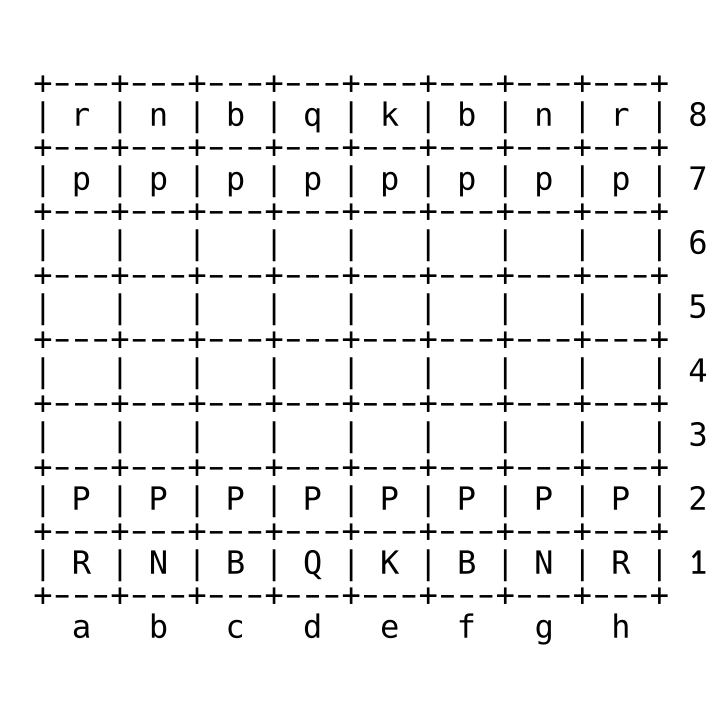
    Simply type d and press enter. You will probably get something like this:

    That is because d is the display command and it will show a text representation of the Chess board. The position can be changed with a certain format. For example

    position startpos moves d2d4

    Will move the pawn from d2 to d4. This is my favorite starting move. So if you use the d command again. You will see that the pawn has now moved!

    Now that we have made our first move as white, we need to tell the computer to search for a move to reply with. For that we can enter go depth 1 and it will come up with a quick response. For example if we get the result “bestmove d7d5”. This means that the engine has decided that moving black’s Queen pawn is the best move. So we add this result to the end of our last command.

    position startpos moves d2d4 d7d5

    As you can see, both pawns have moved. However, this is not the preferred way for most people to use the engine. However, I did this as an example to show you what a Chess GUI has to do behind the scene to operate the engine and get back moves from it.

    Fairy Stockfish

    I would like to mention briefly that Fairy-Stockfish is a version of Stockfish that support all of the Chess variants available on lichess.org and even more. I have not mastered the use of it from the command line, but I have confirmed that it works with Xboard, which is the next program I am recommending.

    Xboard

    You can use XBoard/WinBoard to run not only Stockfish, but many other Chess engines that are less popular. I find the interface of the program to be a little bit confusing. However, I have created convenient commands to use which allow me to play Chess, Shogi, or Xiangqi with it on my Windows 11 laptop.

    winboard -fcp "C:\stockfish\fairy-stockfish.exe" -variant normal -xclock -depth 1

    winboard -fcp "C:\stockfish\fairy-stockfish.exe" -variant shogi -xclock -depth 1

    winboard -fcp "C:\stockfish\fairy-stockfish.exe" -variant xiangqi -xclock -depth 1

    If you are playing XBoard, the Linux version, you can change winboard to xboard and change the path of fairy-stockfish to wherever you have it installed.

    Although I have less experience using Xboard than the other recommended software in this book, XBoard when combined with Fairy Stockfish allows you to play more types of Chess Variants than any other program that I know about.

    Also, if you beat Fairy Stockfish at depth 1 using commands similar to the above, then try changing that number to something higher and then then the computer will search deeper and find even better moves to play against you. Beating it at full strength is impossible for a human player.

    En Croissant

    I recommend En Croissant for people who are only interested in playing standard Chess and want to analyze the games they have played on lichess.org or chess.com. It has a feature which can download all the rated games of a username of a player on those sites specifically. This means that if you play online on these sites, you can instantly obtain a database of your own games. You can use this to see how often you win or lose and what mistakes you are making.

    It also allows you to download larger databases of games like Caissabase which are full of games from the top Chess Masters of the world. This allows you to see how really good Chess players can play and maybe learn some things from them! That’s what I try to do!

    pgn-extract

    Once you have a database of your own games, or perhaps games of other people, you may want to filter them by certain criteria. The program pgn-extract is exactly what you can do this with. It is a command line only program. You will have to read the documentation to know all of its options but here are some commands that I commonly use to keep track of my best wins.

    These commands use the file “lichess_chastitywhiterose.pgn” which I downloaded directly from lichess.org. There is a built in export feature that allows you to select games of different time controls and/or variants and decide which ones to export to pgn file. pgn-extract can only handle standard chess games but it can sort them extremely fast. For example

    This first command takes all of the games where chastitywhiterose was the white player and won the game by checkmate.

    pgn-extract -Twchastitywhiterose -Tr1-0 lichess_chastitywhiterose.pgn -ochastitywhiterose_white_wins_lichess.pgn --checkmate

    The second does the reverse and finds every time that chastitywhiterose played as black and then black won the game by checkmate.

    pgn-extract -Tbchastitywhiterose -Tr0-1 lichess_chastitywhiterose.pgn -ochastitywhiterose_black_wins_lichess.pgn --checkmate

    I have said for years that only games ending in a checkmate are reliable information. If you opponent timed out because they fell asleep or got distracted, that doesn’t really feel like a win does it?

    ChessX

    The best currently available free and open source Chess database management program is ChessX. It allows you to open a pgn file and actually play through all the games with a graphical user interface. This is the best way to analyze your games and see visually where you made the mistakes. I have not full explored everything that the program can do but I read that it also has filtering capabilities similar to what you could have done with pgn-extract which I previously mentioned.

    Possible Updates

    I know there are infinitely more open-source Chess related programs out there that I have not had time to use or write about. If you know of any really good programs that are also open source, let me know and I can probably include them the next time I update this chapter!

    Chapter 5: The Best Chess websites

  • Queen’s Gambit Accepted song and 3 perfect classical Chess wins!

    This was one of the most fun Chess streams I have ever had on Twitch. I presented 3 different songs and won all 3 Chess games that I played.

    I started the episode with introducing the song I just wrote for a 13 move checkmate trap involving the Queen’s Gambit Accepted.

    But that’s not the only notable thing that happened in the stream. I had a total of 5 different viewers and 2 new followers within the hour and 45 minutes I was streaming. I also won all 3 Chess games I played. It was the best stream I have ever had on Twitch since I joined.

    — Watch the next live stream at https://www.twitch.tv/chastitywhiterose

    I can’t promise when I will be streaming next. I live with my mom and it is hard to run a schedule when she needs my help and demands my attention at random times.

    But the day will someday come when I can have a scheduled time for streaming. Until then, just follow me and set notifications on your PC or phone to be notified when I go live.

  • Should you buy a Chess program to study?

    Analysis of different Chess GUIs available

    One of the great things about Chess is that you can play for free either online or over the board if you have a local friend willing to play.

    Most of the time, a person doesn’t need to spend any money at all on the game of Chess. However, I am not a normal person but someone who wants to know everything about Chess.

    The official website for stockfish (the world’s strongest Chess engine) has a convenient list of the best Graphical User Interfaces and how to install and use them along with the stockfish engine.

    But if you are a new Chess player or you are looking for serious advice on how to improve at the game, I have a serious warning.

    Computers don’t play Chess like humans do. They look ahead and make a move that may make a different 50 moves later. Therefore, playing against the computer or even using a computer to analyze a game can mislead you into thinking a move is bad when it may actually help you win, or maybe it will tell you a move is good but not have the means to tell you why in the same way a human can.

    Therefore, when analyzing which GUI you want to use, I will be talking about which of them helps you better analyze your own games with human reasoning. I will present 4 options. 2 of which are free and 2 of which are programs you can buy.

    Free programs

    What I find myself using the most lately is a free and open source program called En-Croissant. It lets you automatically download a database of the rated games you have played on either chess.com or lichess.

    Frank Willow, the creator of the program published a blog post on lichess.org about it.

    Another great program is liground. It allows using the computer to analyze not only Chess but also variants like Crazyhouse, Shogi, Xiangqi, and many others. If you only play standard Chess you probably won’t make use of it but if you are someone like me who loves all games that are similar to Chess, you may find it helpful just as I have.

    Paid

    The stockfish site I linked to earlier recommends 3 different programs you can buy: Chessbase, Shedder, and Hiarcs. Of these options, only Shredder and Hiarcs are that good.

    Shredder is mostly for playing against the computer. It can keep track of your games and even assign you a rating that goes up or down depending on how you win or lose. However, it’s not that special beyond this. Perhaps if you are looking for a nice program to play against customized strength stockfish and want to download something because you don’t have a reliable internet connection, it’s pretty good. The interface looks really nice and it does let you import and export PNG files of individual games.

    Hiarcs is the better option for me because I don’t use it to play against the computer. I prefer to use it by downloading my own databases of games from lichess and stepping through them. The same can be done with En-Croissant, but the fact that you can open different PGN files and have them in different tabs is a huge bonus. Another thing that is a selling point for me is that it allows me to type in the hex codes for exactly what color squares I want the light and dark squares of the chessboard to be. This is important for someone like me who cares about the appearance of the chessboard for streaming and recording videos.

    I will mention that there is a program called Chessx which is similar to Hiarcs that is free and open source, but the user interface leaves much to be desired. I think you might want to start with it and then if you like it, you might want to buy Hiarcs because it just looks way nicer and does not have trouble loading larger database files.

    Conclusion

    These are my current recommendations for programs serious Chess players might want to use if they have a PC. The open-source free options also work on Linux too if that is important for you.

    Both Shredder and Hiarcs also have mobile app versions too, but I find them to be not as great as the desktop PC version.