Tag: assembly

  • chastext 64-bit

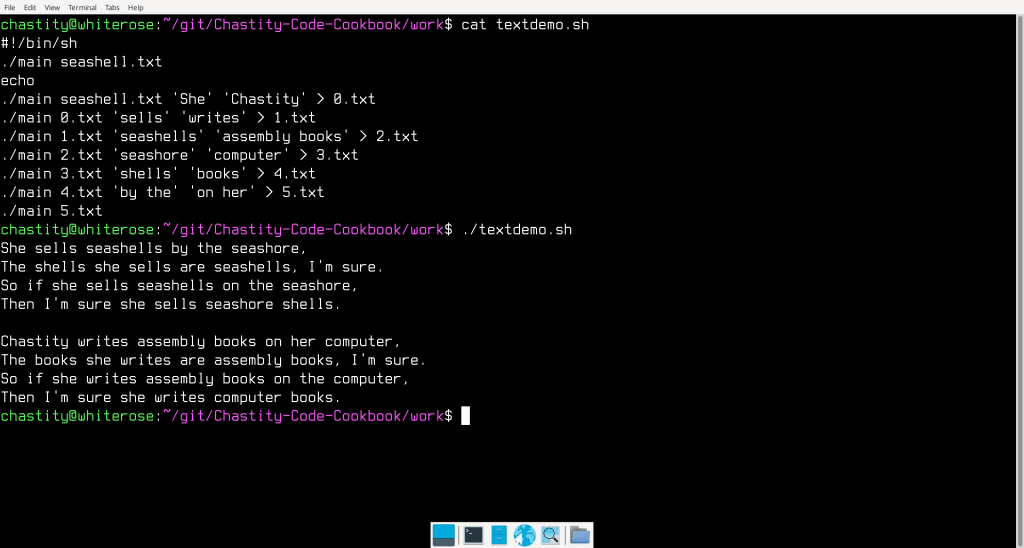
    I have converted my chastext program to 64 bit Assembly for Linux. Next to chastehex, this is the program I am most proud of because it can find and replace exact strings of text. It isn’t quite the same as the Linux “sed” tool, but it is faster, smaller, and I wrote it myself and can do whatever I want with it.

    So of course what I did was write shell script to show what it is capable of!
    main.asm

    ;Linux 64-bit Assembly Source for chastext
    ;a basic text search and replace program
    format ELF64 executable
    entry main
    
    include 'chastelib64.asm'
    
    main:
    
    pop rax
    mov [argc],rax ;save the argument count for later
    
    cmp qword [argc],1
    ja help_skip ;if more than 1 argument is given, skip the help message and process the other arguments
    
    help:
    mov rax,help_message
    call putstring
    jmp main_end
    help_skip:
    
    pop rax ;pop the next arg which is the name of the program we are running
    
    get_filename:
    pop rax ;pop the next arg which is the name of the file we will open
    
    mov [filename],rax ; save the name of the file we will open to read
    
    arg_open_file:
    
    ;Linux system call to open a file
    
    mov rsi,0   ;open file in read only mode
    mov rdi,rax ;filename should be in rax before this function was called
    mov rax,2   ;invoke SYS_OPEN (kernel opcode 2 on 64 bit systems)
    syscall     ;call the kernel
    
    cmp rax,0
    jns file_open_no_errors ;if rax is not negative/signed there was no error
    
    ;Otherwise, if it was signed, then this code will display an error message.
    
    mov rax,open_error_message
    call putstr_and_line
    
    jmp main_end ;end the program because we failed at opening the file
    
    file_open_no_errors:
    
    mov [filedesc],rax ; save the file descriptor number for later use
    
    ;before we just textdump or "cat" the file, we need to check for the existence of more arguments which will modify the output
    
    cmp qword[argc],3
    jb search_skip
    
    pop rax ;pop the next arg which is the string we are searching for
    mov [string_search],rax
    
    search_skip:
    
    cmp qword[argc],4
    jb replace_skip
    
    pop rax ;pop the next arg which is the string we are searching for
    mov [string_replace],rax
    
    replace_skip:
    
    ;now we begin displaying the file but also searching for the search string if it exists. We will check for these based on the number of arguments like we did earlier
    
    textdump:
    
    ;if only there are only 2 arguments (name of program plus input file)
    ;then we do a loop that ignores searching and replacing
    ;this loop will read one character from the file and then send it to stdout
    ;until there are no more bytes to display
    ;but if there are above 2 arguments, we skip this loop and go to search mode
    
    cmp qword[argc],2 ;test arguments 2=only filename given
    ja search_mode    ;but if above 2, then go to search mode because a search string was given
    
    ;This loop is the same as the Linux 'cat' command
    ;or the DOS 'type' command for a single file
    ;it will read one byte and echo it to standard output until EOF
    
    cat:
    
    mov rdx,1            ;number of bytes to read
    mov rsi,byte_array   ;address to store the bytes
    mov rdi,[filedesc]   ;move the opened file descriptor into rdi
    mov rax,0            ;invoke SYS_READ (kernel opcode 0 on 64 bit Intel)
    syscall              ;call the kernel
    
    mov [bytes_read],rax
    
    cmp rax,0
    jnz file_success ;if more than zero bytes read, proceed to display
    
    jmp main_end ;otherwise, end the program
    
    ; this point is reached if file was read from successfully
    
    file_success:
    
    ;print the last read character to stdout by switching to write call
    mov rdi,1            ;write to the STDOUT file
    mov rax,1          ;invoke SYS_WRITE (kernel opcode 1 on 64 bit systems)
    syscall            ;system call to write the message
    
    jmp cat
    
    search_mode:
    
    ;this is the beginning of search mode
    ;it handles the file by seeking and reading to search every position for the search string
    
    ;first, seek to the file_address we initialized to zero
    ;this variable will be added to depending on actions taken
    
    mov rdx,0              ;whence argument (SEEK_SET)
    mov rsi,[file_address] ;move the file cursor to this address
    mov rdi,[filedesc]     ;move the opened file descriptor into rbx
    mov rax,8              ;invoke SYS_LSEEK (kernel opcode 8 on 64 bit Intel)
    syscall                ;call the kernel
    
    ;obtain the length of the search string using my strlen function
    mov rax,[string_search]
    call strlen ;get the length of the search string
    
    ;use the length of the string we are searching for as the number of bytes to read at this location
    
    mov rdx,rax            ;number of bytes to read
    mov rsi,byte_array     ;address to store the bytes
    mov rdi,[filedesc]     ;move the opened file descriptor into rbx
    mov rax,0              ;invoke SYS_READ (kernel opcode 0 on 64 bit Intel)
    syscall                ;call the kernel
    
    mov [bytes_read],rax   ;store how many bytes were read with that last read operation
    
    mov rbx,byte_array     ;move the address of bytes read into rbx
    add rbx,rax            ;add number of bytes read (return value of read function in rax)
    mov byte[rbx],0        ;terminate the string with zero
    
    cmp rax,rdx ;if the number of bytes is not what we expected to read, end this loop
    jnz textdump_end
    
    ;move our two strings into the rsi and rdi registers for comparison
    ;with my custom written strcmp function
    
    mov rsi,[string_search]
    mov rdi,byte_array
    call strcmp ;compare these two strings
    
    cmp rax,0 ;test if they are the same (if rax returned zero)
    jnz not_match ;if they are not a match go to that section for printing a character
    
    ;but if they are a match, then we either quote them
    ;or replace them if a replacement string is available
    
    ;but regardless of which action we do, since a match was found, let us add this count to the file address
    ;so that we read from beyond this point next time the textdump loop starts
    mov rax,[bytes_read]
    add [file_address],rax
    
    cmp qword[argc],4 ;if less than 4 args, no replacement exist, so we quote the strings
    jb print_quotes
    
    ;otherwise, we will print the replacement string instead of the original!
    
    mov rax,[string_replace]
    call putstring ;print the string
    
    jmp textdump ;restart the main loop
    
    print_quotes:
    ;print quotes around matched string
    mov al,'"'
    call putchar
    
    mov rax,byte_array
    call putstring ;print the string
    
    mov al,'"'
    call putchar
    
    jmp textdump ;restart the main loop
    
    not_match: 
    
    ;Instead of calling the putchar function in the case of no match,
    ;I do a system call to print 1 byte to standard output
    ;This is simple and also compatible with binary files we want to replace text in.
    ;But it only works if the search and replace strings are of the same length
    
    mov rdx,1            ;number of bytes to write == 1
    mov rsi,byte_array   ;pointer/address of string to write
    mov rdi,1            ;write to the STDOUT file
    mov rax,1            ;invoke SYS_WRITE (kernel opcode 1 on 64 bit systems)
    syscall              ;system call to write the message
    
    add [file_address],1 ;add 1 to the file address so we don't read this same position again
    
    jmp textdump
    
    textdump_end:
    
    ;print the remaining bytes, if any, left after the main loop ended
    ;mov rax,byte_array
    ;call putstring
    
    mov rdx,[bytes_read] ;number of bytes to write == last read call result
    mov rsi,byte_array   ;pointer/address of string to write
    mov rdi,1            ;write to the STDOUT file
    mov rax,1            ;invoke SYS_WRITE (kernel opcode 1 on 64 bit systems)
    syscall              ;system call to write the message
    
    main_end:
    
    ;this is the end of the program
    ;we close the open file and then use the exit call
    
    ;Linux system call to close a file
    
    mov rdi,[filedesc] ;file number to close
    mov rax,3          ;invoke SYS_CLOSE (kernel opcode 3 for 64 bit Intel)
    syscall            ;call the kernel
    
    mov rax, 0x3C ; invoke SYS_EXIT (kernel opcode 0x3C (60 decimal) on 64 bit systems)
    mov rdi,0   ; return 0 status on exit - 'No Errors'
    syscall
    
    ;the strlen and strcmp are named after the equivalent C functions
    ;but are written from scratch by me based on their expected behavior
    
    ;The strlen function gets the length of string in rax and returns it in rax
    ;This is the same algorithm used in my putstring function
    
    strlen:
    
    push rbx
    mov rbx,rax ; copy rax to rbx. rbx will be used as index to the string
    
    strlen_start: ; this loop finds the length of the string
    
    cmp [rbx],byte 0 ; compare byte at address rbx with 0
    jz strlen_end ; if comparison was zero, jump to loop end
    inc rbx
    jmp strlen_start
    
    strlen_end:
    sub rbx,rax ;subtract start pointer from current pointer to get length of string
    mov rax,rbx ;copy the string length back to rax
    pop rbx
    
    ret
    
    ;strcmp compares the string at rsi to the one at rdi
    ;rax returns 0 if the strings are the same and 1 if different
    ;the algorithm is simple but I will explain it for those who are confused
    
    ;rax is initialized to zero
    ;a byte from each string is loaded into the al and bl registers
    ;the bytes are compared. if they are different, then we jump to the end
    ;However, if they are the same, then we check if one of them is zero
    ;for this purpose it doesn't matter whether we compare al or bl with zero
    ;because it is known that they are the same if the jnz did not take place
    ;if it is zero, this also jumps to the end of the function
    ;If neither jump took place, then we jump to the start of the loop
    ;but when the function finally ends bl will be subtracted from al
    ;this ensures that the function returns zero if the final characters are the same
    ;rbx,rsi,and rdi are preserved but rax is the return value
    ;also, the sub instruction at the end of the function also updates the flags
    ;so you can "jz" or "jnz" to a label after calling this function based on results
    
    strcmp:
    
    push rbx
    push rsi
    push rdi
    
    mov rax,0
    
    strcmp_start:
    
    ;read a byte from each string
    mov al,[rdi]
    mov bl,[rsi]
    cmp al,bl
    jnz strcmp_end
    
    cmp al,0
    jz strcmp_end
    
    inc rdi
    inc rsi
    
    jmp strcmp_start
    
    strcmp_end:
    sub al,bl
    
    pop rdi
    pop rsi
    pop rbx
    
    ret
    
    help_message db 'chastext by Chastity White Rose',0Ah,0Ah
    db '"cat" a file:',0Ah,0Ah,9,'chastext file',0Ah,0Ah
    db 'search for a string:',0Ah,0Ah,9,'chastext file search',0Ah,0Ah
    db 'replace string:',0Ah,0Ah,9,'chastext file search replace',0Ah,0Ah
    db 'Find or replace any string!',0Ah,0
    
    open_error_message db 'error while opening file',0
    
    file_address dq 0 ;file address defaults to zero AKA beginning of file
    
    ;variables for managing arguments and files
    argc rq 1
    filename rq 1 ; name of the file to be opened
    filedesc rq 1 ; file descriptor
    bytes_read rq 1
    
    string_search rq 1 ; place to hold the search string pointer
    string_replace rq 1 ; place to hold the replacement string pointer
    
    ;where we will store data from the file
    byte_array db 0xA4 dup 0
    

    chastelib64.asm

    ; chastelib assembly header file for 64 bit Linux
    ; This file is where I keep the source of my most important Assembly functions
    ; These are my string and integer output and conversion routines.
    
    ; To simplify documentation. The Accumulator/Arithmetic register
    ; (ax,eax,rax) depending on bit size shall be referred to as register A
    ; for the description of these core functions because the A register
    ; is treated special both by the Intel company and my code;
    
    ; putstring; Prints a zero terminated string from the address pointer to by A register.
    ; intstr;    Converts the number in A into a zero terminated string and points A to that address
    ; putint;    Prints the integer in A by calling intstr and then putstring.
    ; strint;    Converts the zero terminated string into an integer and sets A to that value
       
    ; Now, the source of the functions begins, with comments included for parts that I felt needed explanation.
    
    putstring:
    
    push rax
    push rbx
    push rcx
    push rdx
    
    mov rbx,rax ;copy eax to ebx to be used as index to the string
    
    putstring_strlen_start: ; this loop finds the length of the string as part of the putstring function
    
    cmp [rbx],byte 0 ; compare byte at address rbx with 0
    jz putstring_strlen_end ; if comparison was zero, jump to loop end because we have found the length
    inc rbx
    jmp putstring_strlen_start
    
    putstring_strlen_end:
    sub rbx,rax ;subtract start pointer from current pointer to get length of string
    
    ;Write string using Linux Write system call.
    ;Reference for 64 bit x86 syscalls is below.
    ;https://www.chromium.org/chromium-os/developer-library/reference/linux-constants/syscalls/#x86_64-64-bit
    
    mov rdx,rbx      ;number of bytes to write
    mov rsi,rax      ;pointer/address of string to write
    mov rdi,1        ;write to the STDOUT file
    mov rax,1        ;write (kernel opcode 1 on 64 bit systems)
    syscall          ;system call for 64-bit Linux kernel
    
    pop rdx
    pop rcx
    pop rbx
    pop rax
    
    ret ; this is the end of the putstring function return to calling location
    
    ; This is the location in memory where digits are written to by the intstr function
    ; The string of bytes and settings such as the radix and width are global variables defined below.
    
    int_string db 64 dup '?' ;reserve bytes for characters string for 64-bit binary integer
    
    int_string_end db 0 ;zero byte terminator for the integer string
    
    radix dq 2 ;radix or base for integer output. 2=binary, 8=octal, 10=decimal, 16=hexadecimal
    int_width dq 8 ;default width of integers. Extra zeros prefixed if more than 1
    
    ;this function creates a string of the integer in rax
    ;it uses the above radix variable to determine base from 2 to 36
    ;it then loads rax with the address of the string
    ;this means that it can be used with the putstring function
    
    intstr:
    
    mov rbx,int_string_end-1 ;find address of lowest digit(just before the newline 0Ah)
    mov rcx,1
    
    digits_start:
    
    mov rdx,0;
    div qword [radix]
    cmp rdx,10
    jb decimal_digit
    jnb hexadecimal_digit
    
    decimal_digit: ;we go here if it is only a digit 0 to 9
    add rdx,'0'
    jmp save_digit
    
    hexadecimal_digit:
    sub rdx,10
    add rdx,'A'
    
    save_digit:
    
    mov [rbx],dl
    cmp rax,0
    jz intstr_end
    dec rbx
    inc rcx
    jmp digits_start
    
    intstr_end:
    
    prefix_zeros:
    cmp rcx,[int_width]
    jnb end_zeros
    dec rbx
    mov [rbx],byte '0'
    inc rcx
    jmp prefix_zeros
    end_zeros:
    
    mov rax,rbx ;point eax register to this string for putstring
    
    ret
    
    ; function to print string form of whatever integer is in rax
    ; The radix determines which number base the string form takes.
    ; Anything from 2 to 36 is a valid radix
    ; in practice though, only bases 2,8,10,and 16 will make sense to other programmers
    ; this function does not process anything by itself but calls the combination of my other
    ; functions in the order I intended them to be used.
    
    putint: 
    
    push rax
    push rbx
    push rcx
    push rdx
    
    call intstr
    
    call putstring
    
    pop rdx
    pop rcx
    pop rbx
    pop rax
    
    ret
    
    ;this function converts a string pointed to by rax into an integer returned in rax instead
    ;it is a little complicated because it has to account for whether the character in
    ;a string is a decimal digit 0 to 9, or an alphabet character for bases higher than ten
    ;it also checks for both uppercase and lowercase letters for bases 11 to 36
    ;finally, it checks if that letter makes sense for the base.
    ;For example, G to Z cannot be used in hexadecimal, only A to F can
    ;The purpose of writing this function was to be able to accept user input as integers
    ;This function is improved with error checking and uses the new strint_error variable
    ;The program can check this value after the call and see how many errors happened.
    
    strint_error db 0 ;declare a byte variable that keeps track of errors
    
    strint:
    
    mov rbx,rax ;copy string address from rax to rbx because rax will be replaced soon!
    mov rax,0
    mov [strint_error],0 ;set errors to 0 at the start of this function
    
    read_strint:
    mov rcx,0 ; zero rcx so only lower 8 bits are used
    mov cl,[rbx]
    inc rbx
    cmp cl,0 ; compare byte at address rdx with 0
    jz strint_end ; if comparison was zero, this is the end of string
    
    ;if char is below '0' or above '9', it is outside the range of these and is not a digit
    cmp cl,'0'
    jb not_digit
    cmp cl,'9'
    ja not_digit
    
    ;but if it is a digit, then correct and process the character
    is_digit:
    sub cl,'0'
    jmp process_char
    
    not_digit:
    ;it isn't a digit, but it could an alphabet character which is a digit in a higher base
    
    ;if char is below 'A' or above 'Z', it is outside the range of these and is not capital letter
    cmp cl,'A'
    jb not_upper
    cmp cl,'Z'
    ja not_upper
    
    is_upper:
    sub cl,'A'
    add cl,10
    jmp process_char
    
    not_upper:
    
    ;if char is below 'a' or above 'z', it is outside the range of these and is not lowercase letter
    cmp cl,'a'
    jb not_lower
    cmp cl,'z'
    ja not_lower
    
    is_lower:
    sub cl,'a'
    add cl,10
    jmp process_char
    
    not_lower:
    
    ;if we have reached this point, result invalid and end function with error
    jmp strint_end_error
    
    process_char:
    
    cmp rcx,[radix] ;compare char with radix
    jnb strint_end_error ;if this value is above or equal to radix, it is too high despite being a valid digit/alpha
    
    mov rdx,0 ;zero rdx because it is used in mul sometimes
    mul qword [radix] ;mul rax with radix
    add rax,rcx
    
    jmp read_strint ;jump back and continue the loop if nothing has exited it
    
    strint_end_error: ;we jump here if there was an error with one of the chars
    inc [strint_error] ;increment error counter because char invalid
    
    strint_end: ;we jump here when no errors happened
    
    ret
    
    ;The utility functions below simply print a space or a newline.
    ;these help me save code when printing lots of strings and integers.
    
    space db ' ',0 ;a string containing only a space
    
    putspace:
    push rax
    mov rax,space
    call putstring
    pop rax
    ret
    
    line db 0Ah,0 ;a string containing only a newline
    
    ;the next function which pushes rax to the stack
    ;moves the address of the line string and prints it with putstring
    ;then it pops the original value of rax back from the stack before the function returns
    ;this allows me to print a newline anywhere in the code without a single register changing
    
    putline:
    push rax
    mov rax,line
    call putstring
    pop rax
    ret
    
    ;a function for printing a single character that is the value of al
    
    char: db 0,0
    
    putchar:
    push rax
    mov [char],al
    mov rax,char
    call putstring
    pop rax
    ret
    
    ;a small function just for the common operation
    ;printing an integer followed by a space
    ;this saves a few bytes in the assembled code
    ;by reducing the number of function calls in the main program
    
    putint_and_space:
    call putint
    call putspace
    ret
    
    ;a small function just for the common operation
    ;printing an integer followed by a line feed
    ;this saves a few bytes in the assembled code
    ;by reducing the number of function calls in the main program
    
    putint_and_line:
    call putint
    call putline
    ret
    
    ;a small function just for the common operation
    ;printing a string followed by a line feed
    ;this saves a few bytes in the assembled code
    ;by reducing the number of function calls in the main program
    ;it also means we don't need to include a newline in every string!
    
    putstr_and_line:
    call putstring
    call putline
    ret
    

  • Programming Updates

    This is my Chess blog and I want you to know I still play Chess every day but until I have inspiration to write about Chess, I have more programming news to share. I have been doing a TON of Assembly language programming as part of the new book I am writing on DOS programming. Chapter 8 includes some Linux examples to show people the similarity between writing assembly for Linux and how similar it is to DOS.

    When the book is finished, I will probably make a version of the book specifically for Linux because I have a lot more details to share.

    The following text is what happens when I “git pull” on my repository on my Windows PC. This shows all the files that were updated on my Linux computer over the past few weeks. I do all my coding on Linux but the power of git allows me to upload everything to github from Linux and then download it to Windows as a backup. I really do everything I can not to lose this code because it is my math soul at full power!

    Microsoft Windows [Version 10.0.26200.8037]
    (c) Microsoft Corporation. All rights reserved.

    C:\Users\chand\Documents\git\Chastity-Code-Cookbook>git pull
    remote: Enumerating objects: 252, done.
    remote: Counting objects: 100% (250/250), done.
    remote: Compressing objects: 100% (136/136), done.
    remote: Total 201 (delta 126), reused 137 (delta 63), pack-reused 0 (from 0)
    Receiving objects: 100% (201/201), 49.53 KiB | 551.00 KiB/s, done.
    Resolving deltas: 100% (126/126), completed with 36 local objects.
    From https://github.com/chastitywhiterose/Chastity-Code-Cookbook
    f5e931c..c46c7c9 main -> origin/main
    Updating f5e931c..c46c7c9
    Fast-forward
    …/chapter 7 examples/chastelib-C/chastelib.h | 119 ++++++—-
    …/chapter 7 examples/chastelib-C/main.c | 22 +-
    …/chapter 7 examples/chastelib-C/readme.md | 51 ++++
    …/chapter 7 examples/chastelib-DOS/chastelib.h | 143 ++++++++++++
    …/chapter 7 examples/chastelib-DOS/main.asm | 20 +-
    …/chapter 7 examples/chastelib-DOS/main.c | 48 ++++
    …/chapter 7 examples/chastelib-DOS/main.com | Bin 0 -> 443 bytes
    …/fasm_32-bit_putstring/main | Bin 0 -> 172 bytes
    …/fasm_32-bit_putstring/main.asm | 56 +++++
    …/fasm_32-bit_putstring}/makefile | 0
    …/fasm_64-bit_putstring/main | Bin 0 -> 224 bytes
    …/fasm_64-bit_putstring/main.asm | 58 +++++
    …/fasm_64-bit_putstring/makefile | 4 +
    …/gasm_64-bit_putstring/main | Bin 0 -> 4488 bytes
    …/gasm_64-bit_putstring/main.s | 52 +++++
    …/gasm_64-bit_putstring/makefile | 5 +
    …/nasm_32-bit_putstring/main | Bin 0 -> 4324 bytes
    …/nasm_32-bit_putstring/main.asm | 55 +++++
    …/nasm_32-bit_putstring/main.o | Bin 0 -> 688 bytes
    …/nasm_32-bit_putstring/makefile | 5 +
    …/nasm_64-bit_putstring/main | Bin 0 -> 4888 bytes
    …/nasm_64-bit_putstring/main.asm | 55 +++++
    …/nasm_64-bit_putstring/main.o | Bin 0 -> 928 bytes
    …/nasm_64-bit_putstring/makefile | 8 +
    code/asm/fasm/dos/chastelib-DOS/main-output.txt | 257 ———————
    code/asm/fasm/dos/chastelib-DOS/main.asm | 20 +-
    code/asm/fasm/linux-64/chaste-lib64/main | Bin 737 -> 0 bytes
    code/asm/fasm/linux-64/chaste-lib64/main.asm | 52 —–
    code/asm/fasm/linux-64/chastehex64/chastelib64.asm | 50 +++-
    code/asm/fasm/linux-64/chastehex64/main | Bin 1634 -> 1657 bytes
    …/{chaste-lib64 => chastelib64}/chasteio64.asm | 0
    …/{chaste-lib64 => chastelib64}/chastelib64.asm | 50 +++-
    code/asm/fasm/linux-64/chastelib64/main | Bin 0 -> 824 bytes
    code/asm/fasm/linux-64/chastelib64/main.asm | 64 +++++
    code/asm/fasm/linux-64/chastelib64/makefile | 4 +
    code/asm/fasm/linux/chastecmp/chastelib32.asm | 37 ++-
    code/asm/fasm/linux/chastecmp/main | Bin 0 -> 1024 bytes
    code/asm/fasm/linux/chastehex/chastelib32.asm | 25 +-
    code/asm/fasm/linux/chastelib/chastelib32.asm | 25 +-
    code/asm/fasm/linux/chastelib/main.asm | 16 +-
    code/asm/fasm/linux/fasm_32-bit_putstring/main | Bin 0 -> 172 bytes
    code/asm/fasm/linux/fasm_32-bit_putstring/main.asm | 56 +++++
    code/asm/fasm/linux/fasm_32-bit_putstring/makefile | 4 +
    code/asm/fasm/linux/fasm_64-bit_putstring/main | Bin 0 -> 224 bytes
    code/asm/fasm/linux/fasm_64-bit_putstring/main.asm | 58 +++++
    code/asm/fasm/linux/fasm_64-bit_putstring/makefile | 4 +
    …/chastelib-diff-32vs64 (2026)/chastelib32.asm | 252 ++++++++++++++++++++
    …/chastelib-diff-32vs64 (2026)/chastelib64.asm | 254 ++++++++++++++++++++
    …/mixed-bits/chastelib-diff-32vs64 (2026)/main32 | Bin 0 -> 672 bytes
    …/chastelib-diff-32vs64 (2026)/main32.asm | 64 +++++
    …/mixed-bits/chastelib-diff-32vs64 (2026)/main64 | Bin 0 -> 824 bytes
    …/chastelib-diff-32vs64 (2026)/main64.asm | 64 +++++
    …/chastelib-diff-32vs64 (2026)/makefile | 18 ++
    …/chastelib32-test | Bin
    …/chastelib32-test.asm | 0
    …/chastelib32.asm | 0
    …/chastelib64-test | Bin
    …/chastelib64-test.asm | 0
    …/chastelib64.asm | 0
    …/makefile | 0
    code/asm/gas/gasm_32-bit_putstring/main | Bin 0 -> 4380 bytes
    code/asm/gas/gasm_32-bit_putstring/main.s | 53 +++++
    code/asm/gas/gasm_32-bit_putstring/makefile | 5 +
    code/asm/gas/gasm_64-bit_putstring/main | Bin 0 -> 4488 bytes
    code/asm/gas/gasm_64-bit_putstring/main.s | 53 +++++
    code/asm/gas/gasm_64-bit_putstring/makefile | 5 +
    code/asm/gas/hello/hello | Bin 0 -> 4448 bytes
    code/asm/gas/hello/hello.s | 29 +++
    code/asm/gas/hello/makefile | 5 +
    code/asm/nasm/nasm_32-bit_putstring/main | Bin 0 -> 4324 bytes
    code/asm/nasm/nasm_32-bit_putstring/main.asm | 55 +++++
    code/asm/nasm/nasm_32-bit_putstring/main.o | Bin 0 -> 688 bytes
    code/asm/nasm/nasm_32-bit_putstring/makefile | 5 +
    code/asm/nasm/nasm_64-bit_putstring/main | Bin 0 -> 4888 bytes
    code/asm/nasm/nasm_64-bit_putstring/main.asm | 55 +++++
    code/asm/nasm/nasm_64-bit_putstring/main.o | Bin 0 -> 928 bytes
    code/asm/nasm/nasm_64-bit_putstring/makefile | 8 +
    code/c/ncurses/ncurses_chastelib/chastelib.h | 143 ++++++++++++
    …/ncurses/ncurses_chastelib/chastelib_ncurses.h | 109 ———
    code/c/ncurses/ncurses_chastelib/main | Bin 16936 -> 17104 bytes
    code/c/ncurses/ncurses_chastelib/main.c | 28 +–
    code/c/std/chastelib_core/chastelib.h | 56 +++–
    code/c/std/chastelib_core/main | Bin 16416 -> 0 bytes
    code/c/std/chastelib_core/main.c | 12 +-
    code/c/std/chastelib_extensions/float/chastelib.h | 87 ++++—
    code/c/std/chastelib_extensions/float/main | Bin 16432 -> 16512 bytes
    code/c/std/chastelib_extensions/format/chastelib.h | 87 ++++—
    code/c/std/chastelib_extensions/format/main | Bin 16400 -> 16480 bytes
    code/c/std/chastelib_extensions/input/chastelib.h | 87 ++++—
    …/chastelib_extensions/input/chastelib_input.h | 4 +-
    code/c/std/chastelib_extensions/input/main | Bin 16536 -> 16616 bytes
    …/c/std/chastelib_extensions/ncurses/chastelib.h | 143 ++++++++++++
    …/ncurses/chastelib_ncurses.h | 109 ———
    code/c/std/chastelib_extensions/ncurses/main | Bin 16936 -> 17104 bytes
    code/c/std/chastelib_extensions/ncurses/main.c | 28 +–
    code/cpp/chastelib_pp_core/chastelib.hpp | 49 ++–
    code/cpp/chastelib_pp_core/main | Bin 16360 -> 16440 bytes
    code/cpp/chastelib_pp_core/main.cpp | 22 +-
    ebook.epub | Bin 85989 -> 85986 bytes
    99 files changed, 2494 insertions(+), 818 deletions(-)
    create mode 100644 code/asm/fasm/dos/AAA-DOS-book-examples/chapter 7 examples/chastelib-C/readme.md
    create mode 100644 code/asm/fasm/dos/AAA-DOS-book-examples/chapter 7 examples/chastelib-DOS/chastelib.h
    create mode 100644 code/asm/fasm/dos/AAA-DOS-book-examples/chapter 7 examples/chastelib-DOS/main.c
    create mode 100644 code/asm/fasm/dos/AAA-DOS-book-examples/chapter 7 examples/chastelib-DOS/main.com
    create mode 100755 code/asm/fasm/dos/AAA-DOS-book-examples/chapter_8_linux_putstring/fasm_32-bit_putstring/main
    create mode 100644 code/asm/fasm/dos/AAA-DOS-book-examples/chapter_8_linux_putstring/fasm_32-bit_putstring/main.asm
    rename code/asm/fasm/{linux-64/chaste-lib64 => dos/AAA-DOS-book-examples/chapter_8_linux_putstring/fasm_32-bit_putstring}/makefile (100%)
    create mode 100755 code/asm/fasm/dos/AAA-DOS-book-examples/chapter_8_linux_putstring/fasm_64-bit_putstring/main
    create mode 100644 code/asm/fasm/dos/AAA-DOS-book-examples/chapter_8_linux_putstring/fasm_64-bit_putstring/main.asm
    create mode 100644 code/asm/fasm/dos/AAA-DOS-book-examples/chapter_8_linux_putstring/fasm_64-bit_putstring/makefile
    create mode 100755 code/asm/fasm/dos/AAA-DOS-book-examples/chapter_8_linux_putstring/gasm_64-bit_putstring/main
    create mode 100644 code/asm/fasm/dos/AAA-DOS-book-examples/chapter_8_linux_putstring/gasm_64-bit_putstring/main.s
    create mode 100644 code/asm/fasm/dos/AAA-DOS-book-examples/chapter_8_linux_putstring/gasm_64-bit_putstring/makefile
    create mode 100755 code/asm/fasm/dos/AAA-DOS-book-examples/chapter_8_linux_putstring/nasm_32-bit_putstring/main
    create mode 100644 code/asm/fasm/dos/AAA-DOS-book-examples/chapter_8_linux_putstring/nasm_32-bit_putstring/main.asm
    create mode 100644 code/asm/fasm/dos/AAA-DOS-book-examples/chapter_8_linux_putstring/nasm_32-bit_putstring/main.o
    create mode 100644 code/asm/fasm/dos/AAA-DOS-book-examples/chapter_8_linux_putstring/nasm_32-bit_putstring/makefile
    create mode 100755 code/asm/fasm/dos/AAA-DOS-book-examples/chapter_8_linux_putstring/nasm_64-bit_putstring/main
    create mode 100644 code/asm/fasm/dos/AAA-DOS-book-examples/chapter_8_linux_putstring/nasm_64-bit_putstring/main.asm
    create mode 100644 code/asm/fasm/dos/AAA-DOS-book-examples/chapter_8_linux_putstring/nasm_64-bit_putstring/main.o
    create mode 100644 code/asm/fasm/dos/AAA-DOS-book-examples/chapter_8_linux_putstring/nasm_64-bit_putstring/makefile
    delete mode 100644 code/asm/fasm/dos/chastelib-DOS/main-output.txt
    delete mode 100755 code/asm/fasm/linux-64/chaste-lib64/main
    delete mode 100644 code/asm/fasm/linux-64/chaste-lib64/main.asm
    rename code/asm/fasm/linux-64/{chaste-lib64 => chastelib64}/chasteio64.asm (100%)
    rename code/asm/fasm/linux-64/{chaste-lib64 => chastelib64}/chastelib64.asm (76%)
    create mode 100755 code/asm/fasm/linux-64/chastelib64/main
    create mode 100644 code/asm/fasm/linux-64/chastelib64/main.asm
    create mode 100644 code/asm/fasm/linux-64/chastelib64/makefile
    create mode 100755 code/asm/fasm/linux/chastecmp/main
    create mode 100755 code/asm/fasm/linux/fasm_32-bit_putstring/main
    create mode 100644 code/asm/fasm/linux/fasm_32-bit_putstring/main.asm
    create mode 100644 code/asm/fasm/linux/fasm_32-bit_putstring/makefile
    create mode 100755 code/asm/fasm/linux/fasm_64-bit_putstring/main
    create mode 100644 code/asm/fasm/linux/fasm_64-bit_putstring/main.asm
    create mode 100644 code/asm/fasm/linux/fasm_64-bit_putstring/makefile
    create mode 100644 code/asm/fasm/mixed-bits/chastelib-diff-32vs64 (2026)/chastelib32.asm
    create mode 100644 code/asm/fasm/mixed-bits/chastelib-diff-32vs64 (2026)/chastelib64.asm
    create mode 100755 code/asm/fasm/mixed-bits/chastelib-diff-32vs64 (2026)/main32
    create mode 100644 code/asm/fasm/mixed-bits/chastelib-diff-32vs64 (2026)/main32.asm
    create mode 100755 code/asm/fasm/mixed-bits/chastelib-diff-32vs64 (2026)/main64
    create mode 100644 code/asm/fasm/mixed-bits/chastelib-diff-32vs64 (2026)/main64.asm
    create mode 100644 code/asm/fasm/mixed-bits/chastelib-diff-32vs64 (2026)/makefile
    rename code/asm/fasm/mixed-bits/{chastelib-test-32-64 => chastelib-test-32-64 (2025)}/chastelib32-test (100%)
    rename code/asm/fasm/mixed-bits/{chastelib-test-32-64 => chastelib-test-32-64 (2025)}/chastelib32-test.asm (100%)
    rename code/asm/fasm/mixed-bits/{chastelib-test-32-64 => chastelib-test-32-64 (2025)}/chastelib32.asm (100%)
    rename code/asm/fasm/mixed-bits/{chastelib-test-32-64 => chastelib-test-32-64 (2025)}/chastelib64-test (100%)
    rename code/asm/fasm/mixed-bits/{chastelib-test-32-64 => chastelib-test-32-64 (2025)}/chastelib64-test.asm (100%)
    rename code/asm/fasm/mixed-bits/{chastelib-test-32-64 => chastelib-test-32-64 (2025)}/chastelib64.asm (100%)
    rename code/asm/fasm/mixed-bits/{chastelib-test-32-64 => chastelib-test-32-64 (2025)}/makefile (100%)
    create mode 100755 code/asm/gas/gasm_32-bit_putstring/main
    create mode 100644 code/asm/gas/gasm_32-bit_putstring/main.s
    create mode 100644 code/asm/gas/gasm_32-bit_putstring/makefile
    create mode 100755 code/asm/gas/gasm_64-bit_putstring/main
    create mode 100644 code/asm/gas/gasm_64-bit_putstring/main.s
    create mode 100644 code/asm/gas/gasm_64-bit_putstring/makefile
    create mode 100755 code/asm/gas/hello/hello
    create mode 100644 code/asm/gas/hello/hello.s
    create mode 100644 code/asm/gas/hello/makefile
    create mode 100755 code/asm/nasm/nasm_32-bit_putstring/main
    create mode 100644 code/asm/nasm/nasm_32-bit_putstring/main.asm
    create mode 100644 code/asm/nasm/nasm_32-bit_putstring/main.o
    create mode 100644 code/asm/nasm/nasm_32-bit_putstring/makefile
    create mode 100755 code/asm/nasm/nasm_64-bit_putstring/main
    create mode 100644 code/asm/nasm/nasm_64-bit_putstring/main.asm
    create mode 100644 code/asm/nasm/nasm_64-bit_putstring/main.o
    create mode 100644 code/asm/nasm/nasm_64-bit_putstring/makefile
    create mode 100644 code/c/ncurses/ncurses_chastelib/chastelib.h
    delete mode 100644 code/c/ncurses/ncurses_chastelib/chastelib_ncurses.h
    delete mode 100755 code/c/std/chastelib_core/main
    create mode 100644 code/c/std/chastelib_extensions/ncurses/chastelib.h
    delete mode 100644 code/c/std/chastelib_extensions/ncurses/chastelib_ncurses.h

  • DOS Assembly putstring function

    This is a small program which uses the putstring function I wrote. This function is one of 4 ultimate functions I have created which make up “chastelib”. DOS programming is simpler than Windows and is not that different from Linux in that system calls are done with an interrupt.

    org 100h
    
    main:
    
    mov ax,text
    call putstring
    
    mov ax,4C00h
    int 21h
    
    text db 'Hello World!',0Dh,0Ah,0
    
    ;This section is for the putstring function I wrote.
    ;It will print any zero terminated string that register ax points to
    
    stdout dw 1 ; variable for standard output so that it can theoretically be redirected
    
    putstring:
    
    push ax
    push bx
    push cx
    push dx
    
    mov bx,ax                  ;copy ax to bx for use as index register
    
    putstring_strlen_start:    ;this loop finds the length of the string as part of the putstring function
    
    cmp [bx], byte 0           ;compare this byte with 0
    jz putstring_strlen_end    ;if comparison was zero, jump to loop end because we have found the length
    inc bx                     ;increment bx (add 1)
    jmp putstring_strlen_start ;jump to the start of the loop and keep trying until we find a zero
    
    putstring_strlen_end:
    
    sub bx,ax                  ; sub ax from bx to get the difference for number of bytes
    mov cx,bx                  ; mov bx to cx
    mov dx,ax                  ; dx will have address of string to write
    
    mov ah,40h                 ; select DOS function 40h write 
    mov bx,[stdout]            ; file handle 1=stdout
    int 21h                    ; call the DOS kernel
    
    pop dx
    pop cx
    pop bx
    pop ax
    
    ret
    

    Anyone can assemble and run this source code, but you will need a DOS emulator like DOSBox in order for it to work. In fact, I have a video showing me assembling and running it inside of DOSBox.

    Lately I have been having a programming phase and am working on a book about programming in DOS. There is no money involved in this because nobody except nerds like me care about DOS. Speaking of nerds, if you follow my blog, don’t forget that this site was set up for teaching Chess. Leave me a comment if you play Chess online or live in Lee’s Summit. I am still playing Chess every day although some of my time has been taken up with programming in Assembly language because it is so much fun.

    If you like this post, you may be interested in my much longer post/book that is all about Assembly programming in DOS.

  • Assembly Chaste Lib

    I have created two functions in x86 Assembly Language that allow me to output any zero terminated string or output any integer in any base from 2 to 36. I will show the full source so people can play with it. This uses system calls on Linux so it won’t work on Windows.

    first, the header file “chaste-lib.asm”

    ; This file is where I keep my function definitions.
    ; These are usually my string and integer output routines.
    
    putstring: ; function to print zero terminated string pointed to by register eax
    
    mov edx,eax ; copy eax to edx as well. Now both registers have the address of the main_string
    
    strlen_start: ; this loop finds the lenge of the string as part of the putstring function
    
    cmp [edx],byte 0 ; compare byte at address edx with 0
    jz strlen_end ; if comparison was zero, jump to loop end because we have found the length
    inc edx
    jmp strlen_start
    
    strlen_end:
    sub edx,eax ; edx will now have correct number of bytes when we use it for the system write call
    
    mov ecx,eax ; copy eax to ecx which must contain address of string to write
    mov eax, 4  ; invoke SYS_WRITE (kernel opcode 4)
    ;mov ebx, 1  ; ebx=1 means write to the STDOUT file
    int 80h     ; system call to write the message
    
    ret ; this is the end of the putstring function return to calling location


    radix dd 16 ;radix or base for integer output. 2=binary, 16=hexadecimal, 10=decimal
    
    putint: ; function to output decimal form of whatever integer is in eax
    
    push eax ;save eax on the stack to restore later
    
    mov ebp,int_string+31 ;address of start digits
    
    digits_start:
    
    mov edx,0;
    mov esi,[radix] ;radix is from memory location just before this function
    div esi
    cmp edx,10
    jb decimal_digit
    jge hexadecimal_digit
    
    decimal_digit: ;we go here if it is only a digit 0 to 9
    add edx,'0'
    jmp save_digit
    
    hexadecimal_digit:
    sub edx,10
    add edx,'A'
    
    
    save_digit:
    
    mov [ebp],dl
    cmp eax,0
    jz digits_end
    dec ebp
    jmp digits_start
    
    digits_end:
    
    mov eax,ebp ; now that the digits have been written to the string, display it!
    call putstring
    
    pop eax  ;load eax from the stack so it will be as it was before this function was called
    ret
    

    next, the main source that includes the header: “main.asm”

    format ELF executable
    entry main
    
    include 'chaste-lib.asm'
    
    main: ; the main function of our assembly function, just as if I were writing C.
    
    ; I can load any string address into eax and print it!
    
    mov ebx, 1 ;ebx must be 1 to write to standard output
    
    mov eax,msg
    call putstring
    mov eax,main_string ; move the address of main_string into eax register
    call putstring
    
    mov [radix],2 ; can choose radix for integer output!
    
    mov eax,0
    loop1:
    call putint
    inc eax
    cmp eax,100h;
    jnz loop1
    
    mov eax, 1  ; invoke SYS_EXIT (kernel opcode 1)
    mov ebx, 0  ; return 0 status on exit - 'No Errors'
    int 80h
    
    ; this is where I keep my string variables
    
    msg db 'Hello World!', 0Ah,0     ; assign msg variable with your message string
    main_string db "This is Chastity's Assembly Language counting program!",0Ah,0
    int_string db 32 dup '?',0Ah,0


    ; This Assembly source file has been formatted for the FASM assembler.
    ; The following 3 commands assemble, give executable permissions, and run the program
    ;
    ;	fasm main.asm
    ;	chmod +x main
    ;	./main


    If you have the fasm compiler, you can assemble this source on any Linux distribution running on an intel CPU. Assembly is platform specific but it runs really fast and the process of programming with it is enjoyable for me.

  • Assembly Language Counting Program

    I have been learning x86 assembly language. I know a little bit from years ago but now it is coming back to me. I formerly did 16 bit DOS hobby programs. This is 32 bit Linux programming in assembly using FASM as my assembler.

    format ELF executable
    entry main
    
    main: ; the main function of our assembly function, just as if I were writing C.
    
    ; I can load any string address into eax and print it!
    
    mov eax,msg
    call putstring
    mov eax,main_string ; move the address of main_string into eax register
    call putstring
    
    
    mov eax,0
    loop1:
    call putint
    inc eax
    cmp eax,16;
    jnz loop1
    
    mov eax, 1  ; invoke SYS_EXIT (kernel opcode 1)
    mov ebx, 0  ; return 0 status on exit - 'No Errors'
    int 80h
    
    ; this is where I keep my string variables
    
    msg: db 'Hello World!', 0Ah,0     ; assign msg variable with your message string
    main_string db 'This is the assembly counting program!',0Ah,0
    int_string db 32 dup '?',0Ah,0
    
    ; this is where I keep my function definitions
    
    putstring: ; function to print zero terminated string pointed to by register eax
    
    mov edx,eax ; copy eax to edx as well. Now both registers have the address of the main_string
    
    strlen_start: ; this loop finds the lenge of the string as part of the putstring function
    
    cmp [edx],byte 0 ; compare byte at address edx with 0
    jz strlen_end ; if comparison was zero, jump to loop end because we have found the length
    inc edx
    jmp strlen_start
    
    strlen_end:
    sub edx,eax ; edx will now have correct number of bytes when we use it for the system write call
    
    mov ecx,eax ; copy eax to ecx which must contain address of string to write
    mov eax, 4  ; invoke SYS_WRITE (kernel opcode 4)
    mov ebx, 1  ; write to the STDOUT file
    int 80h     ; system call to write the message
    
    ret ; this is the end of the putstring function return to calling location
    
    putint: ; function to output decimal form of whatever integer is in eax
    
    push eax ;save eax on the stack to restore later
    
    mov ebx,int_string+31 ;address of start digits
    
    digits_start:
    
    mov edx,0;
    mov esi,10
    div esi
    add edx,'0'
    mov [ebx],dl
    cmp eax,0
    jz digits_end
    dec ebx
    jmp digits_start
    
    digits_end:
    
    mov eax,ebx ; now that the digits have been written to the string, display it!
    call putstring
    
    pop eax  ;load eax from the stack so it will be as it was before this function was called
    ret
    
    ; This Assembly source file has been formatted for the FASM assembler.
    ; The following 3 commands assemble, give executable permissions, and run the program
    ;
    ;	fasm main.asm
    ;	chmod +x main
    ;	./main
    

    This program only works on computers with Intel x86 CPUs and running a Linux distribution. the “int 80h” instructions mean interrupt 128. For some reason, this calls the Linux kernel. I don’t know why it works this way but I do know enough assembly to write my own string and integer routines to replace printf since it is not available in pure assembly like I could in the C programming language.